Libraries tagged by basic registers
digipolisgent/flanders-basicregisters
11318 Downloads
Package to access the Flanders Basic Registers (Vlaanderen Basisregisters).
briqpay/php-sdk
12066 Downloads
This is the API documentation for Briqpay. You can find out more about us and our offering at our website [https://briqpay.com](https://briqpay.com) In order to get credentials to the playgrund API Please register at [https://app.briqpay.com](https://app.briqpay.com) # Introduction Briqpay Checkout is an inline checkout solution for your b2b ecommerce. Briqpay Checkout gives you the flexibility of controlling your payment methods and credit rules while optimizing the UX for your customers # SDKs Briqpay offers standard SDKs to PHP and .NET based on these swagger definitions. You can download them respively or use our swagger defintitions to codegen your own versions. #### For .NET `` Install-Package Briqpay `` #### For PHP `` composer require briqpay/php-sdk `` # Standard use-case As a first step of integration you will need to create a checkout session. \n\nIn this session you provide Briqpay with the basic information necessary. In the response from briqpay you will recieve a htmlsnippet that is to be inserted into your frontend. The snippet provided by briqpay will render an iframe where the user will complete the purchase. Once completed, briqpay will redirect the customer to a confirmation page that you have defined. 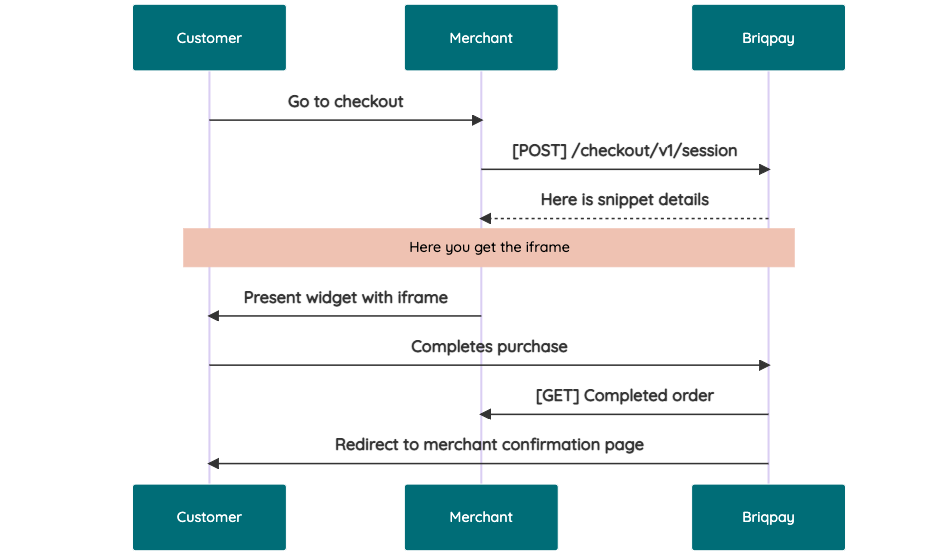 # JavaScript SDK The first step of integration is to add our JS to your site just before closing the ```` tag. This ensures that our JS library is avaliable to load the checkout. ```` Briqpay offers a few methods avaliable through our Javascript SDK. The library is added by our iframe and is avalable on ``window._briqpay`` If you offer the posibility to update the cart or order amonts on the checkout page, the JS library will help you. If your store charges the customer different costs and fees depening on their shipping location, you can listen to the ``addressupdate``event in order to re-calculate the total cost. ```javascript window._briqpay.subscribe('addressupdate', function (data) { console.log(data) }) ``` If your frontend needs to perform an action whe the signup has completed, listen to the ``signup_finalized`` event. ```javascript window._briqpay.subscribe('signup_finalized', function (status) { // redirect or handle status 'success' / 'failure' }) ``` If you allow customers to change the total cart value, you can utilise the JS library to suspend the iframe while you perform a backen update call towards our services. As described below: 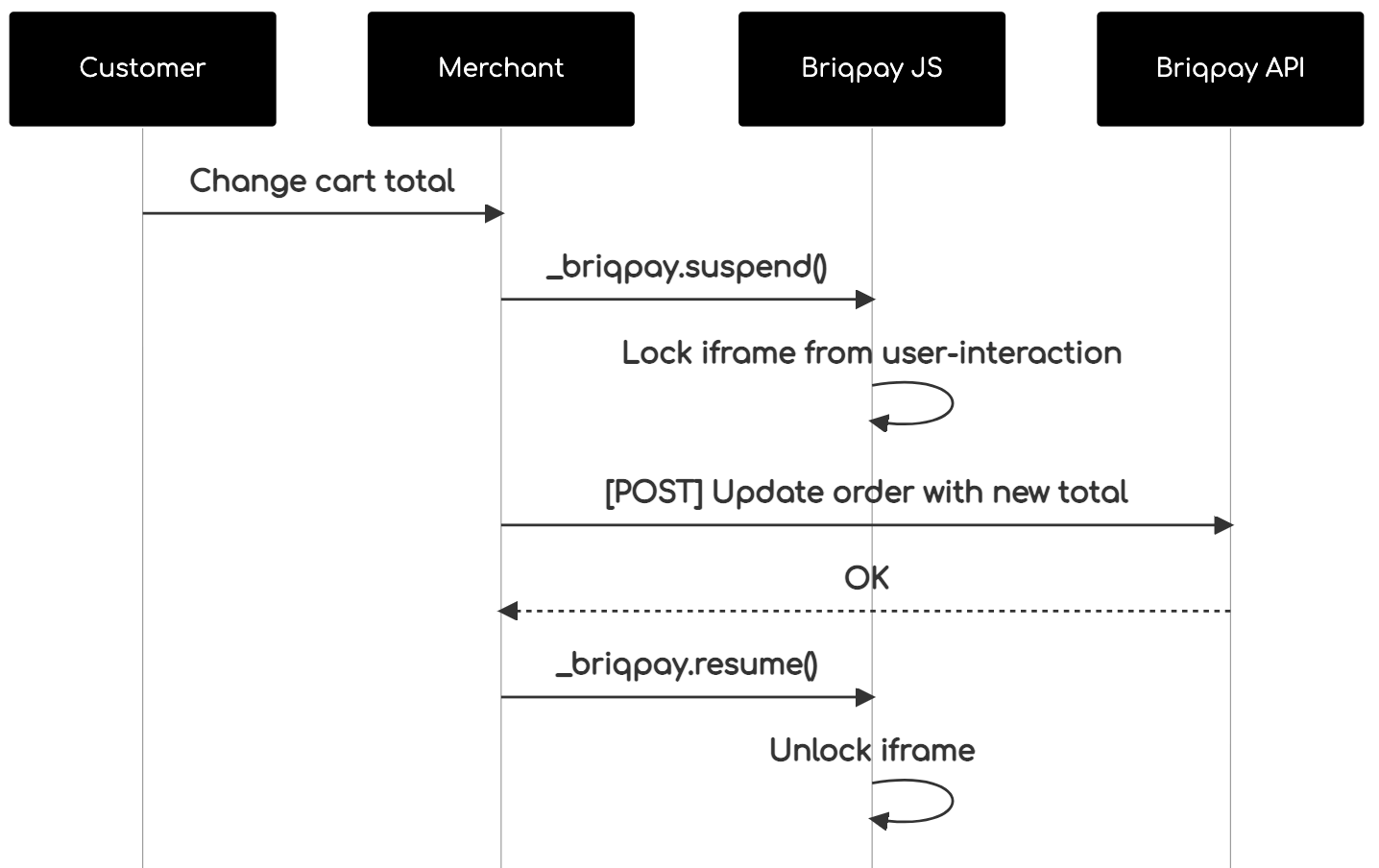 The iframe will auto-resume after 7 seconds if you dont call ``_briqpay.resume()`` before # Test Data In order to verify your integration you will neeed to use test data towards our credit engine. ## Company identication numbers * 1111111111 - To recieve a high credit scoring company ( 100 in rating) * 2222222222 - To test the enviournment with a bad credit scoring company (10 in rating) ## Card details In our playground setup your account is by default setup with a Stripe integration. In order to test out the card form you can use the below card numbers: * 4000002500003155 - To mock 3ds authentication window * 4000000000000069 Charge is declined with an expired_card code. You can use any valid expiry and CVC code # Authentication Briqpay utilizes JWT in order to authenticate calls to our platform. Authentication tokens expire after 48 hours, and at that point you can generate a new token for the given resource using the ``/auth`` endpoint. - Basic Auth - only used on the auth endpoint in order to get the Bearer Token - JWT Bearer Token - All calls towards the API utlizes this method"
acvxqs/nova-registerpage
143 Downloads
A basic registration page for Laravel Nova 3
bluetree-service/register
272 Downloads
Basic Register pattern class
oronatur/basic-user-functionality
2 Downloads
A very basic login and register script. Comes with password reset and email authentication. Intended for private use.
vast-n3/register
10 Downloads
Basic user registration
alfredoem/authentication
44 Downloads
Basic Authentication & Register for Laravel Framework
nathan-emanuel/congressus
5 Downloads
# Introduction The Congressus API allows you to interact with your Congressus administration. The API is RESTful and uses JSON to transport information. This documentation aims to get you started with your first requests. Make sure to read this introduction completely to know all aspects of our API. ## REST basics A REST API describes the resources you can access in a clearly defined path structure. This documentation contains a reference for each resource in the API. Before you can use these resources, you need to know the basics of accessing the Congressus REST API. **Paths and versioning** The Congressus API resides on the following paths: https://api.congressus.nl/ `version` / `resource_path` ? `query_params` - The `version` part of the path indicates the version of the API you want to use. At this moment version v30 is the current version. By pointing to a specific version, we can make sure you always can expect equal behaviour from our API. - The `resource_path` part indicates the path of the resource you want to access. Specific paths to resources can be found in the API documentation. Examples of resource paths are: /members to retrieve all members or /member/ `obj_id` /statuses to create new member status for a member. - The `query_params` contains all filtering, ordering and pagination information. ## Authentication The current authentication flow present at Congressus API is by the use of the Bearer Token suggested by OAuth 2.0. To interact with the Congressus API, you must authenticate by supplying the header `Authorization` with the value `Bearer {access_token}`. **How do I get an API key?** You can create new apps and API keys in Congressus Manager through [this link](https://manager.congressus.nl/settings/integrations/apps). ## Requests There are different approaches for making requests to our API. The command line tool [curl](https://curl.se/) is easy and fast for testing our API. When you want to integrate the API into your own software, you can choose to use a general purpose REST library or to [create your own API client library](https://github.com/OpenAPITools/openapi-generator) based on our OpenAPI specs. ## Responses Congressus uses conventional HTTP response codes to indicate success or failure of an API request. In general, codes in the 2xx range indicate success, codes in the 4xx range indicate an error that resulted from the provided information (e.g. a required parameter was missing or input data was invalid), and codes in the 5xx range indicate an error with the Congressus API. ## Pagination Endpoints returning a list of entities, are paginated to prevent large responses. To control the pagination, you can use the `page` and `page_size` parameters. page determines which page to return (default: 1), page_size controls the amount of entities to return (default: 25, maximum: 100). Each paginated response contains the following information: - `has_prev` bool - `prev_num` int with previous page number - `has next` bool - `next_num` int with next page number - `data` list with results on current page - `total` int with total number of results ## Filtering Most list endpoints support filtering to get a subset of the available information. Filtering is done using the query. For some filter attributes, filtering for multiple options is supported by adding the `=` multiple times. E.g. `category_id=1&category_id=2`. ### Filtering on period For some resources, a period filter is available. This filter is used to get a subset of the available information within a certain period. The period filter is used by adding the `period_filter` query parameter to the endpoint. **Absolute periods** Absolute periods are defined by exact dates. The format is `YYYY(MM(DD))`. E.g. `2024` or `202402` or `20240227`. A different end date can be given by adding `..` and the end date. E.g. `202402..202403` for the period February 2024 to March 2024. **Relative periods** Relative periods are defined by a period in the past or future. Multiple formats are supported: - `today` - today's date - `yesterday` - yesterday's date - `tomorrow` - tomorrow's date - `(last/this/next)_(day/month/quarter/half_year/year)` - e.g. `last_month` or `next_year` or `this_quarter` - `last_x_days` - e.g. `last_7_days` or `last_14_days` ## Ordering Most list endpoints support ordering on one or more attributes. The order is defined using the `order=` parameter in the query part of the endpoint. Multiple columns can be used for ordering, delimited by a comma. E.g. `order=lastname,initials,first_name`. Each attribute used in the order parameter could be extended with a sort property `:`. E.g. `order=lastname:desc`. The following properties are supported throughout our API: - ```:asc``` ASC NULLS LAST (default) [comment]: (- ```:asc_nulls_last``` ASC NULLS LAST) [comment]: (- ```:asc_nulls_first``` ASC NULLS FIRST) - ```:desc``` DESC NULLS FIRST [comment]: (- ```:desc_nulls_last``` DESC NULLS LAST) [comment]: (- ```:desc_nulls_first``` DESC NULLS FIRST) ## Searching and location filtering For some resources a dedicated /search endpoint is available, which is optimized for searching large datasets. We use an Elasticsearch database to deliver these results. The schema for these resources is often a concise version of the schema used for regular endpoints, but always contains the primary key (obj_id). If you need the full schema for a resource found through /search, you can perform an additional call to the GET / endpoint. In most cases, searching has the following query parameters: - `term` - generic term used for the search - `city` or `zip` - a city name or postal code (only Dutch postal codes allowed) - `distance` - distance from the center of the given city or zip (default *5km*) Results from /search endpoints do not support custom ordering, but are ordered based on relevance (i.e. *score* for term queries and *distance* for all location bound search queries). ## Rate limiting Usage of the Congressus API is unlimited within the plan and permissions of the account you are using. To prevent fraud and abuse, requests to the API are throttled. You can request the API 60 times each minute and 1000 times per hour. The API will respond with a **429 Too many requests** response. This response contains the following fields in the headers: - `X-RateLimit-Limit` The total number of requests allowed for the active window - `X-RateLimit-Remaining` The number of requests remaining in the active window. - `X-RateLimit-Reset` UTC seconds since epoch when the window will be reset. - `Retry-After` Seconds to retry after when the Rate Limit will be reset. ## Cross-Origin Resource Sharing This API features Cross-Origin Resource Sharing (CORS) implemented in compliance with W3C spec. This allows cross-domain communication from the browser. All responses have a wildcard same-origin, which allows to use our API from any domain or server. # Webhooks Information in a Congressus administration is constantly changing. If you want to perform actions based on these changes, webhooks help you to achieve this. Instead of querying the API at a certain interval, Congressus will notify you about changes to information in the administration. ## Usage Webhooks are useful in a broad range of situations. When the state of an resource changes, Congressus will perform a HTTP request to the URL you provide. Based on the payload of the request, you can determine which action you need to perform. How it works: - You need a URL that Congressus can call to deliver the payload. The Congressus servers must be able to access this URL. - You can add HTTP basic authentication or other token authentication in the URL, as long as the URL stays valid. - Your URL always needs to respond with a 200 HTTP status. Upon registration this is checked. - When your URL responds with another HTTP status code, Congressus will retry to deliver the call 10 times. The time interval between retries is gradually extended. - After each call, Congressus will store the last HTTP status code and HTTP body. Using the webhooks API, you can retrieve this information for debugging purposes. - You can register as many webhooks as required in an administration. Registration is done by sending a POST request to the webhooks API. > **We strongly recommend that you use a secure HTTPS endpoint for receiving payload from Congressus. If you use > unencrypted HTTP, anyone on the network may be able to listen in on sensitive information like members and invoices.** ## Webhook events Each webhook subscribes to an event. When an event occurs, Congressus will call the webhook using an HTTP request to the provided URL. The following events are available: **Members** - member - All member related events - member_added - Member added to the administration - member_updated - Existing Member is updated - member_deleted - Member is removed from the administration - member_birthday - Triggered once on the birthday of a member **Events** - event - All event related events - event_added - Event added - event_updated - Event updated - event_deleted - Event deleted from the administration **Event participations** - event_participation - All event participation related events - event_participation_added - Event participation added - event_participation_updated - Event participation updated - event_participation_deleted - Event participation deleted from the administration **Form entries** - form_entry - All form entry related events - form_entry_added - Form entry added - form_entry_updated - Form entry updated - form_entry_deleted - Form entry deleted from the administration **Sale invoices** - sale_invoices - All sale invoice related events - sale_invoices_added - Sale invoice added - sale_invoices_updated - Sale invoice updated - sale_invoices_deleted - Sale invoice deleted from the administration ## Payload Each webhook call has a payload based on the category of the event that triggered the webhook. E.g. events in the category **Members** get a payload based on the schema for Members, filled with the data for the resource that triggered the webhook. Each webhook call contains the following information: - `webhook_id`- The id of the webhook that triggered the call - `webhook_event` - The category of events for the webhook - `webhook_event_trigger` - The trigger that caused the webhook call - `created` - Date and time at which the webhook was triggered - `data` - List which contains the payload(s) in the form of the complete resource that triggered the event # Changelog This is version 3.0 of the Congressus API. In this chapter we describe all changes in v3.0. ## 2025-09-30 Endpoint for Filters added - A new endpoint `/filters` is added to retrieve available filters for Members, Events and Organisations. ## 2025-08-13 Filter on folder_id added to Storage - The `folder_id` parameter is added to the `storage` endpoint. This allows you to filter storage resources by folder. ## 2025-07-11 Website added to Magic link endpoint - The `website_id` parameter is added to the `magic-links` endpoint. This allows you to create magic links for a specific website. ## 2025-05-24 Organisation resource improvements - `Organisation` resources now also have the 'published' attribute. - `Organisation` resources now also include custom field data in the `custom_field_data` attribute. - Custom fields are defined per organisation category, so the custom fields available for an organisation depend on the category of the organisation. - `Organisation category` resources now also include metadata for the custom fields available for that category in the `custom_fields` attribute. ## 2025-05-04 Magic links added - `Magic links` are added to the API. These links can be used to authenticate a website visitor without the need for a password. ## 2024-11-25 Form and Form entry resources added - `Form` and `Form entry` resources are added to the API. - `Form` resources can be created and updated through the API. It is currently not possible to delete a form or manage fields and fieldsets. - `forms//entries` endpoint is available to retrieve form entries. - `forms//fields` endpoint is available to retrieve form fields. ## 2024-04-23 Custom fields for Members available in PUT/POST requests - Custom fields for Members can now be added or updated through the API. The custom fields are available in the `custom_field_data` attribute of the Member resource. - The old `custom_fields` attribute is deprecated and will be removed in a future version. - The `members/custom-fields` resource shows the available custom fields for Members, including meta information. ## 2024-02-27 Action endpoints for EventParticipation added - `EventParticipation` status can now be changed through the API, including fines when unsubscribing or declining a participation. - API upgrade guide from v20 to v30 removed from docs, as it is no longer relevant. The v20 API is unavailable since mid 2023. ## 2022-12-09 Event ticket types endpoints - `EventTicketType` resources can now be created, updated and deleted through the API - The context is now applied at row level according to the status of the Member for the `v30/members` endpoint ## 2022-06-28 Events updated, MembershipStatus resources added - `Event` resources are now fully operational, including the possibility to add participants / sell tickets through the API. - `MembershipStatus` is now available for Member resources. ## 2022-06-22 Minor updates and fixes - Feat: /members can be filtered against multiples statuses with the status_id query parameter (i.e: /members?status_id=2&status_id=3). - Feat: the News model now contains a list of websites where the news item is published on - Fix: add the default website to POST /news on create - Fix: sale_invoice_id is now honored when given by the creation of a sale invoice /sale-invoices//send ## 2022-06-03 Minor updates and fixes - Feat: Additional filtering for /sale-invoices endpoint added (invoice_type 'debit', 'is_credited' and 'is_not_credited'). - Feat: Renamed /groups/folders endpoints to /group-folders for more consistency. Deprecated old endpoints. - Feat: Added member status resources through /member-statuses. - Feat: Added profile_picture and formal_picture to Member resources. - Fix: we incorrectly used 'per_page' as parameter in the Pagination-section of these docs. The correct parameter is **'page_size'**. - Fix: all non-recursive endpoints for Group folders and Product folders returned children, this is resolved. ## 2022-05-03 Member validation through context added - Added extended validation options for Member-resources by setting a `context` parameter. This context ensures validation according to the field settings as set in Congressus Manager for the member status. - Description for Context validation added to the Member-resources. - Introduction on Context validation added to the [upgrade guide](#section/Upgrading-from-v20-to-v30) ## 2022-04-22 Upgrade guide from v20 to v30 added - First version for the [upgrade guide](#section/Upgrading-from-v20-to-v30) added ## 2022-03-23 Additional filtering for Group and Organisation resources - `Group` and `Group membership` resources can use a filter on member_id - `Organisation` and `Organisation membership` resources can use a filter on member_id ## 2022-03-21 Group and GroupFolder resources added - Group, GroupFolder and GroupMembership resources are added to the API. - `Group folders` are added and use a tree-like structure. - `Organisation` resources have create, update and delete views added. - `Organisation membership` resources are added - Fix: SDD mandates returned and empty list for Member resources. ## 2021-10-14 Organisation resources added - Both Organisation and Organisation category resources are added to the API. ## 2021-10-02 Additional filters added for Event participations - `Event participations` have additional filter functionality ## 2021-09-22 Added resources for Product folders and Sale invoice workflows - `Product folders` are added, using a tree-like structure. - `Sale invoice workflows` are added as resource. Read-only for this moment. - Updated descriptions for Sale invoice attributes. ## 2021-08-09 additional filters for events and products - Events can now be filtered on published true/false - Products can now be filtered on published and folder_id. More than one folder_id can be given by supplying it more than once as query param, e.g. `products?folder_id=123&folder_id=456` ## 2021-08-04 custom fields and descriptions added, publication options added to events and blogs - The retrieve member resource now also shows the custom field information for a member - Many attributes have an additional description added - Publication attributes are added to Event and Blog resources ## 2021-06-09 website related resources added - Website and Webpage resources added (list and get only) - News resources added - Default order is added for Websites, Webpages, Events and News list endpoints. You can overwrite the default order with the `order` query param - Improved descriptions for several resources, removed some typo's in the documentation ## 2021-04-06 initial release - This initial release contains a minor set of resources to work with.
compucie/congressus
141 Downloads
# Introduction The Congressus API allows you to interact with your Congressus administration. The API is RESTful and uses JSON to transport information. This documentation aims to get you started with your first requests. Make sure to read this introduction completely to know all aspects of our API. ## REST basics A REST API describes the resources you can access in a clearly defined path structure. This documentation contains a reference for each resource in the API. Before you can use these resources, you need to know the basics of accessing the Congressus REST API. **Paths and versioning** The Congressus API resides on the following paths: https://api.congressus.nl/ `version` / `resource_path` ? `query_params` - The `version` part of the path indicates the version of the API you want to use. At this moment version v30 is the current version. By pointing to a specific version, we can make sure you always can expect equal behaviour from our API. - The `resource_path` part indicates the path of the resource you want to access. Specific paths to resources can be found in the API documentation. Examples of resource paths are: /members to retrieve all members or /member/ `obj_id` /statuses to create new member status for a member. - The `query_params` contains all filtering, ordering and pagination information. ## Authentication The current authentication flow present at Congressus API is by the use of the Bearer Token suggested by OAuth 2.0. To interact with the Congressus API, you must authenticate by supplying the header `Authorization` with the value `Bearer {access_token}`. **How do I get an API key?** You can create new apps and API keys in Congressus Manager through [this link](https://manager.congressus.nl/settings/integrations/apps). ## Requests There are different approaches for making requests to our API. The command line tool [curl](https://curl.se/) is easy and fast for testing our API. When you want to integrate the API into your own software, you can choose to use a general purpose REST library or to [create your own API client library](https://github.com/OpenAPITools/openapi-generator) based on our OpenAPI specs. ## Responses Congressus uses conventional HTTP response codes to indicate success or failure of an API request. In general, codes in the 2xx range indicate success, codes in the 4xx range indicate an error that resulted from the provided information (e.g. a required parameter was missing or input data was invalid), and codes in the 5xx range indicate an error with the Congressus API. ## Pagination Endpoints returning a list of entities, are paginated to prevent large responses. To control the pagination, you can use the `page` and `page_size` parameters. page determines which page to return (default: 1), page_size controls the amount of entities to return (default: 25, maximum: 100). Each paginated response contains the following information: - `has_prev` bool - `prev_num` int with previous page number - `has next` bool - `next_num` int with next page number - `data` list with results on current page - `total` int with total number of results ## Filtering Most list endpoints support filtering to get a subset of the available information. Filtering is done using the query. For some filter attributes, filtering for multiple options is supported by adding the `=` multiple times. E.g. `category_id=1&category_id=2`. ### Filtering on period For some resources, a period filter is available. This filter is used to get a subset of the available information within a certain period. The period filter is used by adding the `period_filter` query parameter to the endpoint. **Absolute periods** Absolute periods are defined by exact dates. The format is `YYYY(MM(DD))`. E.g. `2024` or `202402` or `20240227`. A different end date can be given by adding `..` and the end date. E.g. `202402..202403` for the period February 2024 to March 2024. **Relative periods** Relative periods are defined by a period in the past or future. Multiple formats are supported: - `today` - today's date - `yesterday` - yesterday's date - `tomorrow` - tomorrow's date - `(last/this/next)_(day/month/quarter/half_year/year)` - e.g. `last_month` or `next_year` or `this_quarter` - `last_x_days` - e.g. `last_7_days` or `last_14_days` ## Ordering Most list endpoints support ordering on one or more attributes. The order is defined using the `order=` parameter in the query part of the endpoint. Multiple columns can be used for ordering, delimited by a comma. E.g. `order=lastname,initials,first_name`. Each attribute used in the order parameter could be extended with a sort property `:`. E.g. `order=lastname:desc`. The following properties are supported throughout our API: - ```:asc``` ASC NULLS LAST (default) [comment]: (- ```:asc_nulls_last``` ASC NULLS LAST) [comment]: (- ```:asc_nulls_first``` ASC NULLS FIRST) - ```:desc``` DESC NULLS FIRST [comment]: (- ```:desc_nulls_last``` DESC NULLS LAST) [comment]: (- ```:desc_nulls_first``` DESC NULLS FIRST) ## Searching and location filtering For some resources a dedicated /search endpoint is available, which is optimized for searching large datasets. We use an Elasticsearch database to deliver these results. The schema for these resources is often a concise version of the schema used for regular endpoints, but always contains the primary key (obj_id). If you need the full schema for a resource found through /search, you can perform an additional call to the GET / endpoint. In most cases, searching has the following query parameters: - `term` - generic term used for the search - `city` or `zip` - a city name or postal code (only Dutch postal codes allowed) - `distance` - distance from the center of the given city or zip (default *5km*) Results from /search endpoints do not support custom ordering, but are ordered based on relevance (i.e. *score* for term queries and *distance* for all location bound search queries). ## Rate limiting Usage of the Congressus API is unlimited within the plan and permissions of the account you are using. To prevent fraud and abuse, requests to the API are throttled. You can request the API 60 times each minute and 1000 times per hour. The API will respond with a **429 Too many requests** response. This response contains the following fields in the headers: - `X-RateLimit-Limit` The total number of requests allowed for the active window - `X-RateLimit-Remaining` The number of requests remaining in the active window. - `X-RateLimit-Reset` UTC seconds since epoch when the window will be reset. - `Retry-After` Seconds to retry after when the Rate Limit will be reset. ## Cross-Origin Resource Sharing This API features Cross-Origin Resource Sharing (CORS) implemented in compliance with W3C spec. This allows cross-domain communication from the browser. All responses have a wildcard same-origin, which allows to use our API from any domain or server. # Webhooks Information in a Congressus administration is constantly changing. If you want to perform actions based on these changes, webhooks help you to achieve this. Instead of querying the API at a certain interval, Congressus will notify you about changes to information in the administration. ## Usage Webhooks are useful in a broad range of situations. When the state of an resource changes, Congressus will perform a HTTP request to the URL you provide. Based on the payload of the request, you can determine which action you need to perform. How it works: - You need a URL that Congressus can call to deliver the payload. The Congressus servers must be able to access this URL. - You can add HTTP basic authentication or other token authentication in the URL, as long as the URL stays valid. - Your URL always needs to respond with a 200 HTTP status. Upon registration this is checked. - When your URL responds with another HTTP status code, Congressus will retry to deliver the call 10 times. The time interval between retries is gradually extended. - After each call, Congressus will store the last HTTP status code and HTTP body. Using the webhooks API, you can retrieve this information for debugging purposes. - You can register as many webhooks as required in an administration. Registration is done by sending a POST request to the webhooks API. > **We strongly recommend that you use a secure HTTPS endpoint for receiving payload from Congressus. If you use > unencrypted HTTP, anyone on the network may be able to listen in on sensitive information like members and invoices.** ## Webhook events Each webhook subscribes to an event. When an event occurs, Congressus will call the webhook using an HTTP request to the provided URL. The following events are available: **Members** - member - All member related events - member_added - Member added to the administration - member_updated - Existing Member is updated - member_deleted - Member is removed from the administration - member_birthday - Triggered once on the birthday of a member **Events** - event - All event related events - event_added - Event added - event_updated - Event updated - event_deleted - Event deleted from the administration **Event participations** - event_participation - All event participation related events - event_participation_added - Event participation added - event_participation_updated - Event participation updated - event_participation_deleted - Event participation deleted from the administration **Form entries** - form_entry - All form entry related events - form_entry_added - Form entry added - form_entry_updated - Form entry updated - form_entry_deleted - Form entry deleted from the administration **Sale invoices** - sale_invoices - All sale invoice related events - sale_invoices_added - Sale invoice added - sale_invoices_updated - Sale invoice updated - sale_invoices_deleted - Sale invoice deleted from the administration ## Payload Each webhook call has a payload based on the category of the event that triggered the webhook. E.g. events in the category **Members** get a payload based on the schema for Members, filled with the data for the resource that triggered the webhook. Each webhook call contains the following information: - `webhook_id`- The id of the webhook that triggered the call - `webhook_event` - The category of events for the webhook - `webhook_event_trigger` - The trigger that caused the webhook call - `created` - Date and time at which the webhook was triggered - `data` - List which contains the payload(s) in the form of the complete resource that triggered the event # Changelog This is version 3.0 of the Congressus API. In this chapter we describe all changes in v3.0. ## 2025-09-30 Endpoint for Filters added - A new endpoint `/filters` is added to retrieve available filters for Members, Events and Organisations. ## 2025-08-13 Filter on folder_id added to Storage - The `folder_id` parameter is added to the `storage` endpoint. This allows you to filter storage resources by folder. ## 2025-07-11 Website added to Magic link endpoint - The `website_id` parameter is added to the `magic-links` endpoint. This allows you to create magic links for a specific website. ## 2025-05-24 Organisation resource improvements - `Organisation` resources now also have the 'published' attribute. - `Organisation` resources now also include custom field data in the `custom_field_data` attribute. - Custom fields are defined per organisation category, so the custom fields available for an organisation depend on the category of the organisation. - `Organisation category` resources now also include metadata for the custom fields available for that category in the `custom_fields` attribute. ## 2025-05-04 Magic links added - `Magic links` are added to the API. These links can be used to authenticate a website visitor without the need for a password. ## 2024-11-25 Form and Form entry resources added - `Form` and `Form entry` resources are added to the API. - `Form` resources can be created and updated through the API. It is currently not possible to delete a form or manage fields and fieldsets. - `forms//entries` endpoint is available to retrieve form entries. - `forms//fields` endpoint is available to retrieve form fields. ## 2024-04-23 Custom fields for Members available in PUT/POST requests - Custom fields for Members can now be added or updated through the API. The custom fields are available in the `custom_field_data` attribute of the Member resource. - The old `custom_fields` attribute is deprecated and will be removed in a future version. - The `members/custom-fields` resource shows the available custom fields for Members, including meta information. ## 2024-02-27 Action endpoints for EventParticipation added - `EventParticipation` status can now be changed through the API, including fines when unsubscribing or declining a participation. - API upgrade guide from v20 to v30 removed from docs, as it is no longer relevant. The v20 API is unavailable since mid 2023. ## 2022-12-09 Event ticket types endpoints - `EventTicketType` resources can now be created, updated and deleted through the API - The context is now applied at row level according to the status of the Member for the `v30/members` endpoint ## 2022-06-28 Events updated, MembershipStatus resources added - `Event` resources are now fully operational, including the possibility to add participants / sell tickets through the API. - `MembershipStatus` is now available for Member resources. ## 2022-06-22 Minor updates and fixes - Feat: /members can be filtered against multiples statuses with the status_id query parameter (i.e: /members?status_id=2&status_id=3). - Feat: the News model now contains a list of websites where the news item is published on - Fix: add the default website to POST /news on create - Fix: sale_invoice_id is now honored when given by the creation of a sale invoice /sale-invoices//send ## 2022-06-03 Minor updates and fixes - Feat: Additional filtering for /sale-invoices endpoint added (invoice_type 'debit', 'is_credited' and 'is_not_credited'). - Feat: Renamed /groups/folders endpoints to /group-folders for more consistency. Deprecated old endpoints. - Feat: Added member status resources through /member-statuses. - Feat: Added profile_picture and formal_picture to Member resources. - Fix: we incorrectly used 'per_page' as parameter in the Pagination-section of these docs. The correct parameter is **'page_size'**. - Fix: all non-recursive endpoints for Group folders and Product folders returned children, this is resolved. ## 2022-05-03 Member validation through context added - Added extended validation options for Member-resources by setting a `context` parameter. This context ensures validation according to the field settings as set in Congressus Manager for the member status. - Description for Context validation added to the Member-resources. - Introduction on Context validation added to the [upgrade guide](#section/Upgrading-from-v20-to-v30) ## 2022-04-22 Upgrade guide from v20 to v30 added - First version for the [upgrade guide](#section/Upgrading-from-v20-to-v30) added ## 2022-03-23 Additional filtering for Group and Organisation resources - `Group` and `Group membership` resources can use a filter on member_id - `Organisation` and `Organisation membership` resources can use a filter on member_id ## 2022-03-21 Group and GroupFolder resources added - Group, GroupFolder and GroupMembership resources are added to the API. - `Group folders` are added and use a tree-like structure. - `Organisation` resources have create, update and delete views added. - `Organisation membership` resources are added - Fix: SDD mandates returned and empty list for Member resources. ## 2021-10-14 Organisation resources added - Both Organisation and Organisation category resources are added to the API. ## 2021-10-02 Additional filters added for Event participations - `Event participations` have additional filter functionality ## 2021-09-22 Added resources for Product folders and Sale invoice workflows - `Product folders` are added, using a tree-like structure. - `Sale invoice workflows` are added as resource. Read-only for this moment. - Updated descriptions for Sale invoice attributes. ## 2021-08-09 additional filters for events and products - Events can now be filtered on published true/false - Products can now be filtered on published and folder_id. More than one folder_id can be given by supplying it more than once as query param, e.g. `products?folder_id=123&folder_id=456` ## 2021-08-04 custom fields and descriptions added, publication options added to events and blogs - The retrieve member resource now also shows the custom field information for a member - Many attributes have an additional description added - Publication attributes are added to Event and Blog resources ## 2021-06-09 website related resources added - Website and Webpage resources added (list and get only) - News resources added - Default order is added for Websites, Webpages, Events and News list endpoints. You can overwrite the default order with the `order` query param - Improved descriptions for several resources, removed some typo's in the documentation ## 2021-04-06 initial release - This initial release contains a minor set of resources to work with.
factpulse/sdk
70 Downloads
REST API for electronic invoicing in France: Factur-X (CII), UBL 2.1, AFNOR PDP/PA, electronic signatures. ## 🎯 Main Features ### 📄 Invoice Generation - **Formats**: CII XML, UBL 2.1 XML, or Factur-X PDF/A-3 - **Profiles** (CII/PDF): MINIMUM, BASIC, EN16931, EXTENDED - **UBL**: Always EN16931 compliant - **Standards**: EN 16931 (EU directive 2014/55), ISO 19005-3 (PDF/A-3), CII (UN/CEFACT), UBL 2.1 (OASIS) - **Simplified Format**: Generation from SIRET + auto-enrichment (Chorus Pro API + Business Search) ### ✅ Factur-X - Validation - **XML Validation**: Schematron (45 to 210+ rules depending on profile) - **PDF Validation**: PDF/A-3, Factur-X XMP metadata - **VeraPDF**: Strict PDF/A validation (146+ ISO 19005-3 rules) ### ✍️ Electronic Signature - **Standards**: PAdES-B-B, PAdES-B-T (RFC 3161 timestamping), PAdES-B-LT (long-term archival) - **eIDAS Levels**: SES (self-signed), AdES (commercial CA), QES (QTSP) - **Validation**: Cryptographic integrity and certificate verification ### 📋 Flux 6 - Invoice Lifecycle (CDAR) - **CDAR Messages**: Acknowledgements, invoice statuses - **PPF Statuses**: REFUSED (210), PAID (212) ### 📊 Flux 10 - E-Reporting - **Tax Declarations**: International B2B, B2C - **Flow Types**: 10.1 (B2B transactions), 10.2 (B2B payments), 10.3 (B2C transactions), 10.4 (B2C payments) ### 📡 AFNOR PDP/PA (XP Z12-013) - **Flow Service**: Submit and search flows to PDPs - **Directory Service**: Company search (SIREN/SIRET) - **Multi-client**: Support for multiple PDP configs per user ### 🏛️ Chorus Pro - **Public Sector Invoicing**: Complete API for Chorus Pro ### ⏳ Async Tasks - **Celery**: Asynchronous generation, validation and signing - **Polling**: Status tracking via `/tasks/{task_id}/status` - **Webhooks**: Automatic notifications when tasks complete ## 🔒 Authentication All requests require a **JWT token** in the Authorization header: ``` Authorization: Bearer YOUR_JWT_TOKEN ``` ### How to obtain a JWT token? #### 🔑 Method 1: `/api/token/` API (Recommended) **URL:** `https://factpulse.fr/api/token/` This method is **recommended** for integration in your applications and CI/CD workflows. **Prerequisites:** Having set a password on your account **For users registered via email/password:** - You already have a password, use it directly **For users registered via OAuth (Google/GitHub):** - You must first set a password at: https://factpulse.fr/accounts/password/set/ - Once the password is created, you can use the API **Request example:** ```bash curl -X POST https://factpulse.fr/api/token/ \ -H "Content-Type: application/json" \ -d '{ "username": "[email protected]", "password": "your_password" }' ``` **Optional `client_uid` parameter:** To select credentials for a specific client (PA/PDP, Chorus Pro, signing certificates), add `client_uid`: ```bash curl -X POST https://factpulse.fr/api/token/ \ -H "Content-Type: application/json" \ -d '{ "username": "[email protected]", "password": "your_password", "client_uid": "550e8400-e29b-41d4-a716-446655440000" }' ``` The `client_uid` will be included in the JWT and allow the API to automatically use: - AFNOR/PDP credentials configured for this client - Chorus Pro credentials configured for this client - Electronic signature certificates configured for this client **Response:** ```json { "access": "eyJ0eXAiOiJKV1QiLCJhbGc...", // Access token (validity: 30 min) "refresh": "eyJ0eXAiOiJKV1QiLCJhbGc..." // Refresh token (validity: 7 days) } ``` **Advantages:** - ✅ Full automation (CI/CD, scripts) - ✅ Programmatic token management - ✅ Refresh token support for automatic access renewal - ✅ Easy integration in any language/tool #### 🖥️ Method 2: Dashboard Generation (Alternative) **URL:** https://factpulse.fr/api/dashboard/ This method is suitable for quick tests or occasional use via the graphical interface. **How it works:** - Log in to the dashboard - Use the "Generate Test Token" or "Generate Production Token" buttons - Works for **all** users (OAuth and email/password), without requiring a password **Token types:** - **Test Token**: 24h validity, 1000 calls/day quota (free) - **Production Token**: 7 days validity, quota based on your plan **Advantages:** - ✅ Quick for API testing - ✅ No password required - ✅ Simple visual interface **Disadvantages:** - ❌ Requires manual action - ❌ No refresh token - ❌ Less suited for automation ### 📚 Full Documentation For more information on authentication and API usage: https://factpulse.fr/documentation-api/
cloudinary/analysis
8 Downloads
Use the Analyze API to analyze any external asset and return details based on the type of analysis requested. Currently supports the following analysis options: * [AI Vision - Tagging](https://cloudinary.com/documentation/cloudinary_ai_vision_addon#tagging_mode) * [AI Vision - Moderation](https://cloudinary.com/documentation/cloudinary_ai_vision_addon#moderation_mode) * [AI Vision - General](https://cloudinary.com/documentation/cloudinary_ai_vision_addon#general_mode) * [Google tagging](https://cloudinary.com/documentation/google_auto_tagging_addon) * [Captioning](https://cloudinary.com/documentation/cloudinary_ai_content_analysis_addon#ai_based_image_captioning) * [Cld Fashion](https://cloudinary.com/documentation/cloudinary_ai_content_analysis_addon#supported_content_aware_detection_models) * [Coco](https://cloudinary.com/documentation/cloudinary_ai_content_analysis_addon#supported_content_aware_detection_models) * [Lvis](https://cloudinary.com/documentation/cloudinary_ai_content_analysis_addon#supported_content_aware_detection_models) * [Unidet](https://cloudinary.com/documentation/cloudinary_ai_content_analysis_addon#supported_content_aware_detection_models) * [Human Anatomy](https://cloudinary.com/documentation/cloudinary_ai_content_analysis_addon#supported_content_aware_detection_models) * [Cld Text](https://cloudinary.com/documentation/cloudinary_ai_content_analysis_addon#supported_content_aware_detection_models) * [Shop Classifier](https://cloudinary.com/documentation/cloudinary_ai_content_analysis_addon#supported_content_aware_detection_models) **Notes**: * The Analyze API is currently in development and is available as a Public Beta, which means we value your feedback, so please feel free to [share any thoughts with us](https://support.cloudinary.com/hc/en-us/requests/new). * The analysis options require an active subscription to the relevant add-on. Learn more about [registering for add-ons](https://cloudinary.com/documentation/cloudinary_add_ons#registering_for_add_ons). The API supports both Basic Authentication using your Cloudinary API Key and API Secret (which can be found on the Dashboard page of your [Cloudinary Console](https://console.cloudinary.com/pm)) or OAuth2 ([Contact support](https://support.cloudinary.com/hc/en-us/requests/new) for more information regarding OAuth).
romm/formz
14757 Downloads
Manage your forms easily with powerful tools: TypoScript based validation, Fluid view helpers, a whole JavaScript API, and more. Use pre-defined layouts for Twitter Bootstrap and Foundation to build nice-looking forms in minutes. Need to build a basic form with only two fields? Need to build a huge registration form with dozens of fields? Use FormZ, it will live up to your expectations! Visit typo3-formz.com for more information.
tony13tv/registration
42 Downloads
Basic member registration module
hlack/laravel-10-registration-api-basic-auth
10 Downloads
Backend for registration project.
dbeurive/registry
18 Downloads
This package contains a basic implementation for a registry.