Libraries tagged by http response status
briqpay/php-sdk
12246 Downloads
This is the API documentation for Briqpay. You can find out more about us and our offering at our website [https://briqpay.com](https://briqpay.com) In order to get credentials to the playgrund API Please register at [https://app.briqpay.com](https://app.briqpay.com) # Introduction Briqpay Checkout is an inline checkout solution for your b2b ecommerce. Briqpay Checkout gives you the flexibility of controlling your payment methods and credit rules while optimizing the UX for your customers # SDKs Briqpay offers standard SDKs to PHP and .NET based on these swagger definitions. You can download them respively or use our swagger defintitions to codegen your own versions. #### For .NET `` Install-Package Briqpay `` #### For PHP `` composer require briqpay/php-sdk `` # Standard use-case As a first step of integration you will need to create a checkout session. \n\nIn this session you provide Briqpay with the basic information necessary. In the response from briqpay you will recieve a htmlsnippet that is to be inserted into your frontend. The snippet provided by briqpay will render an iframe where the user will complete the purchase. Once completed, briqpay will redirect the customer to a confirmation page that you have defined. 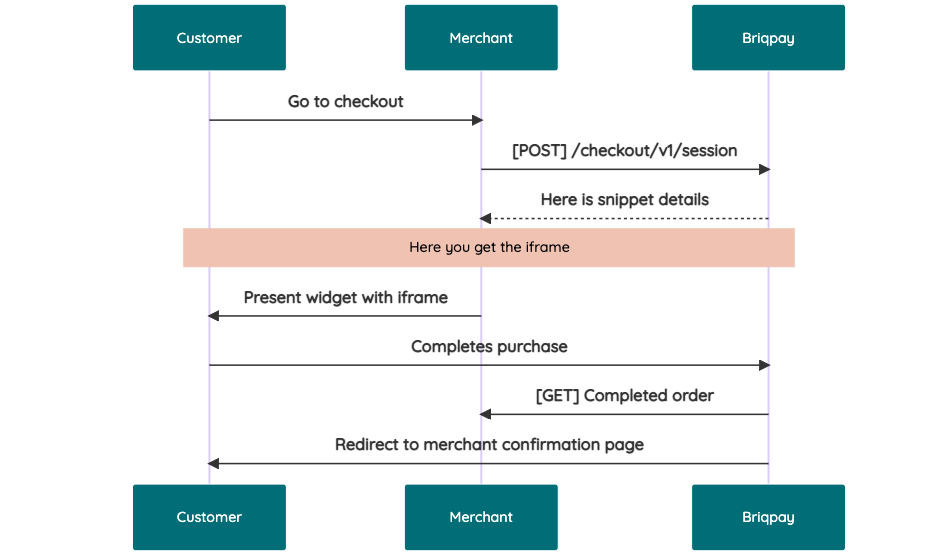 # JavaScript SDK The first step of integration is to add our JS to your site just before closing the ```` tag. This ensures that our JS library is avaliable to load the checkout. ```` Briqpay offers a few methods avaliable through our Javascript SDK. The library is added by our iframe and is avalable on ``window._briqpay`` If you offer the posibility to update the cart or order amonts on the checkout page, the JS library will help you. If your store charges the customer different costs and fees depening on their shipping location, you can listen to the ``addressupdate``event in order to re-calculate the total cost. ```javascript window._briqpay.subscribe('addressupdate', function (data) { console.log(data) }) ``` If your frontend needs to perform an action whe the signup has completed, listen to the ``signup_finalized`` event. ```javascript window._briqpay.subscribe('signup_finalized', function (status) { // redirect or handle status 'success' / 'failure' }) ``` If you allow customers to change the total cart value, you can utilise the JS library to suspend the iframe while you perform a backen update call towards our services. As described below: 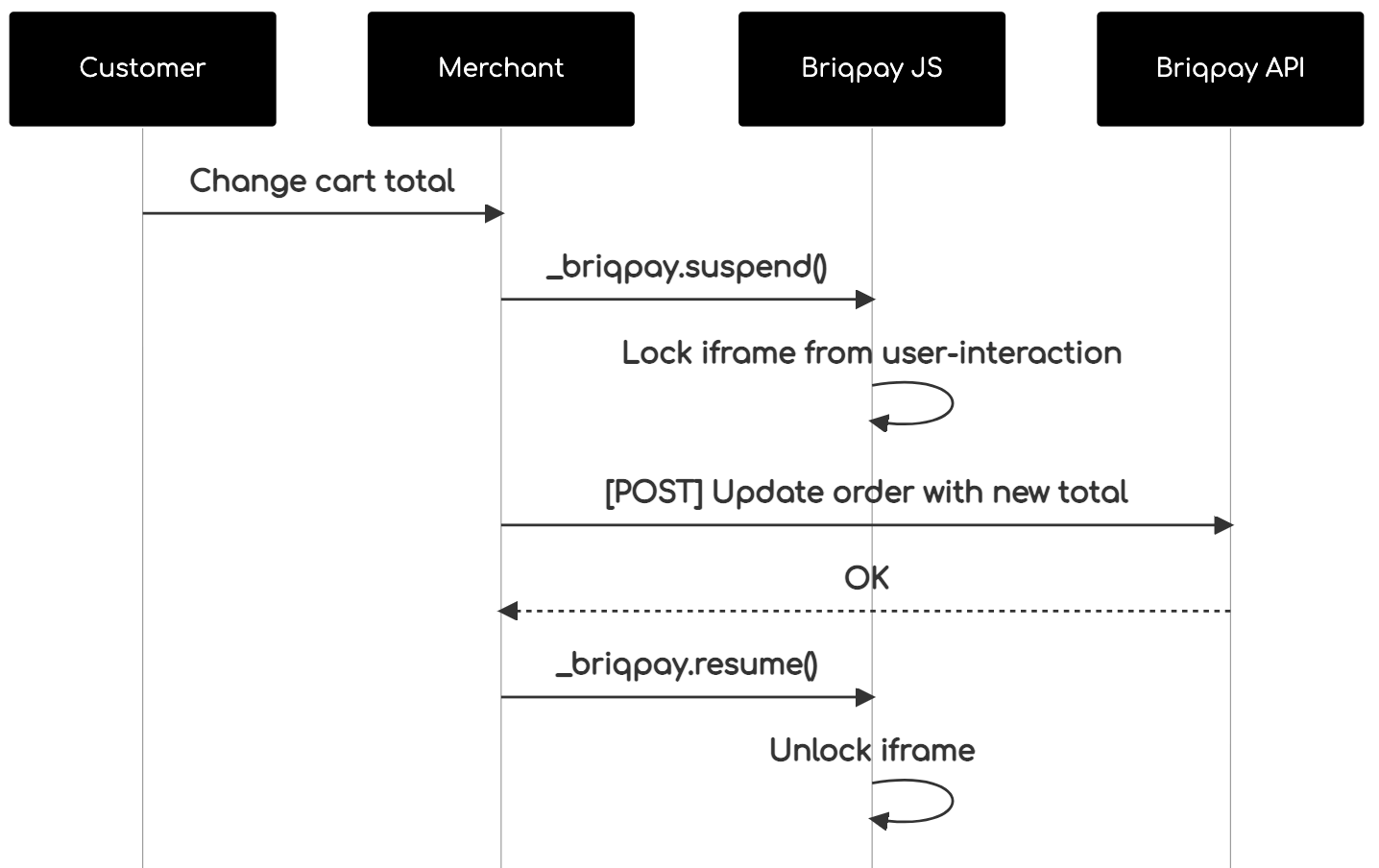 The iframe will auto-resume after 7 seconds if you dont call ``_briqpay.resume()`` before # Test Data In order to verify your integration you will neeed to use test data towards our credit engine. ## Company identication numbers * 1111111111 - To recieve a high credit scoring company ( 100 in rating) * 2222222222 - To test the enviournment with a bad credit scoring company (10 in rating) ## Card details In our playground setup your account is by default setup with a Stripe integration. In order to test out the card form you can use the below card numbers: * 4000002500003155 - To mock 3ds authentication window * 4000000000000069 Charge is declined with an expired_card code. You can use any valid expiry and CVC code # Authentication Briqpay utilizes JWT in order to authenticate calls to our platform. Authentication tokens expire after 48 hours, and at that point you can generate a new token for the given resource using the ``/auth`` endpoint. - Basic Auth - only used on the auth endpoint in order to get the Bearer Token - JWT Bearer Token - All calls towards the API utlizes this method"
ellipse-online/json-response
5 Downloads
A simple class that returns a properly formatted json response with HYTP status
rstmgsnvimax/irisnet-ai-php-api-client
2 Downloads
Artificial Intelligence (AI) for image- and video-processing in real-time. This is an interactive documentation where you can quickly look up the endpoints and their schemas, while having the opportunity to try things out for yourself. In the list below, you can see the available endpoints of the API, which can be expanded by clicking on them. Each expanded endpoint lists the request parameters (if available) and the request body (if available). The request body can list some example bodies and the schema, explaining each model in detail. Additionally you'll find a 'Try it out' button that allows you to enter your custom parameters and custom body and execute that against the API. Be sure to enter your license key to authorize the requests before using this documentation interactively. The responses section in the expanded endpoint lists the possible responses with their corresponding status codes. If you've executed an API call it will also show you the response from the server. Underneath the endpoints you'll find the model schemas. These are the models used for the requests and responses. If you click on the right arrow, you can expand the model and get a description of the model and the model parameters. For nested models, you can keep clicking the right arrow for further details. Clicking the link below the title at the top of this page opens the [OpenAPI specification](https://swagger.io/specification/) (OAS3) in JSON format. The OAS3 Spec allows the generation of clients in many programming languages. There are several free client generators available that can be used to get started easily.
affixapi/api
13 Downloads
The affixapi.com API documentation. # Introduction Affix API is an OAuth 2.1 application that allows developers to access customer data, without developers needing to manage or maintain integrations; or collect login credentials or API keys from users for these third party systems. # OAuth 2.1 Affix API follows the [OAuth 2.1 spec](https://datatracker.ietf.org/doc/html/draft-ietf-oauth-v2-1-08). As an OAuth application, Affix API handles not only both the collection of sensitive user credentials or API keys, but also builds and maintains the integrations with the providers, so you don't have to. # How to obtain an access token in order to get started, you must: - register a `client_id` - direct your user to the sign in flow (`https://connect.affixapi.com` [with the appropriate query parameters](https://github.com/affixapi/starter-kit/tree/master/connect)) - capture `authorization_code` we will send to your redirect URI after the sign in flow is complete and exchange that `authorization_code` for a Bearer token # Sandbox keys (xhr mode) ### dev ``` eyJhbGciOiJFUzI1NiIsImtpZCI6Ims5RmxwSFR1YklmZWNsUU5QRVZzeFcxazFZZ0Zfbk1BWllOSGVuOFQxdGciLCJ0eXAiOiJKV1MifQ.eyJwcm92aWRlciI6InNhbmRib3giLCJzY29wZXMiOlsiLzIwMjMtMDMtMDEveGhyL2NvbXBhbnkiLCIvMjAyMy0wMy0wMS94aHIvZW1wbG95ZWUiLCIvMjAyMy0wMy0wMS94aHIvZW1wbG95ZWVzIiwiLzIwMjMtMDMtMDEveGhyL2dyb3VwcyIsIi8yMDIzLTAzLTAxL3hoci9pZGVudGl0eSIsIi8yMDIzLTAzLTAxL3hoci9wYXlydW5zIiwiLzIwMjMtMDMtMDEveGhyL3BheXJ1bnMvOnBheXJ1bl9pZCIsIi8yMDIzLTAzLTAxL3hoci90aW1lLW9mZi1iYWxhbmNlcyIsIi8yMDIzLTAzLTAxL3hoci90aW1lLW9mZi1lbnRyaWVzIiwiLzIwMjMtMDMtMDEveGhyL3RpbWVzaGVldHMiLCIvMjAyMy0wMy0wMS94aHIvd29yay1sb2NhdGlvbnMiXSwidG9rZW4iOiIzODIzNTNlMi05N2ZiLTRmMWEtOTYxYy0zZDI5OTViNzYxMTUiLCJpYXQiOjE3MTE4MTA3MTQsImlzcyI6InB1YmxpY2FwaS1pbnRlcm1lZGlhdGUuZGV2LmVuZ2luZWVyaW5nLmFmZml4YXBpLmNvbSIsInN1YiI6InhociIsImF1ZCI6IjNGREFFREY5LTFEQ0E0RjU0LTg3OTQ5RjZBLTQxMDI3NjQzIn0.zUJPaT6IxcIdr8b9iO6u-Rr5I-ohTHPYTrQGrgOFghbEbovItiwr9Wk479GnJVJc3WR8bxAwUMAE4Ul6Okdk6Q ``` #### `employees` endpoint sample: ``` curl --fail \ -X GET \ -H 'Authorization: Bearer eyJhbGciOiJFUzI1NiIsImtpZCI6Ims5RmxwSFR1YklmZWNsUU5QRVZzeFcxazFZZ0Zfbk1BWllOSGVuOFQxdGciLCJ0eXAiOiJKV1MifQ.eyJwcm92aWRlciI6InNhbmRib3giLCJzY29wZXMiOlsiLzIwMjMtMDMtMDEveGhyL2NvbXBhbnkiLCIvMjAyMy0wMy0wMS94aHIvZW1wbG95ZWUiLCIvMjAyMy0wMy0wMS94aHIvZW1wbG95ZWVzIiwiLzIwMjMtMDMtMDEveGhyL2dyb3VwcyIsIi8yMDIzLTAzLTAxL3hoci9pZGVudGl0eSIsIi8yMDIzLTAzLTAxL3hoci9wYXlydW5zIiwiLzIwMjMtMDMtMDEveGhyL3BheXJ1bnMvOnBheXJ1bl9pZCIsIi8yMDIzLTAzLTAxL3hoci90aW1lLW9mZi1iYWxhbmNlcyIsIi8yMDIzLTAzLTAxL3hoci90aW1lLW9mZi1lbnRyaWVzIiwiLzIwMjMtMDMtMDEveGhyL3RpbWVzaGVldHMiLCIvMjAyMy0wMy0wMS94aHIvd29yay1sb2NhdGlvbnMiXSwidG9rZW4iOiIzODIzNTNlMi05N2ZiLTRmMWEtOTYxYy0zZDI5OTViNzYxMTUiLCJpYXQiOjE3MTE4MTA3MTQsImlzcyI6InB1YmxpY2FwaS1pbnRlcm1lZGlhdGUuZGV2LmVuZ2luZWVyaW5nLmFmZml4YXBpLmNvbSIsInN1YiI6InhociIsImF1ZCI6IjNGREFFREY5LTFEQ0E0RjU0LTg3OTQ5RjZBLTQxMDI3NjQzIn0.zUJPaT6IxcIdr8b9iO6u-Rr5I-ohTHPYTrQGrgOFghbEbovItiwr9Wk479GnJVJc3WR8bxAwUMAE4Ul6Okdk6Q' \ 'https://dev.api.affixapi.com/2023-03-01/xhr/employees' ``` ### prod ``` eyJhbGciOiJFUzI1NiIsImtpZCI6Ims5RmxwSFR1YklmZWNsUU5QRVZzeFcxazFZZ0Zfbk1BWllOSGVuOFQxdGciLCJ0eXAiOiJKV1MifQ.eyJwcm92aWRlciI6InNhbmRib3giLCJzY29wZXMiOlsiLzIwMjMtMDMtMDEveGhyL2NvbXBhbnkiLCIvMjAyMy0wMy0wMS94aHIvZW1wbG95ZWUiLCIvMjAyMy0wMy0wMS94aHIvZW1wbG95ZWVzIiwiLzIwMjMtMDMtMDEveGhyL2dyb3VwcyIsIi8yMDIzLTAzLTAxL3hoci9pZGVudGl0eSIsIi8yMDIzLTAzLTAxL3hoci9wYXlydW5zIiwiLzIwMjMtMDMtMDEveGhyL3BheXJ1bnMvOnBheXJ1bl9pZCIsIi8yMDIzLTAzLTAxL3hoci90aW1lLW9mZi1iYWxhbmNlcyIsIi8yMDIzLTAzLTAxL3hoci90aW1lLW9mZi1lbnRyaWVzIiwiLzIwMjMtMDMtMDEveGhyL3RpbWVzaGVldHMiLCIvMjAyMy0wMy0wMS94aHIvd29yay1sb2NhdGlvbnMiXSwidG9rZW4iOiIzYjg4MDc2NC1kMGFmLTQ5ZDAtOGM5OS00YzIwYjE2MTJjOTMiLCJpYXQiOjE3MTE4MTA4NTgsImlzcyI6InB1YmxpY2FwaS1pbnRlcm1lZGlhdGUucHJvZC5lbmdpbmVlcmluZy5hZmZpeGFwaS5jb20iLCJzdWIiOiJ4aHIiLCJhdWQiOiIwOEJCMDgxRS1EOUFCNEQxNC04REY5OTIzMy02NjYxNUNFOSJ9.n3pJmmfegU21Tko_TyUyCHi4ITvfd75T8NFFTHmf1r8AI8yCUYTWdfNjyZZWcZD6z50I3Wsk2rAd8GDWXn4vlg ``` #### `employees` endpoint sample: ``` curl --fail \ -X GET \ -H 'Authorization: Bearer eyJhbGciOiJFUzI1NiIsImtpZCI6Ims5RmxwSFR1YklmZWNsUU5QRVZzeFcxazFZZ0Zfbk1BWllOSGVuOFQxdGciLCJ0eXAiOiJKV1MifQ.eyJwcm92aWRlciI6InNhbmRib3giLCJzY29wZXMiOlsiLzIwMjMtMDMtMDEveGhyL2NvbXBhbnkiLCIvMjAyMy0wMy0wMS94aHIvZW1wbG95ZWUiLCIvMjAyMy0wMy0wMS94aHIvZW1wbG95ZWVzIiwiLzIwMjMtMDMtMDEveGhyL2dyb3VwcyIsIi8yMDIzLTAzLTAxL3hoci9pZGVudGl0eSIsIi8yMDIzLTAzLTAxL3hoci9wYXlydW5zIiwiLzIwMjMtMDMtMDEveGhyL3BheXJ1bnMvOnBheXJ1bl9pZCIsIi8yMDIzLTAzLTAxL3hoci90aW1lLW9mZi1iYWxhbmNlcyIsIi8yMDIzLTAzLTAxL3hoci90aW1lLW9mZi1lbnRyaWVzIiwiLzIwMjMtMDMtMDEveGhyL3RpbWVzaGVldHMiLCIvMjAyMy0wMy0wMS94aHIvd29yay1sb2NhdGlvbnMiXSwidG9rZW4iOiIzYjg4MDc2NC1kMGFmLTQ5ZDAtOGM5OS00YzIwYjE2MTJjOTMiLCJpYXQiOjE3MTE4MTA4NTgsImlzcyI6InB1YmxpY2FwaS1pbnRlcm1lZGlhdGUucHJvZC5lbmdpbmVlcmluZy5hZmZpeGFwaS5jb20iLCJzdWIiOiJ4aHIiLCJhdWQiOiIwOEJCMDgxRS1EOUFCNEQxNC04REY5OTIzMy02NjYxNUNFOSJ9.n3pJmmfegU21Tko_TyUyCHi4ITvfd75T8NFFTHmf1r8AI8yCUYTWdfNjyZZWcZD6z50I3Wsk2rAd8GDWXn4vlg' \ 'https://api.affixapi.com/2023-03-01/xhr/employees' ``` # Compression We support `brotli`, `gzip`, and `deflate` compression algorithms. To enable, pass the `Accept-Encoding` header with one or all of the values: `br`, `gzip`, `deflate`, or `identity` (no compression) In the response, you will receive the `Content-Encoding` response header indicating the compression algorithm used in the data payload to enable you to decompress the result. If the `Accept-Encoding: identity` header was passed, no `Content-Encoding` response header is sent back, as no compression algorithm was used. # Webhooks An exciting feature for HR/Payroll modes are webhooks. If enabled, your `webhook_uri` is set on your `client_id` for the respective environment: `dev | prod` Webhooks are configured to make live requests to the underlying integration 1x/hr, and if a difference is detected since the last request, we will send a request to your `webhook_uri` with this shape: ``` { added: [ { ..., date_of_birth: '2010-08-06', display_full_name: 'Daija Rogahn', employee_number: '57993', employment_status: 'pending', employment_type: 'other', employments: [ { currency: 'eur', effective_date: '2022-02-25', employment_type: 'other', job_title: 'Dynamic Implementation Manager', pay_frequency: 'semimonthly', pay_period: 'YEAR', pay_rate: 96000, }, ], first_name: 'Daija', ... } ], removed: [], updated: [ { ..., date_of_birth: '2009-11-09', display_full_name: 'Lourdes Stiedemann', employee_number: '63189', employment_status: 'leave', employment_type: 'full_time', employments: [ { currency: 'gbp', effective_date: '2023-01-16', employment_type: 'full_time', job_title: 'Forward Brand Planner', pay_frequency: 'semimonthly', pay_period: 'YEAR', pay_rate: 86000, }, ], first_name: 'Lourdes', } ] } ``` the following headers will be sent with webhook requests: ``` x-affix-api-signature: ab8474e609db95d5df3adc39ea3add7a7544bd215c5c520a30a650ae93a2fba7 x-affix-api-origin: webhooks-employees-webhook user-agent: affixapi.com ``` Before trusting the payload, you should sign the payload and verify the signature matches the signature sent by the `affixapi.com` service. This secures that the data sent to your `webhook_uri` is from the `affixapi.com` server. The signature is created by combining the signing secret (your `client_secret`) with the body of the request sent using a standard HMAC-SHA256 keyed hash. The signature can be created via: - create an `HMAC` with your `client_secret` - update the `HMAC` with the payload - get the hex digest -> this is the signature Sample `typescript` code that follows this recipe: ``` import { createHmac } from 'crypto'; export const computeSignature = ({ str, signingSecret, }: { signingSecret: string; str: string; }): string => { const hmac = createHmac('sha256', signingSecret); hmac.update(str); const signature = hmac.digest('hex'); return signature; }; ``` While verifying the Affix API signature header should be your primary method of confirming validity, you can also whitelist our outbound webhook static IP addresses. ``` dev: - 52.210.169.82 - 52.210.38.77 - 3.248.135.204 prod: - 52.51.160.102 - 54.220.83.244 - 3.254.213.171 ``` ## Rate limits Open endpoints (not gated by an API key) (applied at endpoint level): - 15 requests every 1 minute (by IP address) - 25 requests every 5 minutes (by IP address) Gated endpoints (require an API key) (applied at endpoint level): - 40 requests every 1 minute (by IP address) - 40 requests every 5 minutes (by `client_id`) Things to keep in mind: - Open endpoints (not gated by an API key) will likely be called by your users, not you, so rate limits generally would not apply to you. - As a developer, rate limits are applied at the endpoint granularity. - For example, say the rate limits below are 10 requests per minute by ip. from that same ip, within 1 minute, you get: - 10 requests per minute on `/orders`, - another 10 requests per minute on `/items`, - and another 10 requests per minute on `/identity`, - for a total of 30 requests per minute.
revkeen/sdk-php
2805 Downloads
RevKeen is a fintech-grade API for payments, subscriptions, invoices, and billing. The canonical production MCP server is available at `https://mcp.revkeen.com/mcp`. **API Version:** `2026-05-01` — Pin with the `RevKeen-Version` header. **Quick Links:** [Full Documentation](https://docs.revkeen.com) | [Authentication](https://docs.revkeen.com/authentication) | [OAuth](https://docs.revkeen.com/oauth) | [SDKs](https://docs.revkeen.com/sdks) | [Webhooks](#webhooks) | [MCP Guide](https://docs.revkeen.com/mcp) ## Authentication Two authentication methods are supported: ### API Keys (recommended for server-to-server REST API integrations) Send your API key in the `x-api-key` header. Get keys from the [Dashboard](https://app.revkeen.com/settings/api-keys). Use `rk_sandbox_*` for test mode and `rk_live_*` for production. ### OAuth 2.1 (recommended for MCP and third-party integrations) Use OAuth 2.1 with PKCE for authorization code flow or client credentials for server-to-server. Tokens are sent via `Authorization: Bearer rk_oauth_*`. See the [OAuth guide](https://docs.revkeen.com/oauth) for setup. - **Authorization Code + PKCE** — user-facing integrations, MCP hosts - **Client Credentials** — server-to-server, automated workflows - **Dynamic Client Registration** — MCP hosts that auto-register ## MCP Integration RevKeen's canonical production MCP server is `https://mcp.revkeen.com/mcp` using Streamable HTTP and OAuth 2.1 bearer tokens. - **Customer launch surface** — read-first customer v1 tools with least-privilege scopes - **Host setup guide** — see the [MCP guide](https://docs.revkeen.com/mcp) for ChatGPT, Claude, and compatible MCP hosts ## API Key Scopes Scopes follow `{resource}:{action}` format (e.g., `invoices:read`, `customers:*`). See [full scope reference](https://docs.revkeen.com/authentication#scopes). | Category | Scope | Description | |----------|-------|-------------| | **Payments & Checkout** | `checkout:read` | View checkout session details | | | `checkout:write` | Create and manage checkout sessions | | | `cart:read` | View cart session details (REV-3511) | | | `cart:write` | Create and mutate cart sessions, line items, add-ons (REV-3511) | | | `payment_links:read` | View payment links | | | `payment_links:write` | Create and manage payment links | | | `charges:read` | View one-time charges | | | `charges:write` | Create one-time charges for customers | | | `payments:read` | View payment details | | | `payments:write` | Capture or void payments | | | `payment_intents:read` | View payment intent details | | | `payment_intents:write` | Create, confirm, capture, and cancel payment intents | | | `setup_intents:read` | View setup intent details | | | `setup_intents:write` | Create, confirm, and cancel setup intents | | | `payment_methods:read` | View saved payment methods | | | `payment_methods:write` | Attach and detach payment methods | | **Billing** | `invoices:read` | View invoices | | | `invoices:write` | Create, update, and manage invoices | | | `subscriptions:read` | View subscriptions | | | `subscriptions:write` | Create, update, pause, and cancel subscriptions | | | `subscription_schedules:read` | View subscription schedule details | | | `subscription_schedules:write` | Create, update, cancel, and release subscription schedules | | | `orders:read` | View orders | | | `orders:write` | Create and manage orders | | | `credit_notes:read` | View credit notes | | | `credit_notes:write` | Create and void credit notes | | **Products & Pricing** | `products:read` | View product catalog | | | `products:write` | Create and update products | | | `prices:read` | View pricing information | | | `prices:write` | Create and update prices | | | `discounts:read` | View discount codes | | | `discounts:write` | Create and manage discount codes | | | `tax_rates:read` | View tax rate configurations | | | `tax_rates:write` | Configure tax rates | | **Usage & Metering** | `meters:read` | View meter configurations | | | `meters:write` | Create and update meters | | | `usage:read` | View usage events and balances | | | `usage:write` | Ingest usage events | | **Customers** | `customers:read` | View customer information | | | `customers:write` | Create and update customers | | | `entitlements:read` | View customer entitlements / feature access | | | `entitlements:write` | Grant and revoke customer entitlements | | | `businesses:read` | View business entities | | | `businesses:write` | Manage business entities | | **Money Movement** | `refunds:read` | View refund details | | | `refunds:write` | Issue refunds | | | `voids:read` | View voided transactions | | | `voids:write` | Void unsettled transactions | | | `disputes:read` | View chargebacks and disputes | | | `disputes:write` | Respond to disputes | | | `payouts:read` | View payout and settlement data | | **Direct Debit** | `mandates:read` | View Direct Debit mandates and collection status | | | `mandates:write` | Create, suspend, reinstate, and cancel Direct Debit mandates | | **Terminal** | `terminal:read` | View terminal devices and card-present payments | | | `terminal:write` | Initiate, cancel, refund, and void terminal payments | | **Data Exchange** | `exports:read` | View and download data exports | | | `exports:write` | Create data exports | | | `imports:read` | View import status and history | | | `imports:write` | Upload and run data imports | | **Analytics & Reporting** | `analytics:read` | View analytics and reports | | | `finance:read` | View financial reports | | **Communication** | `comms:read` | View SMS and email delivery logs | | | `comms:write` | Send SMS, email, and WhatsApp messages | | | `automations:read` | View automations, runs, approvals, and traces | | | `automations:write` | Create automations and trigger runs | | **Integrations** | `apps:read` | View connected applications | | | `apps:write` | Manage app connections | | | `webhooks:read` | View webhook endpoints | | | `webhooks:write` | Manage webhook endpoints | | | `integrations:read` | View integration status and sync logs | | | `integrations:write` | Activate, configure, and sync integrations | | | `events:read` | View webhook event logs | | | `events:write` | Resend and test webhook events | | | `sync:read` | View sync watermarks and state | | | `sync:write` | Update sync watermarks | ## Environments | Environment | Base URL | API Key Prefix | |-------------|----------|----------------| | **Staging** | `https://staging-api.revkeen.com/v2` | `rk_sandbox_*` | | **Production** | `https://api.revkeen.com/v2` | `rk_live_*` | ## Idempotency Include `Idempotency-Key` header (UUID) on mutation requests. Keys are valid for 24 hours. ## Rate Limits | Plan | Requests/min | Burst | |------|-------------|-------| | **Staging** | 100 | 200 | | **Production** | 1000 | 2000 | | **Enterprise** | Custom | Custom |
inda-hr/php_sdk
1535 Downloads
# Introduction **INDA (INtelligent Data Analysis)** is an [Intervieweb](https://www.intervieweb.it/hrm/) AI solution provided as a RESTful API. The INDA pricing model is *credits-based*, which means that a certain number of credits is associated to each API request. Hence, users have to purchase a certain amount of credits (established according to their needs) which will be reduced at each API call. INDA accepts and processes a user's request only if their credits quota is grater than - or, at least, equal to - the number of credits required by that request. To obtain further details on the pricing, please visit our [site](https://inda.ai) or contact us. INDA HR embraces a wide range of functionalities to manage the main elements of a recruitment process: + [**candidate**](https://api.inda.ai/hr/docs/v2/#tag/Resume-Management) (hereafter also referred to as **resume** or **applicant**), or rather a person looking for a job; + [**job advertisement**](https://api.inda.ai/hr/docs/v2/#tag/JobAd-Management) (hereafter also referred to as **job ad**), which is a document that collects all the main information and details about a job vacancy; + [**application**](https://api.inda.ai/hr/docs/v2/#tag/Application-Management), that binds candidates to job ads; it is generated whenever a candidate applies for a job. Each of them has a specific set of methods that grants users the ability to create, read, update and delete the relative documents, plus some special features based on AI approaches (such as *document parsing* or *semantic search*). They can be explored in their respective sections. Data about the listed document types can be enriched by connecting them to other INDA supported entities, such as [**companies**](https://api.inda.ai/hr/docs/v2/#tag/Company-Management) and [**universities**](https://api.inda.ai/hr/docs/v2/#tag/Universities), so that recruiters may get a better and more detailed idea on the candidates' experiences and acquired skills. All the functionalities mentioned above are meant to help recruiters during the talent acquisition process, by exploiting the power of AI systems. Among the advantages a recruiter has by using this kind of systems, tackling the bias problem is surely one of the most relevant. Bias in recruitment is a serious issue that affect both recruiters and candidates, since it may cause wrong hiring decisions. As we care a lot about this problem, we are constantly working on reduce the bias in original data so that INDA results may be as fair as possible. As of now, in order to tackle the bias issue, INDA automatically ignores specific fields (such as name, gender, age and nationality) during the initial processing of each candidate data. Furthermore, we decided to let users collect data of various types, including personal or sensitive details, but we do not allow their usage if it is different from statistical purposes; our aim is to discourage recruiters from focusing on candidates' personal information, and to put their attention on the candidate's skills and abilities. We want to help recruiters to prevent any kind of bias while searching for the most valuable candidates they really need. The following documentation is addressed both to developers, in order to provide all technical details for INDA integration, and to managers, to guide them in the exploration of the implementation possibilities. The host of the API is [https://api.inda.ai/hr/v2/](https://api.inda.ai/hr/v2/). We recommend to check the API version and build (displayed near the documentation title). You can contact us at [email protected] in case of problems, suggestions, or particular needs. The search panel on the left can be used to navigate through the documentation and provides an overview of the API structure. On the right, you can find (*i*) the url of the method, (*ii*) an example of request body (if present), and (*iii*) an example of response for each response code. Finally, in the central section of each API method, you can find (*i*) a general description of the purpose of the method, (*ii*) details on parameters and request body schema (if present), and (*iii*) details on response schema, error models, and error codes.
ocsp/responder
4314 Downloads
Library implement an Online Certificate Status Protocol (OCSP) responder
formundzeichen/contao-cookie-consent-bundle
1445 Downloads
Responsive cookie consent plugin for Contao. The plugin provides different cookie privacy settings for the visitor. Google Analytics is only loaded when the visitor agrees to enable statistics. The plugin supports OnePages - no need to reload page after setting privacy settings. Installation instructions: https://github.com/ckarisch/ContaoCookieConsentBundle