Libraries tagged by http basic authentication
alissonlinneker/statuspage-php-sdk
4 Downloads
# Code of Conduct Please don't abuse the API, and please report all feature requests and issues to https://support.atlassian.com/contact # Rate Limiting Each API token is limited to 1 request / second as measured on a 60 second rolling window. To get this limit increased, please contact us at https://support.atlassian.com/contact Error codes 420 or 429 indicate that you have exceeded the rate limit and the request has been rejected. # Basics ## HTTPS It's required ## URL Prefix In order to maintain version integrity into the future, the API is versioned. All calls currently begin with the following prefix: https://api.statuspage.io/v1/ ## RESTful Interface Wherever possible, the API seeks to implement repeatable patterns with logical, representative URLs and descriptive HTTP verbs. Below are some examples and conventions you will see throughout the documentation. * Collections are buckets: https://api.statuspage.io/v1/pages/asdf123/incidents.json * Elements have unique IDs: https://api.statuspage.io/v1/pages/asdf123/incidents/jklm456.json * GET will retrieve information about a collection/element * POST will create an element in a collection * PATCH will update a single element * PUT will replace a single element in a collection (rarely used) * DELETE will destroy a single element ## Sending Data Information can be sent in the body as form urlencoded or JSON, but make sure the Content-Type header matches the body structure or the server gremlins will be angry. All examples are provided in JSON format, however they can easily be converted to form encoding if required. Some examples of how to convert things are below: // JSON { "incident": { "name": "test incident", "components": ["8kbf7d35c070", "vtnh60py4yd7"] } } // Form Encoded (using curl as an example): curl -X POST https://api.statuspage.io/v1/example \ -d "incident[name]=test incident" \ -d "incident[components][]=8kbf7d35c070" \ -d "incident[components][]=vtnh60py4yd7" # Authentication
launchdarkly/api-client-php
187395 Downloads
This documentation describes LaunchDarkly's REST API. To access the complete OpenAPI spec directly, use [Get OpenAPI spec](https://launchdarkly.com/docs/api/other/get-openapi-spec). To learn how to use LaunchDarkly using the user interface (UI) instead, read our [product documentation](https://launchdarkly.com/docs/home). ## Authentication LaunchDarkly's REST API uses the HTTPS protocol with a minimum TLS version of 1.2. All REST API resources are authenticated with either [personal or service access tokens](https://launchdarkly.com/docs/home/account/api), or session cookies. Other authentication mechanisms are not supported. You can manage personal access tokens on your [**Authorization**](https://app.launchdarkly.com/settings/authorization) page in the LaunchDarkly UI. LaunchDarkly also has SDK keys, mobile keys, and client-side IDs that are used by our server-side SDKs, mobile SDKs, and JavaScript-based SDKs, respectively. **These keys cannot be used to access our REST API**. These keys are environment-specific, and can only perform read-only operations such as fetching feature flag settings. | Auth mechanism | Allowed resources | Use cases | | ----------------------------------------------------------------------------------------------- | ----------------------------------------------------------------------------------------------------- | -------------------------------------------------- | | [Personal or service access tokens](https://launchdarkly.com/docs/home/account/api) | Can be customized on a per-token basis | Building scripts, custom integrations, data export. | | SDK keys | Can only access read-only resources specific to server-side SDKs. Restricted to a single environment. | Server-side SDKs | | Mobile keys | Can only access read-only resources specific to mobile SDKs, and only for flags marked available to mobile keys. Restricted to a single environment. | Mobile SDKs | | Client-side ID | Can only access read-only resources specific to JavaScript-based client-side SDKs, and only for flags marked available to client-side. Restricted to a single environment. | Client-side JavaScript | > #### Keep your access tokens and SDK keys private > > Access tokens should _never_ be exposed in untrusted contexts. Never put an access token in client-side JavaScript, or embed it in a mobile application. LaunchDarkly has special mobile keys that you can embed in mobile apps. If you accidentally expose an access token or SDK key, you can reset it from your [**Authorization**](https://app.launchdarkly.com/settings/authorization) page. > > The client-side ID is safe to embed in untrusted contexts. It's designed for use in client-side JavaScript. ### Authentication using request header The preferred way to authenticate with the API is by adding an `Authorization` header containing your access token to your requests. The value of the `Authorization` header must be your access token. Manage personal access tokens from the [**Authorization**](https://app.launchdarkly.com/settings/authorization) page. ### Authentication using session cookie For testing purposes, you can make API calls directly from your web browser. If you are logged in to the LaunchDarkly application, the API will use your existing session to authenticate calls. Depending on the permissions granted as part of your [role](https://launchdarkly.com/docs/home/account/roles), you may not have permission to perform some API calls. You will receive a `401` response code in that case. > ### Modifying the Origin header causes an error > > LaunchDarkly validates that the Origin header for any API request authenticated by a session cookie matches the expected Origin header. The expected Origin header is `https://app.launchdarkly.com`. > > If the Origin header does not match what's expected, LaunchDarkly returns an error. This error can prevent the LaunchDarkly app from working correctly. > > Any browser extension that intentionally changes the Origin header can cause this problem. For example, the `Allow-Control-Allow-Origin: *` Chrome extension changes the Origin header to `http://evil.com` and causes the app to fail. > > To prevent this error, do not modify your Origin header. > > LaunchDarkly does not require origin matching when authenticating with an access token, so this issue does not affect normal API usage. ## Representations All resources expect and return JSON response bodies. Error responses also send a JSON body. To learn more about the error format of the API, read [Errors](https://launchdarkly.com/docs/api#errors). In practice this means that you always get a response with a `Content-Type` header set to `application/json`. In addition, request bodies for `PATCH`, `POST`, and `PUT` requests must be encoded as JSON with a `Content-Type` header set to `application/json`. ### Summary and detailed representations When you fetch a list of resources, the response includes only the most important attributes of each resource. This is a _summary representation_ of the resource. When you fetch an individual resource, such as a single feature flag, you receive a _detailed representation_ of the resource. The best way to find a detailed representation is to follow links. Every summary representation includes a link to its detailed representation. ### Expanding responses Sometimes the detailed representation of a resource does not include all of the attributes of the resource by default. If this is the case, the request method will clearly document this and describe which attributes you can include in an expanded response. To include the additional attributes, append the `expand` request parameter to your request and add a comma-separated list of the attributes to include. For example, when you append `?expand=members,maintainers` to the [Get team](https://launchdarkly.com/docs/api/teams/get-team) endpoint, the expanded response includes both of these attributes. ### Links and addressability The best way to navigate the API is by following links. These are attributes in representations that link to other resources. The API always uses the same format for links: - Links to other resources within the API are encapsulated in a `_links` object - If the resource has a corresponding link to HTML content on the site, it is stored in a special `_site` link Each link has two attributes: - An `href`, which contains the URL - A `type`, which describes the content type For example, a feature resource might return the following: ```json { "_links": { "parent": { "href": "/api/features", "type": "application/json" }, "self": { "href": "/api/features/sort.order", "type": "application/json" } }, "_site": { "href": "/features/sort.order", "type": "text/html" } } ``` From this, you can navigate to the parent collection of features by following the `parent` link, or navigate to the site page for the feature by following the `_site` link. Collections are always represented as a JSON object with an `items` attribute containing an array of representations. Like all other representations, collections have `_links` defined at the top level. Paginated collections include `first`, `last`, `next`, and `prev` links containing a URL with the respective set of elements in the collection. ## Updates Resources that accept partial updates use the `PATCH` verb. Most resources support the [JSON patch](https://launchdarkly.com/docs/api#updates-using-json-patch) format. Some resources also support the [JSON merge patch](https://launchdarkly.com/docs/api#updates-using-json-merge-patch) format, and some resources support the [semantic patch](https://launchdarkly.com/docs/api#updates-using-semantic-patch) format, which is a way to specify the modifications to perform as a set of executable instructions. Each resource supports optional [comments](https://launchdarkly.com/docs/api#updates-with-comments) that you can submit with updates. Comments appear in outgoing webhooks, the audit log, and other integrations. When a resource supports both JSON patch and semantic patch, we document both in the request method. However, the specific request body fields and descriptions included in our documentation only match one type of patch or the other. ### Updates using JSON patch [JSON patch](https://datatracker.ietf.org/doc/html/rfc6902) is a way to specify the modifications to perform on a resource. JSON patch uses paths and a limited set of operations to describe how to transform the current state of the resource into a new state. JSON patch documents are always arrays, where each element contains an operation, a path to the field to update, and the new value. For example, in this feature flag representation: ```json { "name": "New recommendations engine", "key": "engine.enable", "description": "This is the description", ... } ``` You can change the feature flag's description with the following patch document: ```json [{ "op": "replace", "path": "/description", "value": "This is the new description" }] ``` You can specify multiple modifications to perform in a single request. You can also test that certain preconditions are met before applying the patch: ```json [ { "op": "test", "path": "/version", "value": 10 }, { "op": "replace", "path": "/description", "value": "The new description" } ] ``` The above patch request tests whether the feature flag's `version` is `10`, and if so, changes the feature flag's description. Attributes that are not editable, such as a resource's `_links`, have names that start with an underscore. ### Updates using JSON merge patch [JSON merge patch](https://datatracker.ietf.org/doc/html/rfc7386) is another format for specifying the modifications to perform on a resource. JSON merge patch is less expressive than JSON patch. However, in many cases it is simpler to construct a merge patch document. For example, you can change a feature flag's description with the following merge patch document: ```json { "description": "New flag description" } ``` ### Updates using semantic patch Some resources support the semantic patch format. A semantic patch is a way to specify the modifications to perform on a resource as a set of executable instructions. Semantic patch allows you to be explicit about intent using precise, custom instructions. In many cases, you can define semantic patch instructions independently of the current state of the resource. This can be useful when defining a change that may be applied at a future date. To make a semantic patch request, you must append `domain-model=launchdarkly.semanticpatch` to your `Content-Type` header. Here's how: ``` Content-Type: application/json; domain-model=launchdarkly.semanticpatch ``` If you call a semantic patch resource without this header, you will receive a `400` response because your semantic patch will be interpreted as a JSON patch. The body of a semantic patch request takes the following properties: * `comment` (string): (Optional) A description of the update. * `environmentKey` (string): (Required for some resources only) The environment key. * `instructions` (array): (Required) A list of actions the update should perform. Each action in the list must be an object with a `kind` property that indicates the instruction. If the instruction requires parameters, you must include those parameters as additional fields in the object. The documentation for each resource that supports semantic patch includes the available instructions and any additional parameters. For example: ```json { "comment": "optional comment", "instructions": [ {"kind": "turnFlagOn"} ] } ``` Semantic patches are not applied partially; either all of the instructions are applied or none of them are. If **any** instruction is invalid, the endpoint returns an error and will not change the resource. If all instructions are valid, the request succeeds and the resources are updated if necessary, or left unchanged if they are already in the state you request. ### Updates with comments You can submit optional comments with `PATCH` changes. To submit a comment along with a JSON patch document, use the following format: ```json { "comment": "This is a comment string", "patch": [{ "op": "replace", "path": "/description", "value": "The new description" }] } ``` To submit a comment along with a JSON merge patch document, use the following format: ```json { "comment": "This is a comment string", "merge": { "description": "New flag description" } } ``` To submit a comment along with a semantic patch, use the following format: ```json { "comment": "This is a comment string", "instructions": [ {"kind": "turnFlagOn"} ] } ``` ## Errors The API always returns errors in a common format. Here's an example: ```json { "code": "invalid_request", "message": "A feature with that key already exists", "id": "30ce6058-87da-11e4-b116-123b93f75cba" } ``` The `code` indicates the general class of error. The `message` is a human-readable explanation of what went wrong. The `id` is a unique identifier. Use it when you're working with LaunchDarkly Support to debug a problem with a specific API call. ### HTTP status error response codes | Code | Definition | Description | Possible Solution | | ---- | ----------------- | ------------------------------------------------------------------------------------------- | ---------------------------------------------------------------- | | 400 | Invalid request | The request cannot be understood. | Ensure JSON syntax in request body is correct. | | 401 | Invalid access token | Requestor is unauthorized or does not have permission for this API call. | Ensure your API access token is valid and has the appropriate permissions. | | 403 | Forbidden | Requestor does not have access to this resource. | Ensure that the account member or access token has proper permissions set. | | 404 | Invalid resource identifier | The requested resource is not valid. | Ensure that the resource is correctly identified by ID or key. | | 405 | Method not allowed | The request method is not allowed on this resource. | Ensure that the HTTP verb is correct. | | 409 | Conflict | The API request can not be completed because it conflicts with a concurrent API request. | Retry your request. | | 422 | Unprocessable entity | The API request can not be completed because the update description can not be understood. | Ensure that the request body is correct for the type of patch you are using, either JSON patch or semantic patch. | 429 | Too many requests | Read [Rate limiting](https://launchdarkly.com/docs/api#rate-limiting). | Wait and try again later. | ## CORS The LaunchDarkly API supports Cross Origin Resource Sharing (CORS) for AJAX requests from any origin. If an `Origin` header is given in a request, it will be echoed as an explicitly allowed origin. Otherwise the request returns a wildcard, `Access-Control-Allow-Origin: *`. For more information on CORS, read the [CORS W3C Recommendation](http://www.w3.org/TR/cors). Example CORS headers might look like: ```http Access-Control-Allow-Headers: Accept, Content-Type, Content-Length, Accept-Encoding, Authorization Access-Control-Allow-Methods: OPTIONS, GET, DELETE, PATCH Access-Control-Allow-Origin: * Access-Control-Max-Age: 300 ``` You can make authenticated CORS calls just as you would make same-origin calls, using either [token or session-based authentication](https://launchdarkly.com/docs/api#authentication). If you are using session authentication, you should set the `withCredentials` property for your `xhr` request to `true`. You should never expose your access tokens to untrusted entities. ## Rate limiting We use several rate limiting strategies to ensure the availability of our APIs. Rate-limited calls to our APIs return a `429` status code. Calls to our APIs include headers indicating the current rate limit status. The specific headers returned depend on the API route being called. The limits differ based on the route, authentication mechanism, and other factors. Routes that are not rate limited may not contain any of the headers described below. > ### Rate limiting and SDKs > > LaunchDarkly SDKs are never rate limited and do not use the API endpoints defined here. LaunchDarkly uses a different set of approaches, including streaming/server-sent events and a global CDN, to ensure availability to the routes used by LaunchDarkly SDKs. ### Global rate limits Authenticated requests are subject to a global limit. This is the maximum number of calls that your account can make to the API per ten seconds. All service and personal access tokens on the account share this limit, so exceeding the limit with one access token will impact other tokens. Calls that are subject to global rate limits may return the headers below: | Header name | Description | | ------------------------------ | -------------------------------------------------------------------------------- | | `X-Ratelimit-Global-Remaining` | The maximum number of requests the account is permitted to make per ten seconds. | | `X-Ratelimit-Reset` | The time at which the current rate limit window resets in epoch milliseconds. | We do not publicly document the specific number of calls that can be made globally. This limit may change, and we encourage clients to program against the specification, relying on the two headers defined above, rather than hardcoding to the current limit. ### Route-level rate limits Some authenticated routes have custom rate limits. These also reset every ten seconds. Any service or personal access tokens hitting the same route share this limit, so exceeding the limit with one access token may impact other tokens. Calls that are subject to route-level rate limits return the headers below: | Header name | Description | | ----------------------------- | ----------------------------------------------------------------------------------------------------- | | `X-Ratelimit-Route-Remaining` | The maximum number of requests to the current route the account is permitted to make per ten seconds. | | `X-Ratelimit-Reset` | The time at which the current rate limit window resets in epoch milliseconds. | A _route_ represents a specific URL pattern and verb. For example, the [Delete environment](https://launchdarkly.com/docs/api/environments/delete-environment) endpoint is considered a single route, and each call to delete an environment counts against your route-level rate limit for that route. We do not publicly document the specific number of calls that an account can make to each endpoint per ten seconds. These limits may change, and we encourage clients to program against the specification, relying on the two headers defined above, rather than hardcoding to the current limits. ### IP-based rate limiting We also employ IP-based rate limiting on some API routes. If you hit an IP-based rate limit, your API response will include a `Retry-After` header indicating how long to wait before re-trying the call. Clients must wait at least `Retry-After` seconds before making additional calls to our API, and should employ jitter and backoff strategies to avoid triggering rate limits again. ## OpenAPI (Swagger) and client libraries We have a [complete OpenAPI (Swagger) specification](https://app.launchdarkly.com/api/v2/openapi.json) for our API. We auto-generate multiple client libraries based on our OpenAPI specification. To learn more, visit the [collection of client libraries on GitHub](https://github.com/search?q=topic%3Alaunchdarkly-api+org%3Alaunchdarkly&type=Repositories). You can also use this specification to generate client libraries to interact with our REST API in your language of choice. Our OpenAPI specification is supported by several API-based tools such as Postman and Insomnia. In many cases, you can directly import our specification to explore our APIs. ## Method overriding Some firewalls and HTTP clients restrict the use of verbs other than `GET` and `POST`. In those environments, our API endpoints that use `DELETE`, `PATCH`, and `PUT` verbs are inaccessible. To avoid this issue, our API supports the `X-HTTP-Method-Override` header, allowing clients to "tunnel" `DELETE`, `PATCH`, and `PUT` requests using a `POST` request. For example, to call a `PATCH` endpoint using a `POST` request, you can include `X-HTTP-Method-Override:PATCH` as a header. ## Beta resources We sometimes release new API resources in **beta** status before we release them with general availability. Resources that are in beta are still undergoing testing and development. They may change without notice, including becoming backwards incompatible. We try to promote resources into general availability as quickly as possible. This happens after sufficient testing and when we're satisfied that we no longer need to make backwards-incompatible changes. We mark beta resources with a "Beta" callout in our documentation, pictured below: > ### This feature is in beta > > To use this feature, pass in a header including the `LD-API-Version` key with value set to `beta`. Use this header with each call. To learn more, read [Beta resources](https://launchdarkly.com/docs/api#beta-resources). > > Resources that are in beta are still undergoing testing and development. They may change without notice, including becoming backwards incompatible. ### Using beta resources To use a beta resource, you must include a header in the request. If you call a beta resource without this header, you receive a `403` response. Use this header: ``` LD-API-Version: beta ``` ## Federal and EU environments In addition to the commercial versions, LaunchDarkly offers instances for federal agencies and those based in the European Union (EU). ### Federal environments The version of LaunchDarkly that is available on domains controlled by the United States government is different from the version of LaunchDarkly available to the general public. If you are an employee or contractor for a United States federal agency and use LaunchDarkly in your work, you likely use the federal instance of LaunchDarkly. If you are working in the federal instance of LaunchDarkly, the base URI for each request is `https://app.launchdarkly.us`. To learn more, read [LaunchDarkly in federal environments](https://launchdarkly.com/docs/home/infrastructure/federal). ### EU environments The version of LaunchDarkly that is available in the EU is different from the version of LaunchDarkly available to other regions. If you are based in the EU, you likely use the EU instance of LaunchDarkly. The LaunchDarkly EU instance complies with EU data residency principles, including the protection and confidentiality of EU customer information. If you are working in the EU instance of LaunchDarkly, the base URI for each request is `https://app.eu.launchdarkly.com`. To learn more, read [LaunchDarkly in the European Union (EU)](https://launchdarkly.com/docs/home/infrastructure/eu). ## Versioning We try hard to keep our REST API backwards compatible, but we occasionally have to make backwards-incompatible changes in the process of shipping new features. These breaking changes can cause unexpected behavior if you don't prepare for them accordingly. Updates to our REST API include support for the latest features in LaunchDarkly. We also release a new version of our REST API every time we make a breaking change. We provide simultaneous support for multiple API versions so you can migrate from your current API version to a new version at your own pace. ### Setting the API version per request You can set the API version on a specific request by sending an `LD-API-Version` header, as shown in the example below: ``` LD-API-Version: 20240415 ``` The header value is the version number of the API version you would like to request. The number for each version corresponds to the date the version was released in `yyyymmdd` format. In the example above the version `20240415` corresponds to April 15, 2024. ### Setting the API version per access token When you create an access token, you must specify a specific version of the API to use. This ensures that integrations using this token cannot be broken by version changes. Tokens created before versioning was released have their version set to `20160426`, which is the version of the API that existed before the current versioning scheme, so that they continue working the same way they did before versioning. If you would like to upgrade your integration to use a new API version, you can explicitly set the header described above. > ### Best practice: Set the header for every client or integration > > We recommend that you set the API version header explicitly in any client or integration you build. > > Only rely on the access token API version during manual testing. ### API version changelog Version Changes End of life (EOL) `20240415` Changed several endpoints from unpaginated to paginated. Use the `limit` and `offset` query parameters to page through the results. Changed the [list access tokens](https://launchdarkly.com/docs/api/access-tokens/get-tokens) endpoint: Response is now paginated with a default limit of `25` Changed the [list account members](https://launchdarkly.com/docs/api/account-members/get-members) endpoint: The `accessCheck` filter is no longer available Changed the [list custom roles](https://launchdarkly.com/docs/api/custom-roles/get-custom-roles) endpoint: Response is now paginated with a default limit of `20` Changed the [list feature flags](https://launchdarkly.com/docs/api/feature-flags/get-feature-flags) endpoint: Response is now paginated with a default limit of `20`The `environments` field is now only returned if the request is filtered by environment, using the `filterEnv` query parameterThe `followerId`, `hasDataExport`, `status`, `contextKindTargeted`, and `segmentTargeted` filters are no longer availableThe `compare` query parameter is no longer available Changed the [list segments](https://launchdarkly.com/docs/api/segments/get-segments) endpoint: Response is now paginated with a default limit of `20` Changed the [list teams](https://launchdarkly.com/docs/api/teams/get-teams) endpoint: The `expand` parameter no longer supports including `projects` or `roles`In paginated results, the maximum page size is now 100 Changed the [get workflows](https://launchdarkly.com/docs/api/workflows/get-workflows) endpoint: Response is now paginated with a default limit of `20`The `_conflicts` field in the response is no longer available Current `20220603` Changed the [list projects](https://launchdarkly.com/docs/api/projects/get-projects) return value:Response is now paginated with a default limit of `20`.Added support for filter and sort.The project `environments` field is now expandable. This field is omitted by default.Changed the [get project](https://launchdarkly.com/docs/api/projects/get-project) return value:The `environments` field is now expandable. This field is omitted by default. 2025-04-15 `20210729` Changed the [create approval request](https://launchdarkly.com/docs/api/approvals/post-approval-request) return value. It now returns HTTP Status Code `201` instead of `200`. Changed the [get user](https://launchdarkly.com/docs/api/users/get-user) return value. It now returns a user record, not a user. Added additional optional fields to environment, segments, flags, members, and segments, including the ability to create big segments. Added default values for flag variations when new environments are created. Added filtering and pagination for getting flags and members, including `limit`, `number`, `filter`, and `sort` query parameters. Added endpoints for expiring user targets for flags and segments, scheduled changes, access tokens, Relay Proxy configuration, integrations and subscriptions, and approvals. 2023-06-03 `20191212` [List feature flags](https://launchdarkly.com/docs/api/feature-flags/get-feature-flags) now defaults to sending summaries of feature flag configurations, equivalent to setting the query parameter `summary=true`. Summaries omit flag targeting rules and individual user targets from the payload. Added endpoints for flags, flag status, projects, environments, audit logs, members, users, custom roles, segments, usage, streams, events, and data export. 2022-07-29 `20160426` Initial versioning of API. Tokens created before versioning have their version set to this. 2020-12-12 To learn more about how EOL is determined, read LaunchDarkly's [End of Life (EOL) Policy](https://launchdarkly.com/policies/end-of-life-policy/).
briqpay/php-sdk
12142 Downloads
This is the API documentation for Briqpay. You can find out more about us and our offering at our website [https://briqpay.com](https://briqpay.com) In order to get credentials to the playgrund API Please register at [https://app.briqpay.com](https://app.briqpay.com) # Introduction Briqpay Checkout is an inline checkout solution for your b2b ecommerce. Briqpay Checkout gives you the flexibility of controlling your payment methods and credit rules while optimizing the UX for your customers # SDKs Briqpay offers standard SDKs to PHP and .NET based on these swagger definitions. You can download them respively or use our swagger defintitions to codegen your own versions. #### For .NET `` Install-Package Briqpay `` #### For PHP `` composer require briqpay/php-sdk `` # Standard use-case As a first step of integration you will need to create a checkout session. \n\nIn this session you provide Briqpay with the basic information necessary. In the response from briqpay you will recieve a htmlsnippet that is to be inserted into your frontend. The snippet provided by briqpay will render an iframe where the user will complete the purchase. Once completed, briqpay will redirect the customer to a confirmation page that you have defined. 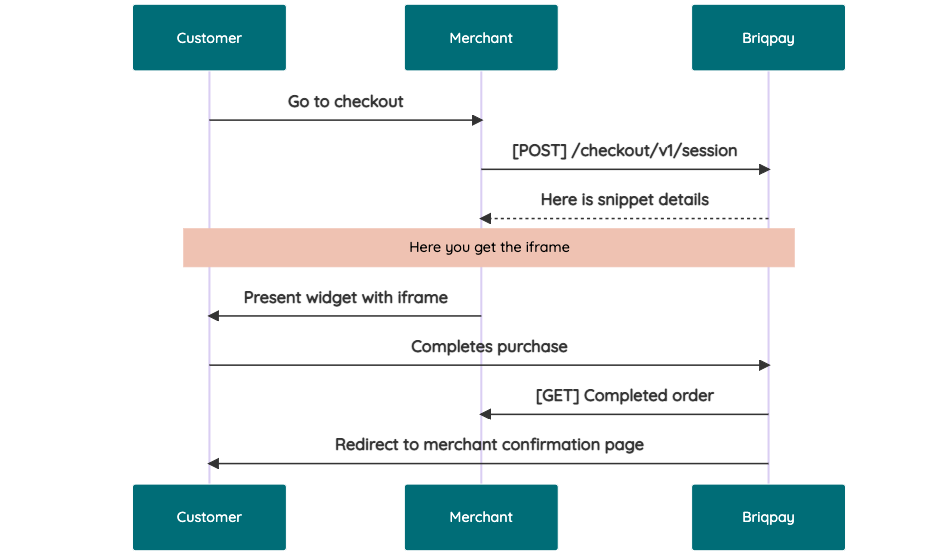 # JavaScript SDK The first step of integration is to add our JS to your site just before closing the ```` tag. This ensures that our JS library is avaliable to load the checkout. ```` Briqpay offers a few methods avaliable through our Javascript SDK. The library is added by our iframe and is avalable on ``window._briqpay`` If you offer the posibility to update the cart or order amonts on the checkout page, the JS library will help you. If your store charges the customer different costs and fees depening on their shipping location, you can listen to the ``addressupdate``event in order to re-calculate the total cost. ```javascript window._briqpay.subscribe('addressupdate', function (data) { console.log(data) }) ``` If your frontend needs to perform an action whe the signup has completed, listen to the ``signup_finalized`` event. ```javascript window._briqpay.subscribe('signup_finalized', function (status) { // redirect or handle status 'success' / 'failure' }) ``` If you allow customers to change the total cart value, you can utilise the JS library to suspend the iframe while you perform a backen update call towards our services. As described below: 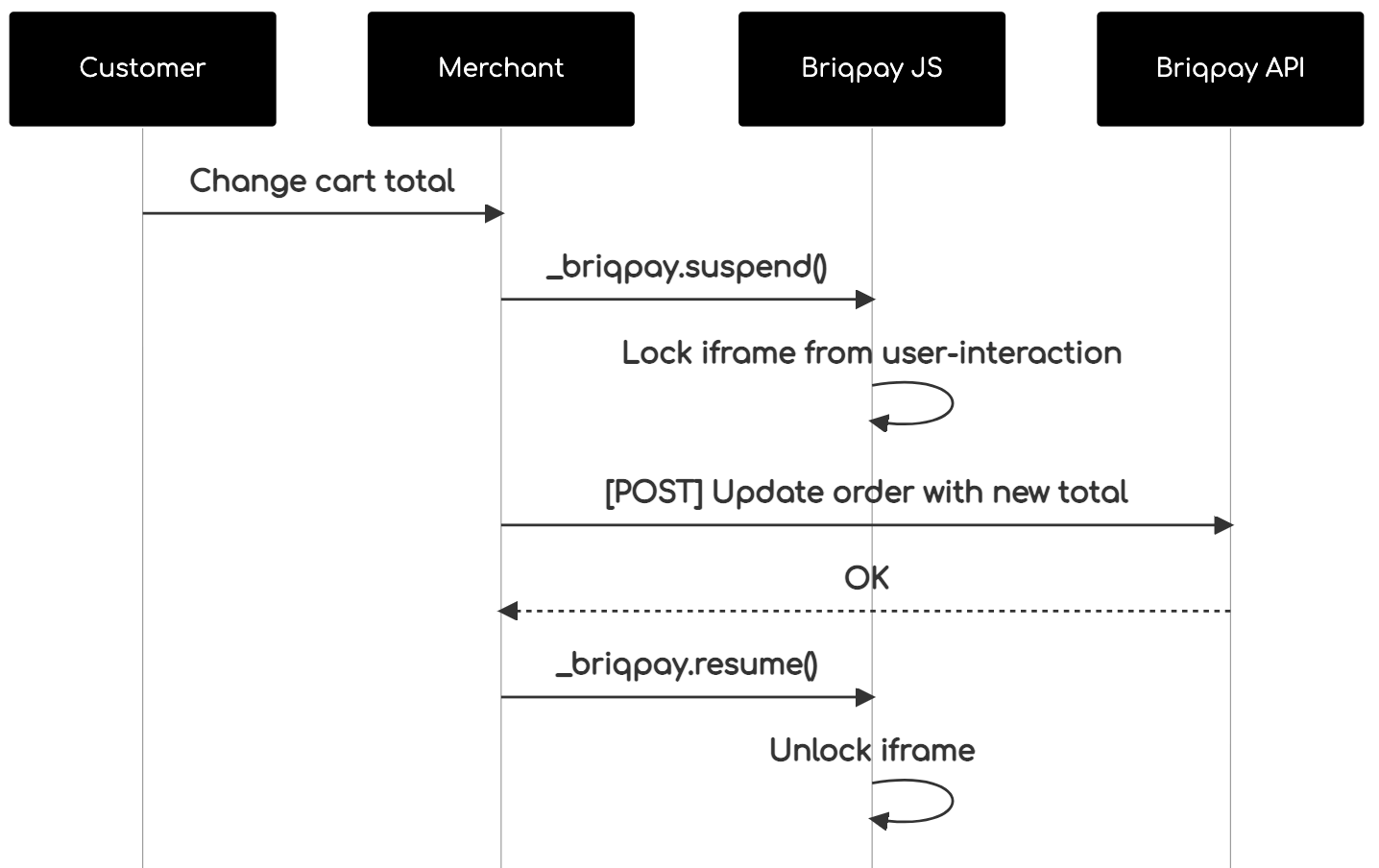 The iframe will auto-resume after 7 seconds if you dont call ``_briqpay.resume()`` before # Test Data In order to verify your integration you will neeed to use test data towards our credit engine. ## Company identication numbers * 1111111111 - To recieve a high credit scoring company ( 100 in rating) * 2222222222 - To test the enviournment with a bad credit scoring company (10 in rating) ## Card details In our playground setup your account is by default setup with a Stripe integration. In order to test out the card form you can use the below card numbers: * 4000002500003155 - To mock 3ds authentication window * 4000000000000069 Charge is declined with an expired_card code. You can use any valid expiry and CVC code # Authentication Briqpay utilizes JWT in order to authenticate calls to our platform. Authentication tokens expire after 48 hours, and at that point you can generate a new token for the given resource using the ``/auth`` endpoint. - Basic Auth - only used on the auth endpoint in order to get the Bearer Token - JWT Bearer Token - All calls towards the API utlizes this method"
factpulse/sdk
74 Downloads
REST API for electronic invoicing in France: Factur-X (CII), UBL 2.1, AFNOR PDP/PA, electronic signatures. ## 🎯 Main Features ### 📄 Invoice Generation - **Formats**: CII XML, UBL 2.1 XML, or Factur-X PDF/A-3 - **Profiles** (CII/PDF): MINIMUM, BASIC, EN16931, EXTENDED - **UBL**: Always EN16931 compliant - **Standards**: EN 16931 (EU directive 2014/55), ISO 19005-3 (PDF/A-3), CII (UN/CEFACT), UBL 2.1 (OASIS) - **Simplified Format**: Generation from SIRET + auto-enrichment (Chorus Pro API + Business Search) ### ✅ Factur-X - Validation - **XML Validation**: Schematron (45 to 210+ rules depending on profile) - **PDF Validation**: PDF/A-3, Factur-X XMP metadata - **VeraPDF**: Strict PDF/A validation (146+ ISO 19005-3 rules) ### ✍️ Electronic Signature - **Standards**: PAdES-B-B, PAdES-B-T (RFC 3161 timestamping), PAdES-B-LT (long-term archival) - **eIDAS Levels**: SES (self-signed), AdES (commercial CA), QES (QTSP) - **Validation**: Cryptographic integrity and certificate verification ### 📋 Flux 6 - Invoice Lifecycle (CDAR) - **CDAR Messages**: Acknowledgements, invoice statuses - **PPF Statuses**: REFUSED (210), PAID (212) ### 📊 Flux 10 - E-Reporting - **Tax Declarations**: International B2B, B2C - **Flow Types**: 10.1 (B2B transactions), 10.2 (B2B payments), 10.3 (B2C transactions), 10.4 (B2C payments) ### 📡 AFNOR PDP/PA (XP Z12-013) - **Flow Service**: Submit and search flows to PDPs - **Directory Service**: Company search (SIREN/SIRET) - **Multi-client**: Support for multiple PDP configs per user ### 🏛️ Chorus Pro - **Public Sector Invoicing**: Complete API for Chorus Pro ### ⏳ Async Tasks - **Celery**: Asynchronous generation, validation and signing - **Polling**: Status tracking via `/tasks/{task_id}/status` - **Webhooks**: Automatic notifications when tasks complete ## 🔒 Authentication All requests require a **JWT token** in the Authorization header: ``` Authorization: Bearer YOUR_JWT_TOKEN ``` ### How to obtain a JWT token? #### 🔑 Method 1: `/api/token/` API (Recommended) **URL:** `https://factpulse.fr/api/token/` This method is **recommended** for integration in your applications and CI/CD workflows. **Prerequisites:** Having set a password on your account **For users registered via email/password:** - You already have a password, use it directly **For users registered via OAuth (Google/GitHub):** - You must first set a password at: https://factpulse.fr/accounts/password/set/ - Once the password is created, you can use the API **Request example:** ```bash curl -X POST https://factpulse.fr/api/token/ \ -H "Content-Type: application/json" \ -d '{ "username": "[email protected]", "password": "your_password" }' ``` **Optional `client_uid` parameter:** To select credentials for a specific client (PA/PDP, Chorus Pro, signing certificates), add `client_uid`: ```bash curl -X POST https://factpulse.fr/api/token/ \ -H "Content-Type: application/json" \ -d '{ "username": "[email protected]", "password": "your_password", "client_uid": "550e8400-e29b-41d4-a716-446655440000" }' ``` The `client_uid` will be included in the JWT and allow the API to automatically use: - AFNOR/PDP credentials configured for this client - Chorus Pro credentials configured for this client - Electronic signature certificates configured for this client **Response:** ```json { "access": "eyJ0eXAiOiJKV1QiLCJhbGc...", // Access token (validity: 30 min) "refresh": "eyJ0eXAiOiJKV1QiLCJhbGc..." // Refresh token (validity: 7 days) } ``` **Advantages:** - ✅ Full automation (CI/CD, scripts) - ✅ Programmatic token management - ✅ Refresh token support for automatic access renewal - ✅ Easy integration in any language/tool #### 🖥️ Method 2: Dashboard Generation (Alternative) **URL:** https://factpulse.fr/api/dashboard/ This method is suitable for quick tests or occasional use via the graphical interface. **How it works:** - Log in to the dashboard - Use the "Generate Test Token" or "Generate Production Token" buttons - Works for **all** users (OAuth and email/password), without requiring a password **Token types:** - **Test Token**: 24h validity, 1000 calls/day quota (free) - **Production Token**: 7 days validity, quota based on your plan **Advantages:** - ✅ Quick for API testing - ✅ No password required - ✅ Simple visual interface **Disadvantages:** - ❌ Requires manual action - ❌ No refresh token - ❌ Less suited for automation ### 📚 Full Documentation For more information on authentication and API usage: https://factpulse.fr/documentation-api/
cloudinary/permissions
5 Downloads
Accounts with Permissions API access can manage custom permission policies. These policies assign permissions for a principal, allowing the principal to perform a specific action on a designated resource within a particular scope (your account or a product environment). Refer to the [Permissions API guide](permissions_api_guide) for instructions on what to specify in the `policy_statement` to control Cloudinary activities, and to the Cedar schema, which defines the possible values for principals, actions, and resources. The API uses **Basic Authentication** over HTTPS. Your **Provisioning Key** and **Provisioning Secret** are used for the authentication. These credentials (as well as your ACCOUNT_ID) are located in the [Cloudinary Console](https://console.cloudinary.com/pm) under **Settings > Account > Provisioning API Access**. The Permissions API has dedicated SDKs for the following languages: * JavaScript * PHP * Java
cloudinary/video-live-streaming
3 Downloads
Use the Video Live Streaming API to create and manage your RTMP live streams. This includes managing outputs as well as manually starting and stopping streams. See the [live streaming guide](https://cloudinary.com/documentation/video_live_streaming) for information on how to use the Live Streaming API to stream video to your users. **Note**: The Live Streaming API is currently in development and is available as a Public Beta, which means we value your feedback, so please feel free to [share any thoughts with us](https://support.cloudinary.com/hc/en-us/requests/new). The API supports Basic Authentication using your Cloudinary API Key and API Secret (which can be found on the Dashboard page of your [Cloudinary Console](https://console.cloudinary.com/pm)).
cloudinary/analysis
8 Downloads
Use the Analyze API to analyze any external asset and return details based on the type of analysis requested. Currently supports the following analysis options: * [AI Vision - Tagging](https://cloudinary.com/documentation/cloudinary_ai_vision_addon#tagging_mode) * [AI Vision - Moderation](https://cloudinary.com/documentation/cloudinary_ai_vision_addon#moderation_mode) * [AI Vision - General](https://cloudinary.com/documentation/cloudinary_ai_vision_addon#general_mode) * [Google tagging](https://cloudinary.com/documentation/google_auto_tagging_addon) * [Captioning](https://cloudinary.com/documentation/cloudinary_ai_content_analysis_addon#ai_based_image_captioning) * [Cld Fashion](https://cloudinary.com/documentation/cloudinary_ai_content_analysis_addon#supported_content_aware_detection_models) * [Coco](https://cloudinary.com/documentation/cloudinary_ai_content_analysis_addon#supported_content_aware_detection_models) * [Lvis](https://cloudinary.com/documentation/cloudinary_ai_content_analysis_addon#supported_content_aware_detection_models) * [Unidet](https://cloudinary.com/documentation/cloudinary_ai_content_analysis_addon#supported_content_aware_detection_models) * [Human Anatomy](https://cloudinary.com/documentation/cloudinary_ai_content_analysis_addon#supported_content_aware_detection_models) * [Cld Text](https://cloudinary.com/documentation/cloudinary_ai_content_analysis_addon#supported_content_aware_detection_models) * [Shop Classifier](https://cloudinary.com/documentation/cloudinary_ai_content_analysis_addon#supported_content_aware_detection_models) **Notes**: * The Analyze API is currently in development and is available as a Public Beta, which means we value your feedback, so please feel free to [share any thoughts with us](https://support.cloudinary.com/hc/en-us/requests/new). * The analysis options require an active subscription to the relevant add-on. Learn more about [registering for add-ons](https://cloudinary.com/documentation/cloudinary_add_ons#registering_for_add_ons). The API supports both Basic Authentication using your Cloudinary API Key and API Secret (which can be found on the Dashboard page of your [Cloudinary Console](https://console.cloudinary.com/pm)) or OAuth2 ([Contact support](https://support.cloudinary.com/hc/en-us/requests/new) for more information regarding OAuth).
segnivo/php-sdk
0 Downloads
**API Version**: 1.7 **Date**: 9th July, 2024 ## 📄 Getting Started This API is based on the REST API architecture, allowing the user to easily manage their data with this resource-based approach. Every API call is established on which specific request type (GET, POST, PUT, DELETE) will be used. The API must not be abused and should be used within acceptable limits. To start using this API, you will need not create or access an existing Segnivo account to obtain your API key ([retrievable from your account settings](https://messaging.segnivo.com/account/api)). - You must use a valid API Key to send requests to the API endpoints. - The API only responds to HTTPS-secured communications. Any requests sent via HTTP return an HTTP 301 redirect to the corresponding HTTPS resources. - The API returns request responses in JSON format. When an API request returns an error, it is sent in the JSON response as an error key or with details in the message key. ### 🔖 **Need some help?** In case you have questions or need clarity with interacting with some endpoints feel free to create a support ticket on your account or you can send an email ([[email protected]](https://mailto:[email protected])) directly and we would be happy to help. --- ## Authentication As noted earlier, this API uses API keys for authentication. You can generate a Segnivo API key in the [API](https://messaging.segnivo.com/account/api) section of your account settings. You must include an API key in each request to this API with the `X-API-KEY` request header. ### Authentication error response If an API key is missing, malformed, or invalid, you will receive an HTTP 401 Unauthorized response code. ## Rate and usage limits API access rate limits apply on a per-API endpoint basis in unit time. The limit is 10k requests per hour for most endpoints and 1m requests per hour for transactional/relay email-sending endpoints. Also, depending on your plan, you may have usage limits. If you exceed either limit, your request will return an HTTP 429 Too Many Requests status code or HTTP 403 if sending credits have been exhausted. ### 503 response An HTTP `503` response from our servers may indicate there is an unexpected spike in API access traffic, while this rarely happens, we ensure the server is usually operational within the next two to five minutes. If the outage persists or you receive any other form of an HTTP `5XX` error, contact support ([[email protected]](https://mailto:[email protected])). ### Request headers To make a successful request, some or all of the following headers must be passed with the request. | **Header** | **Description** | | --- | --- | | Content-Type | Required and should be `application/json` in most cases. | | Accept | Required and should be `application/json` in most cases | | Content-Length | Required for `POST`, `PATCH`, and `PUT` requests containing a request body. The value must be the number of bytes rather than the number of characters in the request body. | | X-API-KEY | Required. Specifies the API key used for authorization. | ##### 🔖 Note with example requests and code snippets If/when you use the code snippets used as example requests, remember to calculate and add the `Content-Length` header. Some request libraries, frameworks, and tools automatically add this header for you while a few do not. Kindly check and ensure yours does or add it yourself.
symfony-notes/http-basic-authenticator-bundle
25594 Downloads
Symfony Http Basic Authenticator Bundle