Libraries tagged by backed enum
lukasbableck/contao-more-backend-widgets-bundle
243 Downloads
This bundle adds backend widgets/inputTypes which can for example be used in other extensions or in RockSolid Custom Elements.
numencode/wn-widgets-plugin
35 Downloads
Reusable content widgets for Winter CMS: promotions, features, highlights, galleries and counters, managed in the backend and rendered by components with theme-overridable layouts.
lcmialichi/php-gpu-tensors
5 Downloads
Native PHP tensor extension with pluggable backend contracts and CUDA-accelerated computing.
briqpay/php-sdk
12246 Downloads
This is the API documentation for Briqpay. You can find out more about us and our offering at our website [https://briqpay.com](https://briqpay.com) In order to get credentials to the playgrund API Please register at [https://app.briqpay.com](https://app.briqpay.com) # Introduction Briqpay Checkout is an inline checkout solution for your b2b ecommerce. Briqpay Checkout gives you the flexibility of controlling your payment methods and credit rules while optimizing the UX for your customers # SDKs Briqpay offers standard SDKs to PHP and .NET based on these swagger definitions. You can download them respively or use our swagger defintitions to codegen your own versions. #### For .NET `` Install-Package Briqpay `` #### For PHP `` composer require briqpay/php-sdk `` # Standard use-case As a first step of integration you will need to create a checkout session. \n\nIn this session you provide Briqpay with the basic information necessary. In the response from briqpay you will recieve a htmlsnippet that is to be inserted into your frontend. The snippet provided by briqpay will render an iframe where the user will complete the purchase. Once completed, briqpay will redirect the customer to a confirmation page that you have defined. 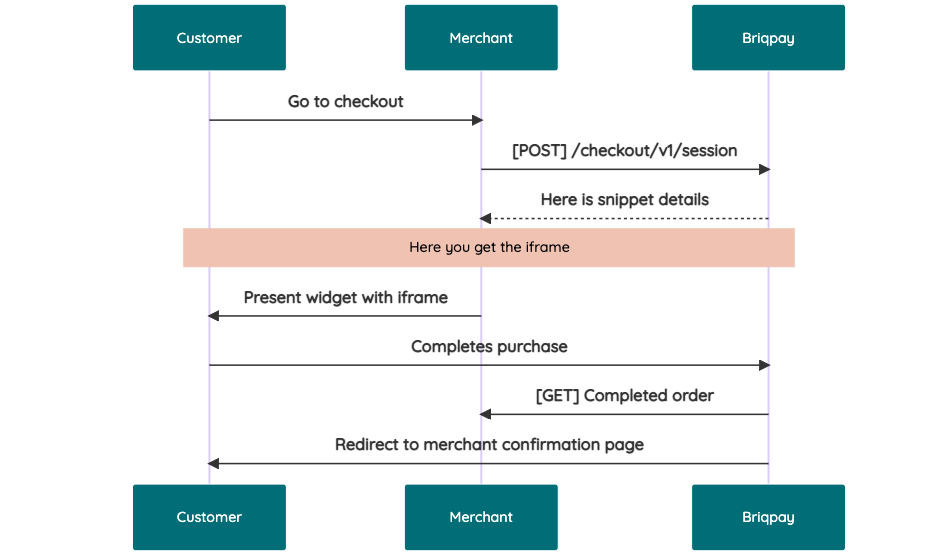 # JavaScript SDK The first step of integration is to add our JS to your site just before closing the ```` tag. This ensures that our JS library is avaliable to load the checkout. ```` Briqpay offers a few methods avaliable through our Javascript SDK. The library is added by our iframe and is avalable on ``window._briqpay`` If you offer the posibility to update the cart or order amonts on the checkout page, the JS library will help you. If your store charges the customer different costs and fees depening on their shipping location, you can listen to the ``addressupdate``event in order to re-calculate the total cost. ```javascript window._briqpay.subscribe('addressupdate', function (data) { console.log(data) }) ``` If your frontend needs to perform an action whe the signup has completed, listen to the ``signup_finalized`` event. ```javascript window._briqpay.subscribe('signup_finalized', function (status) { // redirect or handle status 'success' / 'failure' }) ``` If you allow customers to change the total cart value, you can utilise the JS library to suspend the iframe while you perform a backen update call towards our services. As described below: 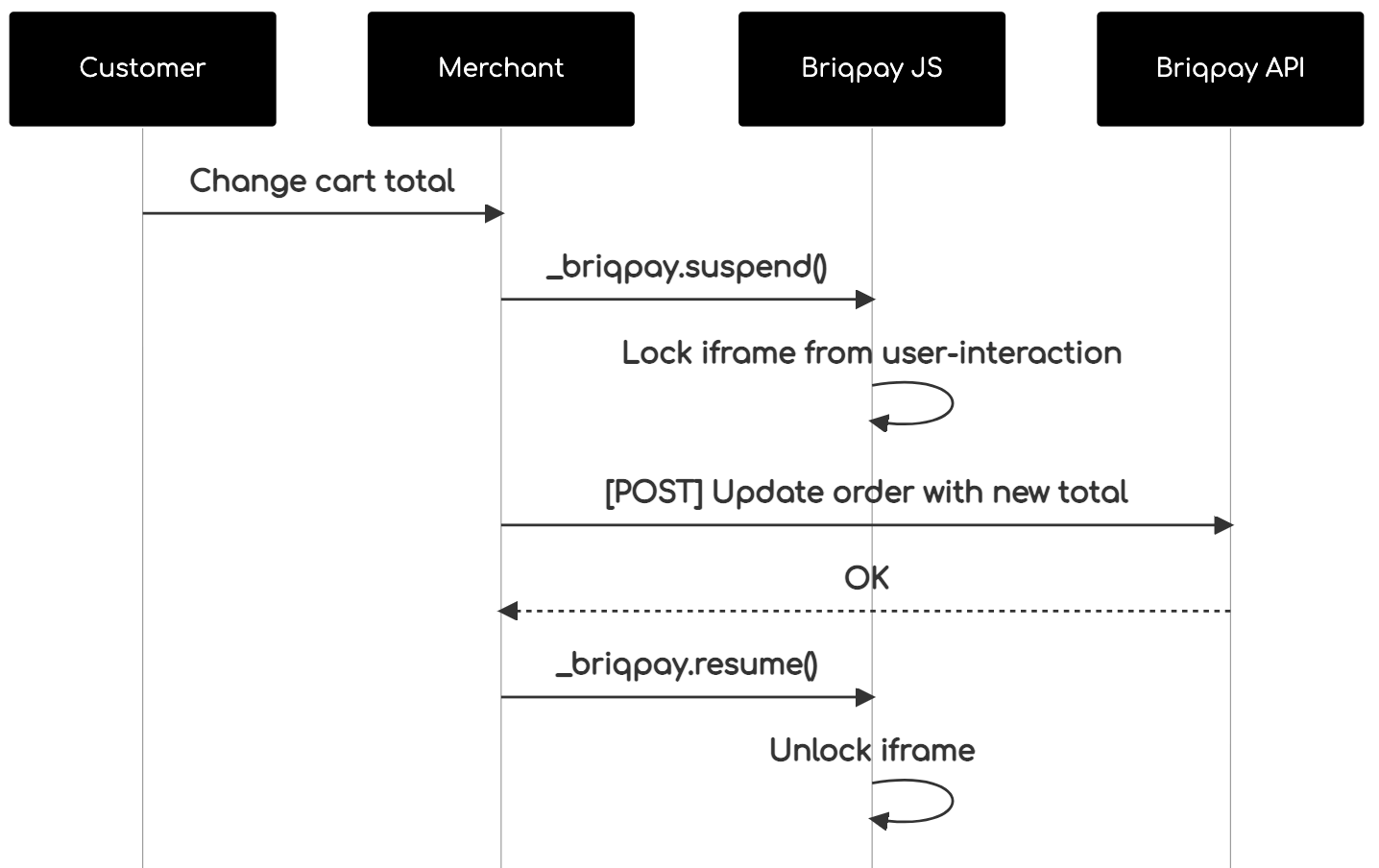 The iframe will auto-resume after 7 seconds if you dont call ``_briqpay.resume()`` before # Test Data In order to verify your integration you will neeed to use test data towards our credit engine. ## Company identication numbers * 1111111111 - To recieve a high credit scoring company ( 100 in rating) * 2222222222 - To test the enviournment with a bad credit scoring company (10 in rating) ## Card details In our playground setup your account is by default setup with a Stripe integration. In order to test out the card form you can use the below card numbers: * 4000002500003155 - To mock 3ds authentication window * 4000000000000069 Charge is declined with an expired_card code. You can use any valid expiry and CVC code # Authentication Briqpay utilizes JWT in order to authenticate calls to our platform. Authentication tokens expire after 48 hours, and at that point you can generate a new token for the given resource using the ``/auth`` endpoint. - Basic Auth - only used on the auth endpoint in order to get the Bearer Token - JWT Bearer Token - All calls towards the API utlizes this method"
numbers/backend
260 Downloads
Backend modules for Numbers Framework
pixxet/numerals-translator
56 Downloads
Converts any numerals to western arabic numerals. This tool used to support any numeral input at the PHP backend
taghwo/phone-number-validator-formatter-for-nigerian-phone-numbers
2 Downloads
This handles backend validations and formatting of Nigerian phone numbers
verifyspeed/vs-php
10 Downloads
Official PHP backend SDK for VerifySpeed API
contao-garage/contao-global-elements
26 Downloads
Contao 5 CMS module providing a backend module to help organizing numerously reused content elements outside the page and article tree.
pixelegg/pxe-counter
3 Downloads
Animated number counter content element for TYPO3: counts up when scrolled into view, locale-aware, accessible, no dependencies. With a backend overview of all counters.
iliaal/phpser
25 Downloads
Fast binary serializer for PHP cache workloads. Decoder-optimized, beats igbinary on packed numerics, deep-nested structures, and same-class DTO batches.
omnilab/mpc
1 Downloads
Omnilab MPC: a minor planet, comet or natural satellite of the IAU's Minor Planet Center by its number, designation (provisional, packed or not) or name - its designations, name and naming citation, its orbit as the MPC computes it (osculating elements with their uncertainties, perihelion, period, MOIDs), absolute magnitude, observations, oppositions, arc and uncertainty parameter; a search of the names; its latest observations - through the MPC's APIs, no key needed.