Libraries tagged by app key
ordereazi/commerce-sdk
5 Downloads
Build a fully custom headless storefront - your own web app, mobile app, or POS - against a single OE Commerce store. Every endpoint below is namespaced under `/api/v1/store/...`. Building admin/back-office tooling instead? See [/docs/admin](/docs/admin). New here? [/guides/store](/guides/store) walks through getting a key, the anonymous cart session, and calling your first endpoints step by step - this page is the field-level reference to come back to afterward. ## Getting Started 1. Click the **Authorize** button at the top of this page. 2. Provide credentials: - **X-Commerce-Key** (always required) - your store's Store Access Key from Backoffice > Settings > Application APIs. `pk_store_...` (publishable) is safe for browser/mobile code; `sk_store_...` (secret) is server-to-server only and is rejected outright if a browser Origin header is present. - **Bearer** (only for endpoints acting on a specific customer - Account, Orders, Wishlists, etc.) - the token from **Auth > register** or **Auth > login**. Once authorized, you can explore and test all available endpoints directly from this interface. ## Anonymous Carts A guest cart is tracked by an `X-Session-Ref` header, not a cookie - the server generates one on your first request and echoes it back on every response after. Keep sending back whatever value you last received. Logging in carries that same cart forward onto the customer's account automatically, with no separate merge step. ## Errors Failures use RFC 9457 Problem Details (`application/problem+json`) with a stable `code` field for programmatic handling, e.g. `store_key_invalid`, `store_key_revoked`, `store_key_scope_denied`, `rate_limited`. A rejected *business* action (e.g. adding fewer than a product's minimum order quantity to the cart) instead comes back as HTTP 200 with `"success": false` and a human-readable `message` - always check `success` in the body, not just the HTTP status code. ## Rate Limits Requests are limited per Store Access Key (200/minute). The credential-stuffing surface (register/login/forgot-password/reset-password) is limited more tightly per caller IP (10 per 5 minutes). A 429 response includes a `Retry-After` header.
numeno/api-art-rec
2 Downloads
## Introduction Use the Numeno Article Recommender API to receive a curated selection of articles from across the web. See below for the steps to creating a Feed, as well as an introduction to the top-level concepts making up the Article Recommender API. ## Steps to creating a Feed 1. Create a Feed - [`/feeds`](create-feed) 2. Create a number of Stream queries associated with the Feed - [`/feeds/:feedId/streams`](create-stream) 3. Pull from the Feed as the Feed refreshes - [`/feeds/:feedId/articles`](get-articles-in-feed) 4. Use those Article IDs to look up metadata for the Articles -[`/articles/:id`](get-article-by-id) 5. Visit the Article links and render to your server DB or client app. ## Sources, Articles and Topics A **Source** is a place where Articles come from, typically a website, a blog, or a knowledgebase endpoint. Sources can be queried for activity via the [`/sources`](get-sources) endpoint. Beyond the Sources Numeno regaularly indexes, additional Sources can be associated with Stream queries, and Sources can be `allowlist`/`denylist`'d. **Articles** are the documents produced by Sources, typically pages from a blogpost or website, articles from a news source, or posts from a social platform or company intranet. See the [`/articles`](search-articles) endpoint. **Topics** - Numeno has millions of Topics that it associates with Articles when they are sourced. Topics are used in Stream queries, which themselves are composed to create Feeds. Get topics via the [`/topics`](get-topics) endpoint. ## Feeds **A Feed is a collection of Streams.** Feeds are configured to refresh on a regular schedule. No new Articles are published to a Feed except when it's refreshed. Feeds can be refreshed manually if the API Key Scopes allow. You can ask for Articles chronologically or by decreasing score. You can also limit Articles to a date-range, meaning that you can produce Feeds from historical content. Interact with Feeds via the [`/feeds`](create-feed) endpoint. ## Streams Think of a **Stream** as a search query with a "volume control knob". It's a collection of Topics that you're interested and a collection of Sources you'd explicitly like to include or exclude. Streams are associated with a Feed, and a collection of Streams produce the sequence of Articles that appear when a Feed is refreshed. The "volume control knob" on a Stream is a way to decide how many of the search results from the Stream query are included in the Feed. Our searches are "soft", and with a such a rich `Article x Topic` space to draw on, the "volume control" allows you to put a cuttoff on what you'd like included. Streams are a nested resource of `/feeds` - get started by explorting [`/feeds/:feedId/streams`](create-stream).
live4tv/stream-network-api-client-php-sdk
3 Downloads
Omnichannel for live streaming on social networks We're glad that you chose to use Live4.tv's API for managing your connection with social networks (currently Instagram). We understand that Instagram currently restricts users from conducting live broadcasts without their official app. However, our innovative API empowers users to go live on Instagram without relying on the app itself. By leveraging our API, users gain access to a stream key, enabling them to seamlessly transmit their live broadcasts using popular software like OBS (Open Broadcaster Software). This breakthrough feature provides users with the freedom to connect with their audience and share captivating live content on Instagram, all without the constraints of the official app. The login flow: 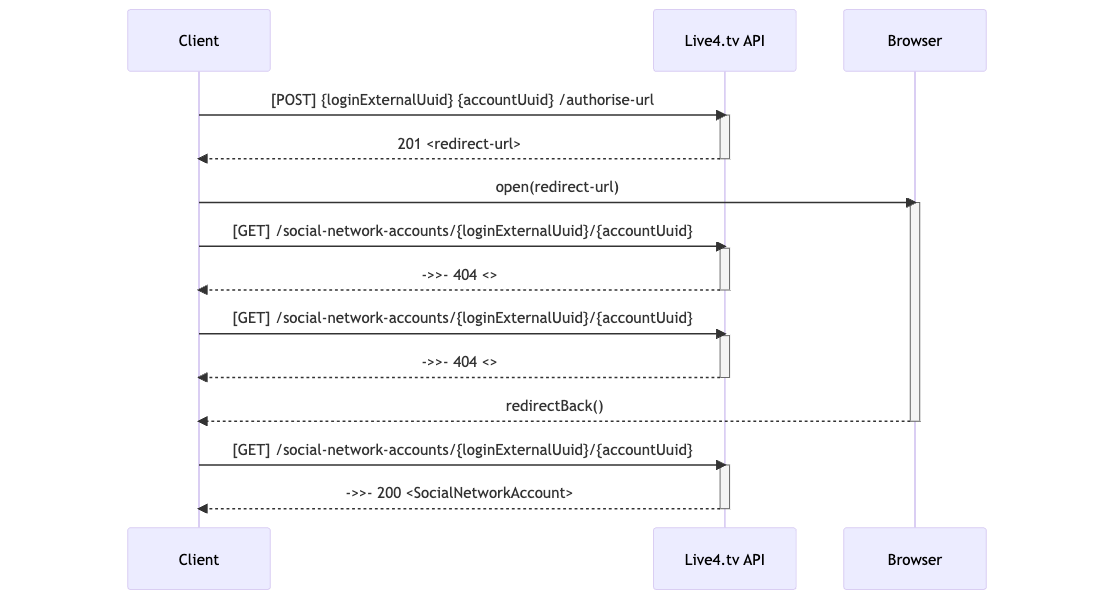
lelevar/sms
24 Downloads
Lelevar SMS Package for Laravel simplifies SMS sending via the Lelevar SMS API. It supports single and bulk SMS messaging with easy API key configuration, optional facades, and a helper function for quick integration. Ideal for integrating SMS into Laravel apps effortlessly.
laravelsecurityaudit/laravel-ai-lint
6 Downloads
Static analysis for insecure AI wiring in Laravel apps: a scan command that finds AI provider keys leaked into tracked or client-reachable files, plus PHPStan rules that flag model output flowing into unsafe sinks and prompts built by concatenation. SARIF for CI.
ignome/tatum-php
2 Downloads
A flexible framework to build, run, and scale blockchain apps with PHP. Perform local wallet operations (mnemonic, xpub, private key) for Bitcoin, Bitcoin Cash, BSC, Litecoin, Celo, Dogecoin, Ethereum, Harmony.ONE, KCS, Klaytn, Polygon, Tron, VeChain and XDC.
bleumi/payment-sdk-php
5 Downloads
A simple and powerful REST API to integrate Traditional (Credit/Debit Card, Alternative Payment Methods) and Crypto Currency (Bitcoin, Ethereum, Stablecoins) payments into your business or application. ### Getting Started 1. Create an account on [Bleumi](https://account.bleumi.com/signUp/?app=payment) 1. Fill up your [profile](https://account.bleumi.com/account/?app=payment&tab=profile) 1. Complete your KYC by contacting [[email protected]](mailto:[email protected]) 1. Add your preferred payment service providers in the [Bleumi Portal](https://account.bleumi.com/account/?app=payment&tab=gateway) 1. Create your API key on the [Bleumi Integration Settings](https://account.bleumi.com/account/?app=payment&tab=integration) screen ### Authentication Bleumi uses API keys to authenticate requests. You can view and manage your API keys in the [Bleumi Integration Settings](https://account.bleumi.com/account/?app=payment&tab=integration) screen. Authenticated API requests should be made with a `X-Api-Key` header. Your API key should be passed as the value. ### Payment Methods Use the [Bleumi Portal](https://account.bleumi.com/account/?app=payment&tab=gateway) to add your preferred payment service provider (e.g. Stripe, BitPay, Bleumi Pay) and configure the payment methods that buyers would be able to use to make payments.
allstak/sdk-php
28 Downloads
Official AllStak PHP SDK — drop-in observability for plain PHP and Laravel apps. Captures errors, logs, HTTP requests, DB queries, traces, outbound HTTP, and scheduled cron tasks with one Composer require and one API key.
genai/sql-mapper
162 Downloads
MyBatis-style SQL mapper: mark an interface #[Mapper] and its methods #[Select]/#[Insert]/#[Update]/#[Delete] with the SQL. A build-time processor compiles a reflection-free Cache\ implementation (prepared statements, #{name} bound params, optional row->object hydration) and registers it as a container bean keyed by the interface. Self-contained: a bundled DatabaseConfig provides the 'PDO' bean from a [database] group in the app's app.ini, so you only edit config. Runtime is PHP 5.3-safe.