Libraries tagged by Sdds
juststeveking/sdk-toolbox
143 Downloads
Build PHP SDKs on PSR-18, typed end to end, with the HTTP standards an API client should honour.
invoicetronic/php-sdk
295 Downloads
The [Invoicetronic API][2] is a RESTful service that allows you to send and receive invoices through the Italian [Servizio di Interscambio (SDI)][1], or Interchange Service. The API is designed to be simple and easy to use, abstracting away SDI complexity while providing complete control over the invoice send/receive process. It provides advanced features as encryption at rest, multi-language pre-flight invoice validation, multiple upload formats, webhooks, event logging, client SDKs, and CLI tools. For more information, see [Invoicetronic website][2] ## Before you start For the full integration guide, tutorials, SDKs and quickstarts, see the **[Documentation](https://invoicetronic.com/en/docs/)**. A few cross-cutting topics worth knowing before integrating: - **[Prerequisites](https://invoicetronic.com/en/docs/prerequisites/)** — what you need to start in Sandbox and what's required to move to production. - **[API Keys](https://invoicetronic.com/en/docs/apikeys/)** — how `ik_live_` and `ik_test_` keys select the environment. - **[Restricted Keys](https://invoicetronic.com/en/docs/sub-keys/)** — keys limited to some companies and permissions, managed from the Dashboard or through `/subkey`. - **[Sandbox](https://invoicetronic.com/en/docs/sandbox/)** — free test environment that mirrors the live workflow, with no credits consumed. - **[Rate Limiting](https://invoicetronic.com/en/docs/ratelimiting/)** — per-second, per-minute and per-day limits; how to handle `429 Too Many Requests`. - **[Pagination](https://invoicetronic.com/en/docs/pagination/)** — `page` and `page_size` parameters and the `Invoicetronic-Total-Count` response header. - **[CORS](https://invoicetronic.com/en/docs/cors/)** — calling the API from the browser; allowed origins are configured per key. - **[Webhooks](https://invoicetronic.com/en/docs/webhooks/)** — real-time event notifications with HMAC-SHA256 signature validation. - **[Localization](https://invoicetronic.com/en/docs/accept-language/)** — use the `Accept-Language` header to receive error messages in Italian, English or German. [1]: https://www.fatturapa.gov.it/it/sistemainterscambio/cose-il-sdi/ [2]: https://invoicetronic.com/
hyvor/sdk-core
1039 Downloads
Shared HTTP transport, auth, serialization, and exceptions for HYVOR product SDKs. Not intended to be required directly - installed transitively by hyvor/sdk-* product packages.
ggcode/etunnel
116 Downloads
Expose local services to the internet in one line of code: instant public HTTPS URLs with automatic TLS, through NAT and firewalls, no signup. Webhook-friendly ngrok-style reverse tunnel, with SDKs in 20 languages and a single-binary Go server.
compwright/easy-webhook
6169 Downloads
Easy Webhook tools for building PSR-compliant SDKs for PHP
compwright/easy-api
6243 Downloads
Easy API tools for building PSR-compliant SDKs for PHP
cieplik206/laravel-integration-operations
692 Downloads
Durable integration operation kernel for Laravel applications and provider SDKs
briqpay/php-sdk
12246 Downloads
This is the API documentation for Briqpay. You can find out more about us and our offering at our website [https://briqpay.com](https://briqpay.com) In order to get credentials to the playgrund API Please register at [https://app.briqpay.com](https://app.briqpay.com) # Introduction Briqpay Checkout is an inline checkout solution for your b2b ecommerce. Briqpay Checkout gives you the flexibility of controlling your payment methods and credit rules while optimizing the UX for your customers # SDKs Briqpay offers standard SDKs to PHP and .NET based on these swagger definitions. You can download them respively or use our swagger defintitions to codegen your own versions. #### For .NET `` Install-Package Briqpay `` #### For PHP `` composer require briqpay/php-sdk `` # Standard use-case As a first step of integration you will need to create a checkout session. \n\nIn this session you provide Briqpay with the basic information necessary. In the response from briqpay you will recieve a htmlsnippet that is to be inserted into your frontend. The snippet provided by briqpay will render an iframe where the user will complete the purchase. Once completed, briqpay will redirect the customer to a confirmation page that you have defined. 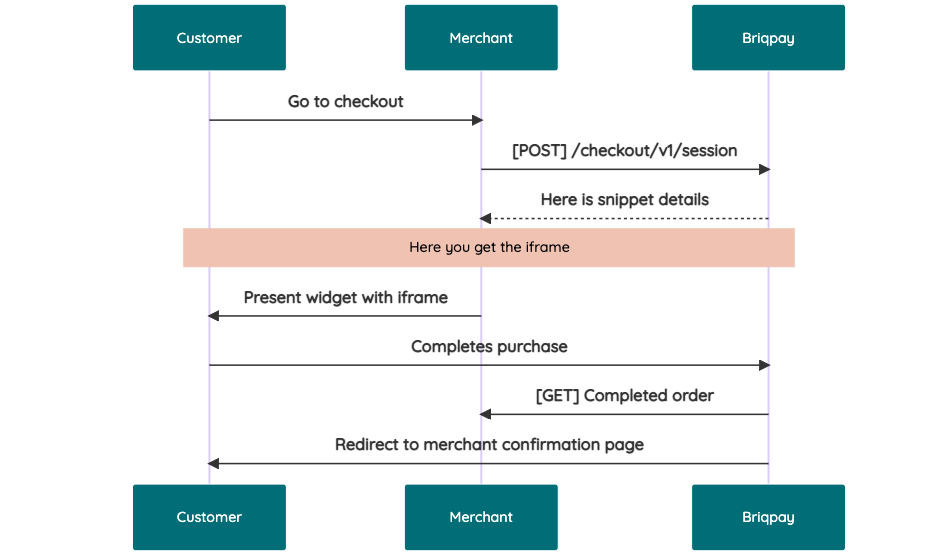 # JavaScript SDK The first step of integration is to add our JS to your site just before closing the ```` tag. This ensures that our JS library is avaliable to load the checkout. ```` Briqpay offers a few methods avaliable through our Javascript SDK. The library is added by our iframe and is avalable on ``window._briqpay`` If you offer the posibility to update the cart or order amonts on the checkout page, the JS library will help you. If your store charges the customer different costs and fees depening on their shipping location, you can listen to the ``addressupdate``event in order to re-calculate the total cost. ```javascript window._briqpay.subscribe('addressupdate', function (data) { console.log(data) }) ``` If your frontend needs to perform an action whe the signup has completed, listen to the ``signup_finalized`` event. ```javascript window._briqpay.subscribe('signup_finalized', function (status) { // redirect or handle status 'success' / 'failure' }) ``` If you allow customers to change the total cart value, you can utilise the JS library to suspend the iframe while you perform a backen update call towards our services. As described below: 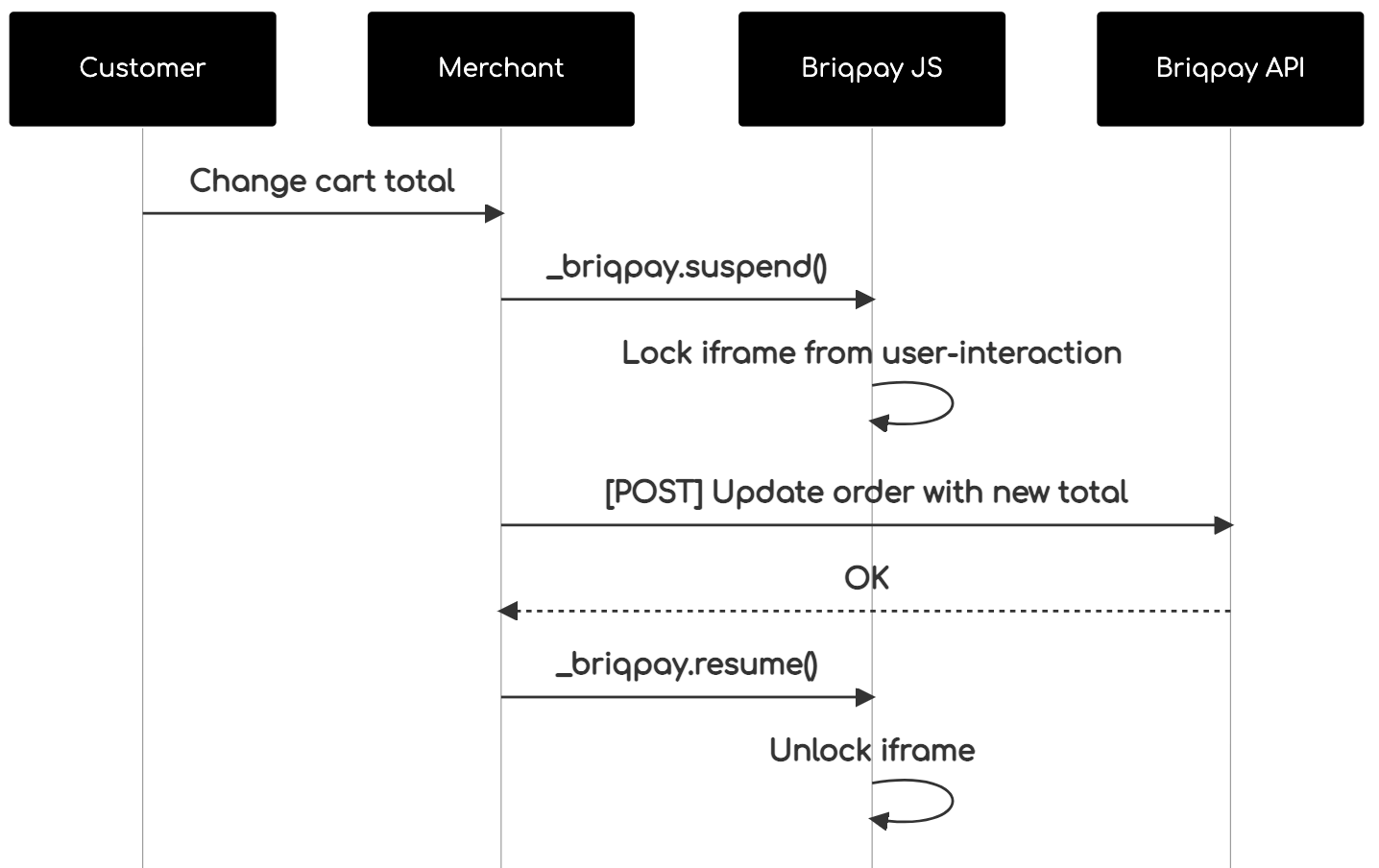 The iframe will auto-resume after 7 seconds if you dont call ``_briqpay.resume()`` before # Test Data In order to verify your integration you will neeed to use test data towards our credit engine. ## Company identication numbers * 1111111111 - To recieve a high credit scoring company ( 100 in rating) * 2222222222 - To test the enviournment with a bad credit scoring company (10 in rating) ## Card details In our playground setup your account is by default setup with a Stripe integration. In order to test out the card form you can use the below card numbers: * 4000002500003155 - To mock 3ds authentication window * 4000000000000069 Charge is declined with an expired_card code. You can use any valid expiry and CVC code # Authentication Briqpay utilizes JWT in order to authenticate calls to our platform. Authentication tokens expire after 48 hours, and at that point you can generate a new token for the given resource using the ``/auth`` endpoint. - Basic Auth - only used on the auth endpoint in order to get the Bearer Token - JWT Bearer Token - All calls towards the API utlizes this method"
argo-php/rest-client
429 Downloads
Client and mapper for REST API SDKs
dividebuy/sdks
7094 Downloads
DivideBuy SDK
bounteous-inc/suds
17 Downloads
An opinionated orchestrator for Drupal site development workflows.
commercetools/spec-sdks
59 Downloads
The official PHP SDK for the commercetools Composable Commerce APIs
superdweebie/sijit
444 Downloads
Extensions for the dojo js lib
shell/data-and-reporting-sdk
75 Downloads
Data And Reporting product consists of API's which provides details of transaction and invoice informations about shell cards. The Shell Card Transaction and Invoice API is REST-based and employs Basic authentication in Version 1 and Oauth authentication in Version 2 end points. The API endpoints accept JSON-encoded request bodies, return JSON-encoded responses and use standard HTTP response codes. All resources are located in the Shell Card Platform. The Shell Card Platform is the overall platform that encompasses all the internal Shell systems used to manage resources.
dragermrb/php-sepa-xml-generator
132 Downloads
Creates an XML file for a Single Euro Payments Area (SEPA) Direct Debit Payment.