Libraries tagged by php to javascript
php-flasher/flasher-sweetalert-symfony
20445 Downloads
Utilize SweetAlert for dynamic notifications in Symfony with PHPFlasher. Bring engaging user alerts and confirmations to Symfony apps.
php-flasher/flasher-noty-symfony
384510 Downloads
Bring Noty.js flash notifications to Symfony projects using PHPFlasher. Leverage Noty.js within Symfony to elevate user notifications.
mistralys/html_quickform2
52811 Downloads
Provides methods to create, validate and render HTML forms in PHP.
duzun/p2peg
843 Downloads
Peer to Peer Entropy Generator (or Random numbers generator with p2p seeding)
php-flasher/flasher-pnotify
1040230 Downloads
PHPFlasher - A powerful & easy-to-use package for adding flash messages to Laravel or Symfony projects. Provides feedback to users, improves engagement & enhances user experience. Intuitive design for beginners & experienced developers. A reliable, flexible solution.
creativestyle/magesuite-server-side-swatches
48716 Downloads
Magento module that moves rendering of swatches from JavaScript to PHP for better frontend performance.
nitro/nitro
537 Downloads
A full-stack framework for Laravel. Write components in PHP and Blade; Nitro compiles them to JavaScript that runs in the browser, and calls the server only when you ask it to.
silarhi/ux-icons-js-bundle
2737 Downloads
Render Symfony UX Icons in JavaScript, React, Preact and Vue, with the same attributes and configuration as ux_icon() — the PHP companion to @silarhi/ux-icons-js
realrashid/laravel-driverjs
118 Downloads
Add product tours, feature highlights and contextual help to any Laravel application, powered by Driver.js. Fluent PHP builder, Blade directives, session-tracked completion, no JavaScript to write.
bennettstone/magicmin
5994 Downloads
MagicMin is a PHP based javascript and stylesheet minification and merging class designed to generate minified, merged, and automatically updating files to simplify the process of minified file usage and updating when going between production and development environments.
base-reality/php-to-javascript
1159 Downloads
A PHP to Javascript converter for automatically converting PHP source code (including Classes) into Javascript.
fet/laravel-php-to-js
1176 Downloads
A simple Laravel package to pass PHP variables to JavaScript.
mervick/javascript-unpacker
440 Downloads
PHP helper that makes easy to unpack JavaScript code packed by Dean Edwards packer tool
tayfunerbilen/jquery-to-javascript-convert
102 Downloads
It helps to convert your simple jquery codes to vanilla javascript codes
briqpay/php-sdk
12246 Downloads
This is the API documentation for Briqpay. You can find out more about us and our offering at our website [https://briqpay.com](https://briqpay.com) In order to get credentials to the playgrund API Please register at [https://app.briqpay.com](https://app.briqpay.com) # Introduction Briqpay Checkout is an inline checkout solution for your b2b ecommerce. Briqpay Checkout gives you the flexibility of controlling your payment methods and credit rules while optimizing the UX for your customers # SDKs Briqpay offers standard SDKs to PHP and .NET based on these swagger definitions. You can download them respively or use our swagger defintitions to codegen your own versions. #### For .NET `` Install-Package Briqpay `` #### For PHP `` composer require briqpay/php-sdk `` # Standard use-case As a first step of integration you will need to create a checkout session. \n\nIn this session you provide Briqpay with the basic information necessary. In the response from briqpay you will recieve a htmlsnippet that is to be inserted into your frontend. The snippet provided by briqpay will render an iframe where the user will complete the purchase. Once completed, briqpay will redirect the customer to a confirmation page that you have defined. 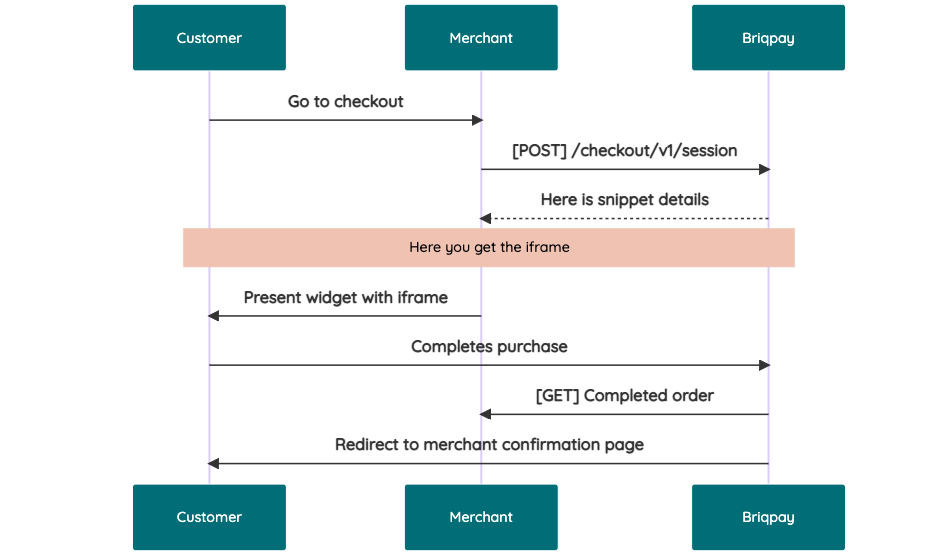 # JavaScript SDK The first step of integration is to add our JS to your site just before closing the ```` tag. This ensures that our JS library is avaliable to load the checkout. ```` Briqpay offers a few methods avaliable through our Javascript SDK. The library is added by our iframe and is avalable on ``window._briqpay`` If you offer the posibility to update the cart or order amonts on the checkout page, the JS library will help you. If your store charges the customer different costs and fees depening on their shipping location, you can listen to the ``addressupdate``event in order to re-calculate the total cost. ```javascript window._briqpay.subscribe('addressupdate', function (data) { console.log(data) }) ``` If your frontend needs to perform an action whe the signup has completed, listen to the ``signup_finalized`` event. ```javascript window._briqpay.subscribe('signup_finalized', function (status) { // redirect or handle status 'success' / 'failure' }) ``` If you allow customers to change the total cart value, you can utilise the JS library to suspend the iframe while you perform a backen update call towards our services. As described below: 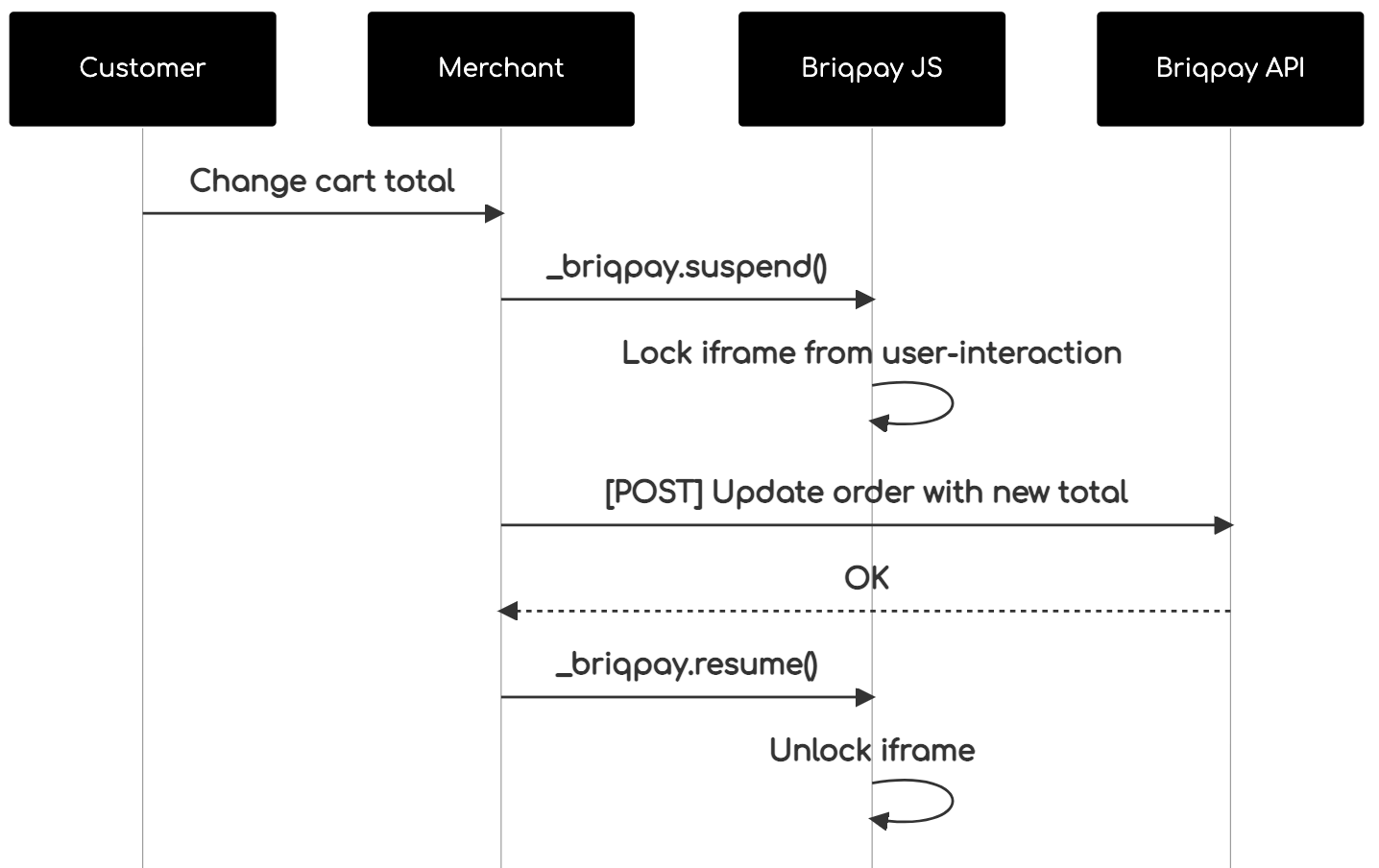 The iframe will auto-resume after 7 seconds if you dont call ``_briqpay.resume()`` before # Test Data In order to verify your integration you will neeed to use test data towards our credit engine. ## Company identication numbers * 1111111111 - To recieve a high credit scoring company ( 100 in rating) * 2222222222 - To test the enviournment with a bad credit scoring company (10 in rating) ## Card details In our playground setup your account is by default setup with a Stripe integration. In order to test out the card form you can use the below card numbers: * 4000002500003155 - To mock 3ds authentication window * 4000000000000069 Charge is declined with an expired_card code. You can use any valid expiry and CVC code # Authentication Briqpay utilizes JWT in order to authenticate calls to our platform. Authentication tokens expire after 48 hours, and at that point you can generate a new token for the given resource using the ``/auth`` endpoint. - Basic Auth - only used on the auth endpoint in order to get the Bearer Token - JWT Bearer Token - All calls towards the API utlizes this method"