Libraries tagged by API setup
novicell/premium_search
280 Downloads
Includes basic setup for Search API installed with the Database as backend.
novicell/premium_headless
731 Downloads
Includes basic setup for headless sites using Transform API.
akhelij/larabase-notification
175 Downloads
A lightweight Laravel package for sending push notifications via Firebase Cloud Messaging (FCM) HTTP v1 API. Send device-specific notifications to Android, iOS, and web applications with minimal setup, concurrent delivery, and automatic retry.
edlugz/sasapay
1547 Downloads
This package provides you with a simple tool to make requests to Sasapay APIs so that you can focus on the development of your awesome applications instead of all the set up involved.
iamnotstatic/laravel-api-auth
118 Downloads
A Laravel Package for easy API authentication setup with passport
code4mk/lara-spa-api
5 Downloads
Laravel SPA API system setup easily with lara-spa-api
metfan/rabbit-setup
13 Downloads
Tools to ease creation of exchanges, queues, parameters on rabbitMQ
kakarot/laravel-initial-setup
5 Downloads
A package to automate Laravel localization, exception handling and API versioning
wazobiamail/wazobiamail-wordpress
11 Downloads
Send WordPress email through the WazobiaMail API. Start free with 3,000 emails/month. A Resend alternative that also supports SMTP, with automatic domain setup and delivery receipts.
mr.incognito/crudify
352 Downloads
This package is for handling the crud for simple crud like for setup etc.
iteks/laravel-openai
1259 Downloads
A powerful package that seamlessly integrates OpenAI's advanced AI capabilities into your Laravel applications. This package offers quick setup and intuitive configuration to leverage AI models for chat, embeddings, and more.
briqpay/php-sdk
12246 Downloads
This is the API documentation for Briqpay. You can find out more about us and our offering at our website [https://briqpay.com](https://briqpay.com) In order to get credentials to the playgrund API Please register at [https://app.briqpay.com](https://app.briqpay.com) # Introduction Briqpay Checkout is an inline checkout solution for your b2b ecommerce. Briqpay Checkout gives you the flexibility of controlling your payment methods and credit rules while optimizing the UX for your customers # SDKs Briqpay offers standard SDKs to PHP and .NET based on these swagger definitions. You can download them respively or use our swagger defintitions to codegen your own versions. #### For .NET `` Install-Package Briqpay `` #### For PHP `` composer require briqpay/php-sdk `` # Standard use-case As a first step of integration you will need to create a checkout session. \n\nIn this session you provide Briqpay with the basic information necessary. In the response from briqpay you will recieve a htmlsnippet that is to be inserted into your frontend. The snippet provided by briqpay will render an iframe where the user will complete the purchase. Once completed, briqpay will redirect the customer to a confirmation page that you have defined. 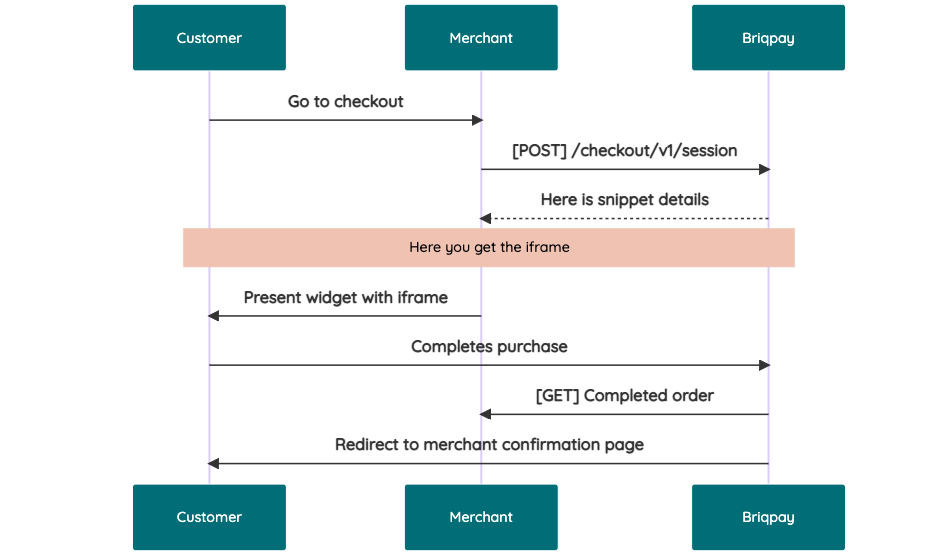 # JavaScript SDK The first step of integration is to add our JS to your site just before closing the ```` tag. This ensures that our JS library is avaliable to load the checkout. ```` Briqpay offers a few methods avaliable through our Javascript SDK. The library is added by our iframe and is avalable on ``window._briqpay`` If you offer the posibility to update the cart or order amonts on the checkout page, the JS library will help you. If your store charges the customer different costs and fees depening on their shipping location, you can listen to the ``addressupdate``event in order to re-calculate the total cost. ```javascript window._briqpay.subscribe('addressupdate', function (data) { console.log(data) }) ``` If your frontend needs to perform an action whe the signup has completed, listen to the ``signup_finalized`` event. ```javascript window._briqpay.subscribe('signup_finalized', function (status) { // redirect or handle status 'success' / 'failure' }) ``` If you allow customers to change the total cart value, you can utilise the JS library to suspend the iframe while you perform a backen update call towards our services. As described below: 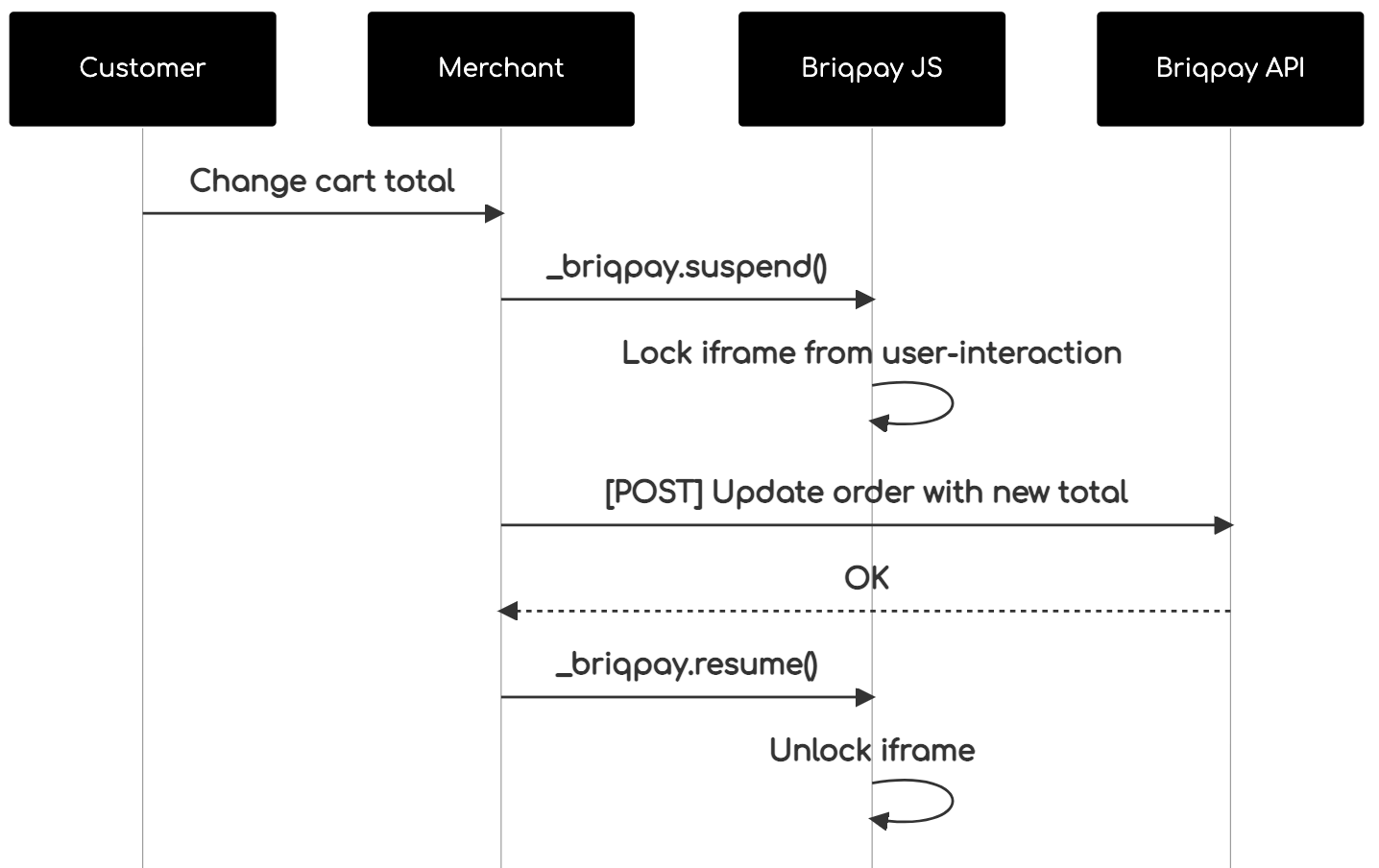 The iframe will auto-resume after 7 seconds if you dont call ``_briqpay.resume()`` before # Test Data In order to verify your integration you will neeed to use test data towards our credit engine. ## Company identication numbers * 1111111111 - To recieve a high credit scoring company ( 100 in rating) * 2222222222 - To test the enviournment with a bad credit scoring company (10 in rating) ## Card details In our playground setup your account is by default setup with a Stripe integration. In order to test out the card form you can use the below card numbers: * 4000002500003155 - To mock 3ds authentication window * 4000000000000069 Charge is declined with an expired_card code. You can use any valid expiry and CVC code # Authentication Briqpay utilizes JWT in order to authenticate calls to our platform. Authentication tokens expire after 48 hours, and at that point you can generate a new token for the given resource using the ``/auth`` endpoint. - Basic Auth - only used on the auth endpoint in order to get the Bearer Token - JWT Bearer Token - All calls towards the API utlizes this method"
apiverve/randomjoke
5 Downloads
Random Joke fetches two-part jokes with separated setups and punchlines for applications and bots. Paid plans add a joke rating score to evaluate humor.
macropage/sdk-ebay-rest-marketing
44 Downloads
The Marketing API offers two platforms that sellers can use to promote and advertise their products: Promoted Listings is an eBay ad service that lets sellers set up ad campaigns for the products they want to promote. eBay displays the ads in search results and in other marketing modules as SPONSORED listings. If an item in a Promoted Listings campaign sells, the seller is assessed a Promoted Listings fee, which is a seller-specified percentage applied to the sales price. For complete details, refer to the Promoted Listings playbook.Promotions Manager gives sellers a way to offer discounts on specific items as a way to attract buyers to their inventory. Sellers can set up discounts (such as "20% off" and other types of offers) on specific items or on an entire customer order. To further attract buyers, eBay prominently displays promotion teasers throughout buyer flows. For complete details, see Promotions Manager. Marketing reports, on both the Promoted Listings and Promotions Manager platforms, give sellers information that shows the effectiveness of their marketing strategies. The data gives sellers the ability to review and fine tune their marketing efforts.Store Email Campaign allows sellers to create and send email campaigns to customers who have signed up to receive their newsletter. For more information on email campaigns, see Store Email Campaigns.Important! Sellers must have an active eBay Store subscription, and they must accept the Terms and Conditions before they can make requests to these APIs in the Production environment. There are also site-specific listings requirements and restrictions associated with these marketing tools, as listed in the "requirements and restrictions" sections for Promoted Listings and Promotions Manager. The table below lists all the Marketing API calls grouped by resource.
ingewikkeld/resourceful
1 Downloads
Symfony2-based REST API setup