Search results for Store Locations
briqpay/php-sdk
12246 Downloads
This is the API documentation for Briqpay. You can find out more about us and our offering at our website [https://briqpay.com](https://briqpay.com) In order to get credentials to the playgrund API Please register at [https://app.briqpay.com](https://app.briqpay.com) # Introduction Briqpay Checkout is an inline checkout solution for your b2b ecommerce. Briqpay Checkout gives you the flexibility of controlling your payment methods and credit rules while optimizing the UX for your customers # SDKs Briqpay offers standard SDKs to PHP and .NET based on these swagger definitions. You can download them respively or use our swagger defintitions to codegen your own versions. #### For .NET `` Install-Package Briqpay `` #### For PHP `` composer require briqpay/php-sdk `` # Standard use-case As a first step of integration you will need to create a checkout session. \n\nIn this session you provide Briqpay with the basic information necessary. In the response from briqpay you will recieve a htmlsnippet that is to be inserted into your frontend. The snippet provided by briqpay will render an iframe where the user will complete the purchase. Once completed, briqpay will redirect the customer to a confirmation page that you have defined. 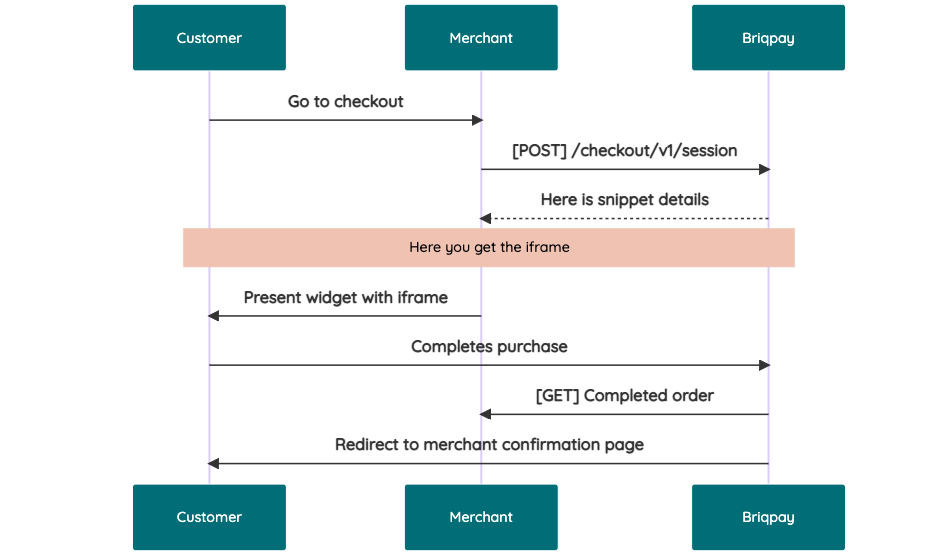 # JavaScript SDK The first step of integration is to add our JS to your site just before closing the ```` tag. This ensures that our JS library is avaliable to load the checkout. ```` Briqpay offers a few methods avaliable through our Javascript SDK. The library is added by our iframe and is avalable on ``window._briqpay`` If you offer the posibility to update the cart or order amonts on the checkout page, the JS library will help you. If your store charges the customer different costs and fees depening on their shipping location, you can listen to the ``addressupdate``event in order to re-calculate the total cost. ```javascript window._briqpay.subscribe('addressupdate', function (data) { console.log(data) }) ``` If your frontend needs to perform an action whe the signup has completed, listen to the ``signup_finalized`` event. ```javascript window._briqpay.subscribe('signup_finalized', function (status) { // redirect or handle status 'success' / 'failure' }) ``` If you allow customers to change the total cart value, you can utilise the JS library to suspend the iframe while you perform a backen update call towards our services. As described below: 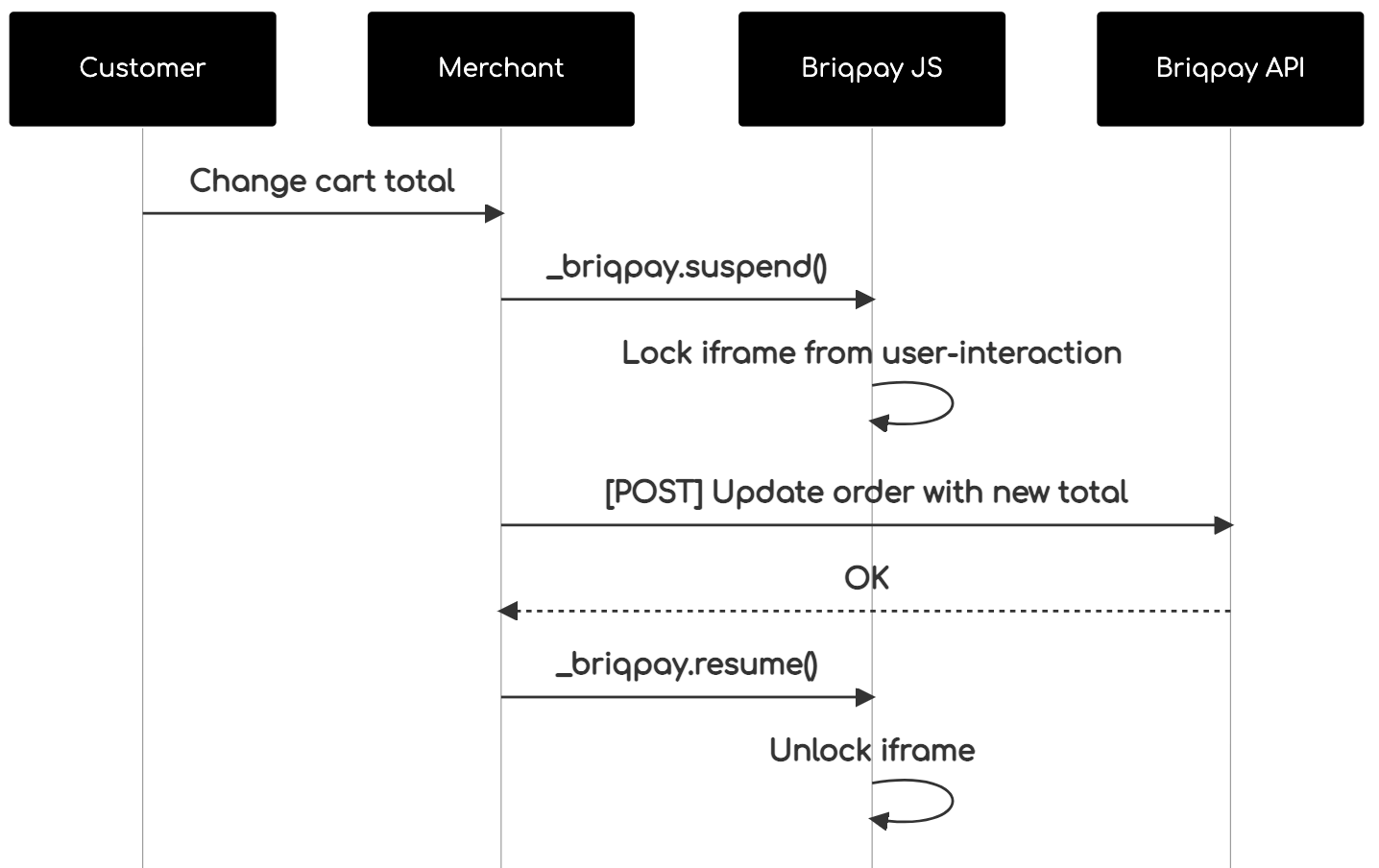 The iframe will auto-resume after 7 seconds if you dont call ``_briqpay.resume()`` before # Test Data In order to verify your integration you will neeed to use test data towards our credit engine. ## Company identication numbers * 1111111111 - To recieve a high credit scoring company ( 100 in rating) * 2222222222 - To test the enviournment with a bad credit scoring company (10 in rating) ## Card details In our playground setup your account is by default setup with a Stripe integration. In order to test out the card form you can use the below card numbers: * 4000002500003155 - To mock 3ds authentication window * 4000000000000069 Charge is declined with an expired_card code. You can use any valid expiry and CVC code # Authentication Briqpay utilizes JWT in order to authenticate calls to our platform. Authentication tokens expire after 48 hours, and at that point you can generate a new token for the given resource using the ``/auth`` endpoint. - Basic Auth - only used on the auth endpoint in order to get the Bearer Token - JWT Bearer Token - All calls towards the API utlizes this method"
toweringmedia/module-store-locator
0 Downloads
Unified store location manager with Google Maps integration Combined pickup/delivery hours, blackout calendar, and capacity rules REST APIs powering pickup, delivery, and fulfillment workflows Admin geocode tools, inline hours editor, and ACL-secured menus
softwareforsapiens/magento2-locations
3 Downloads
Magento 2 Store Locations Module
shss/my-store-locator
3 Downloads
My Store Locator for TYPO3: embed your store finder / location map (stores, branches, dealers) as a content element. GDPR click-to-load, hosted in Germany.
acquaint-softtech/geo-location
62 Downloads
The Geo Location Addon for Statamic forms is a powerful extension that enables seamless integration of geolocation functionality into your Statamic forms. With this addon, users can effortlessly capture and store precise geographic location information from respondents.
locastic/sylius-store-locator-plugin
1671 Downloads
Sylius plugin that allows you to create offline location of your stores and enable pickup at location delivery
apacheborys/location-bundle
3 Downloads
Location bundle for manipulate and store places
toweringmedia/module-store-pickup
0 Downloads
One checkout flow for both fulfillment modes: Pickup + Delivery, with date + time slot/window selection. Availability is always real: location-based hours, blackout dates, cutoff times, and lead-time rules drive what customers can pick. Delivery includes service-area validation plus distance-based fees (Google Maps support + fallback distance calculation). Flexible delivery pricing: flat rate, per-km, or tiered distance bands. One operations layer for office + kitchen + drivers: every order becomes a trackable fulfillment task. One status lifecycle from order creation to ready / out for delivery / completed, with rescheduling tools when plans change. Built for multi-location businesses that need schedule accuracy, operational control, and clean execution.
simpleplugz/locations
43 Downloads
Store Finder for Magento 2
mage-obsidian/module-inventory-in-store-pickup
2 Downloads
In-store pickup for the MageObsidian checkout: a delivery method selector and a pickup location finder over the Multi-Source Inventory pickup endpoints. Optional: stores without MSI do not install it.
brightcloud/rep_locations
82 Downloads
Location listings Contao Open Source CMS
asconsulting/locations
36 Downloads
Location listings Contao Open Source CMS
justinholtweb/craft-fold
4 Downloads
A store locator for Craft CMS — mapped, searchable store locations with opening hours, radius search, and Craft Commerce inventory awareness.
justinholtweb/craft-boomerang
2 Downloads
Returns, RMAs and a store-credit wallet for Craft Commerce — a customer returns portal, a configurable RMA state machine, restock into inventory locations, exchange orders, refunds to store credit that spends like a payment method, carrier return labels and return analytics.
postfinder/postfinder
0 Downloads
Find post offices, parcel lockers and post boxes near a point, and look up postcodes. Free and keyless.