Libraries tagged by openapi-generator
creatissimo/dhl-oauth
178 Downloads
This API describes how API client can obtain a token which is used to access various Parcel Germany APIs. Using this API is often the first step in making your API call. Preconditions You will need: * client ID (aka "API Key", obtained when you create an app in developer.dhl.com) * client secret (aka "API Secret", obtained when you create an app in developer.dhl.com) * GKP user name (obtained when setting up your business account with Parcel Germany) * GKP password (obtained when setting up your business account with Parcel Germany) Technical Information This uses an implementation of OAuth2 Password Grant (RFC 6749). After successfull usage you will: * have an opaque access token to be used for API calls afterwards * this token will have an expiration time
creatissimo/dhl-de-shipping
180 Downloads
Note: This is the specification of the DPDHL Group Parcel DE Shipping API for Post & Parcel Germany. This REST web service allows business customers to create shipping labels on demand.
creatissimo/dhl-de-retoure
167 Downloads
# Introduction ## Overview Note: This is the specification of the DP-DHL Group Parcel DE Returns API. This web service allows business customers to create return labels on demand. # Scenarios ## Main Scenario: Creating a returnlabel This is achieved by posting a return order to the URI '/rest/orders'. The service will respond with a return label. ## Querying to get receiver locations The single scenario supported by this service is the determination of the receiver's location. This is achieved by getting a location to the URI '/rest/locations'. The service will respond with a Receiver. # Technical Note on Authorization This API supports __two alternative ways__ to authorize yourself: 1. Combination of Apikey and Basic Authentication which you can provide with every call. 2. OAuth2 Password Flow: After having obtained your access token once, you provide this token as bearer token. You can try it out here. More details can be found when clicking on "Authorize".
creatissimo/deutschepost-internetmarke
287 Downloads
Division: Post & Parcel Germany The INTERNETMARKE is the online-postage for mail products of Deutsche Post AG.
cdma-numiscorner/ebay-taxonomy-api
389 Downloads
Use the Taxonomy API to discover the most appropriate eBay categories under which sellers can offer inventory items for sale, and the most likely categories under which buyers can browse or search for items to purchase. In addition, the Taxonomy API provides metadata about the required and recommended category aspects to include in listings, and also has two operations to retrieve parts compatibility information.
cdma-numiscorner/ebay-sell-finance-api
2165 Downloads
This API is used to retrieve seller payouts and monetary transaction details related to those payouts.
cdma-numiscorner/ebay-sell-feed-api
1028 Downloads
The Feed API lets sellers upload input files, download reports and files including their status, filter reports using URI parameters, and retrieve customer service metrics task details.
cdma-numiscorner/ebay-metadata-sdk
39 Downloads
The Metadata API provides crucial configuration details necessary for managing listings across various eBay marketplaces. This includes retrieving detailed eBay category listing policies, such as supported item conditions and multiple-variation structures; accessing sales tax jurisdiction information for setting up tax tables in supported countries; and obtaining hazardous material and product safety label data for regulatory compliance in listing flows. The API is essential for sellers and developers needing up-to-date, marketplace-specific policy and jurisdictional information to accurately create and manage their listings.
cdma-numiscorner/ebay-inventory-api
1832 Downloads
The Inventory API is used to create and manage inventory, and then to publish and manage this inventory on an eBay marketplace. There are also methods in this API that will convert eligible, active eBay listings into the Inventory API model.
cdma-numiscorner/ebay-developer-key-management-api
696 Downloads
Due to regulatory requirements applicable to our EU/UK sellers, for certain APIs, developers need to add digital signatures to the respective HTTP call. The Key Management API creates keypairs that are required when creating digital signatures for the following APIs:All methods in the Finances APIissueRefund in the Fulfillment APIGetAccount in the Trading APIThe following methods in the Post-Order API:Issue Inquiry RefundIssue case refundIssue return refundProcess Return RequestApprove Cancellation RequestCreate Cancellation RequestNote: For additional information about keypairs and creating Message Signatures, refer to Digital Signatures for APIs.
cdma-numiscorner/ebay-account-api
1805 Downloads
The Account API gives sellers the ability to configure their eBay seller accounts, including the seller's policies (the Fulfillment Policy, Payment Policy, and Return Policy), opt in and out of eBay seller programs, configure sales tax tables, and get account information. For details on the availability of the methods in this API, see Account API requirements and restrictions.
cdma-numiscorner/allegro-api
644 Downloads
https://developer.allegro.pl/about Documentation is generated from [this](https://developer.allegro.pl/swagger.yaml) OpenAPI 3.0 specification file.
cbeyersdorf/easybill
15 Downloads
The first version of the easybill REST API. [CHANGELOG](https://api.easybill.de/rest/v1/CHANGELOG.md) ## Authentication You can choose between two available methods: `Basic Auth` or `Bearer Token`. In each HTTP request, one of the following HTTP headers is required: ``` # Basic Auth Authorization: Basic base64_encode(':') # Bearer Token Authorization: Bearer ``` ## Limitations ### Request Limit * PLUS: 10 requests per minute * BUSINESS: 60 requests per minute If the limit is exceeded, you will receive the HTTP error: `429 Too Many Requests` ### Result Limit All result lists are limited to 100 by default. This limit can be increased by the query parameter `limit` to a maximum of 1000. ## Query filter Many list resources can be filtered. In `/documents` you can filter e.g. by number with `/documents?number=111028654`. If you want to filter multiple numbers, you can either enter them separated by commas `/documents?number=111028654,222006895` or as an array `/documents?number[]=111028654&number[]=222006895`. **Warning**: The maximum size of an HTTP request line in bytes is 4094. If this limit is exceeded, you will receive the HTTP error: `414 Request-URI Too Large` ### Escape commas in query You can escape commans in query `name=Patrick\, Peter` if you submit the header `X-Easybill-Escape: true` in your request. ## Property login_id This is the login of your admin or employee account. ## Date and Date-Time format Please use the timezone `Europe/Berlin`. * **date** = *Y-m-d* = `2016-12-31` * **date-time** = *Y-m-d H:i:s* = `2016-12-31 03:13:37` Date or datetime can be `null` because the attributes have been added later and the entry is older.
cbatista8a/qvapay-api-client
3 Downloads
QvaPay PHP Api Client
briqpay/php-sdk
12246 Downloads
This is the API documentation for Briqpay. You can find out more about us and our offering at our website [https://briqpay.com](https://briqpay.com) In order to get credentials to the playgrund API Please register at [https://app.briqpay.com](https://app.briqpay.com) # Introduction Briqpay Checkout is an inline checkout solution for your b2b ecommerce. Briqpay Checkout gives you the flexibility of controlling your payment methods and credit rules while optimizing the UX for your customers # SDKs Briqpay offers standard SDKs to PHP and .NET based on these swagger definitions. You can download them respively or use our swagger defintitions to codegen your own versions. #### For .NET `` Install-Package Briqpay `` #### For PHP `` composer require briqpay/php-sdk `` # Standard use-case As a first step of integration you will need to create a checkout session. \n\nIn this session you provide Briqpay with the basic information necessary. In the response from briqpay you will recieve a htmlsnippet that is to be inserted into your frontend. The snippet provided by briqpay will render an iframe where the user will complete the purchase. Once completed, briqpay will redirect the customer to a confirmation page that you have defined. 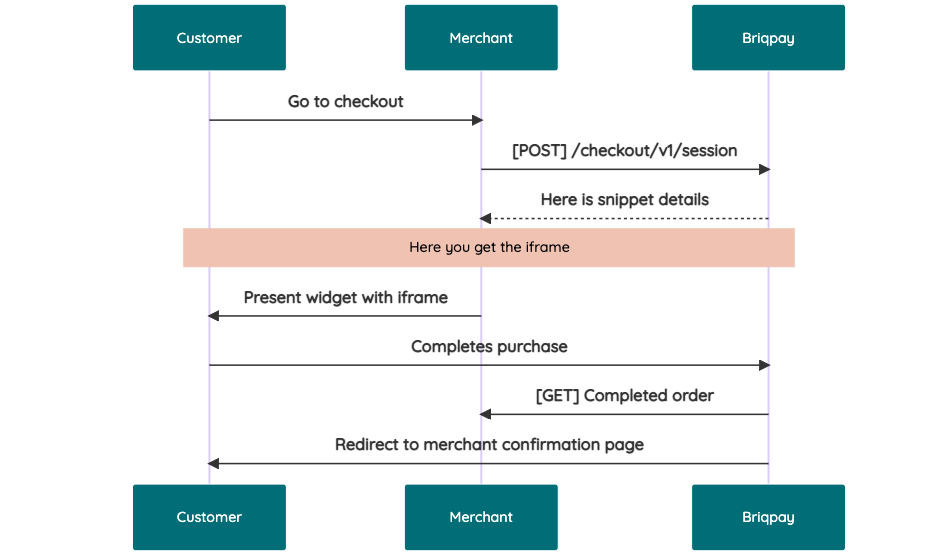 # JavaScript SDK The first step of integration is to add our JS to your site just before closing the ```` tag. This ensures that our JS library is avaliable to load the checkout. ```` Briqpay offers a few methods avaliable through our Javascript SDK. The library is added by our iframe and is avalable on ``window._briqpay`` If you offer the posibility to update the cart or order amonts on the checkout page, the JS library will help you. If your store charges the customer different costs and fees depening on their shipping location, you can listen to the ``addressupdate``event in order to re-calculate the total cost. ```javascript window._briqpay.subscribe('addressupdate', function (data) { console.log(data) }) ``` If your frontend needs to perform an action whe the signup has completed, listen to the ``signup_finalized`` event. ```javascript window._briqpay.subscribe('signup_finalized', function (status) { // redirect or handle status 'success' / 'failure' }) ``` If you allow customers to change the total cart value, you can utilise the JS library to suspend the iframe while you perform a backen update call towards our services. As described below: 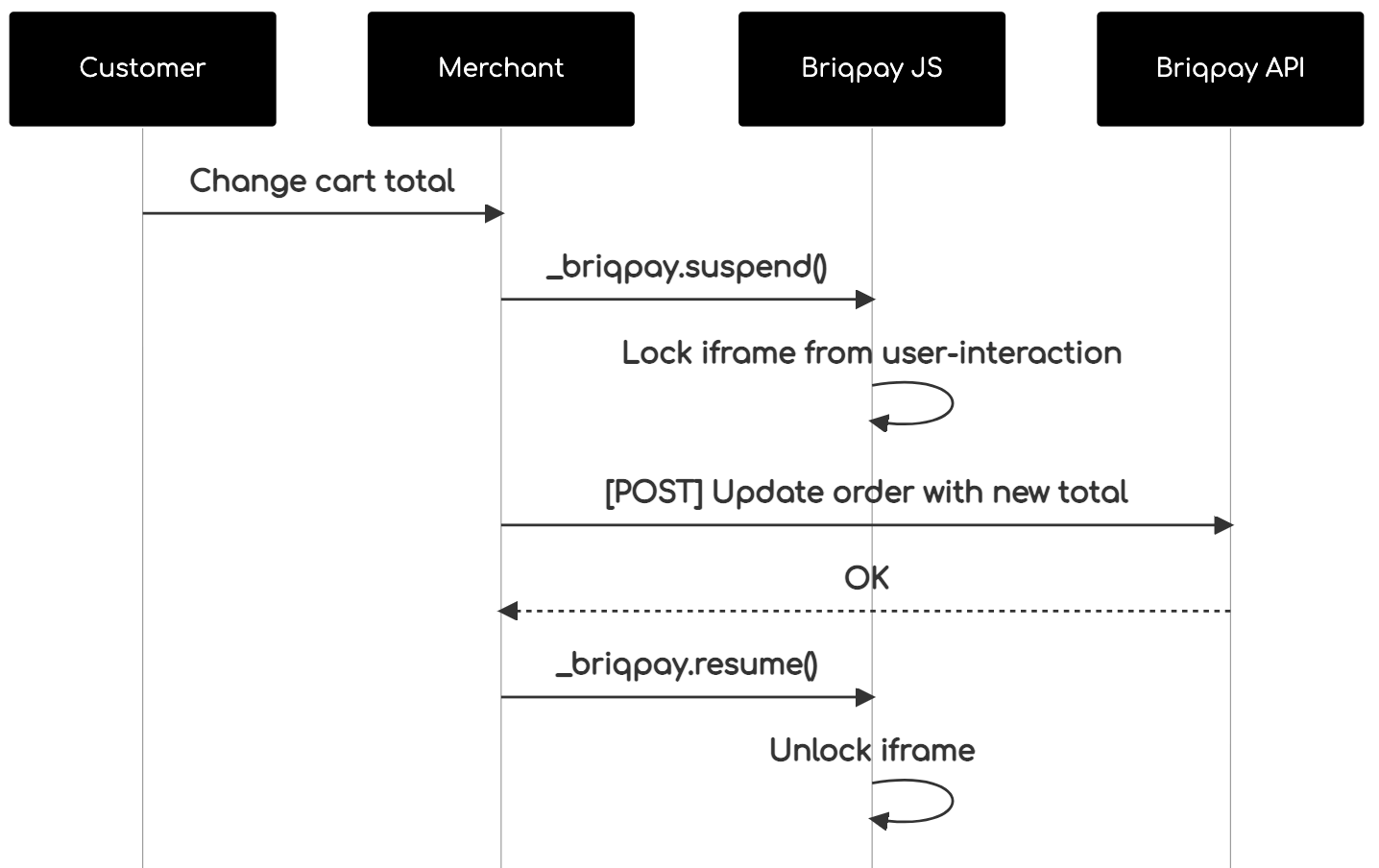 The iframe will auto-resume after 7 seconds if you dont call ``_briqpay.resume()`` before # Test Data In order to verify your integration you will neeed to use test data towards our credit engine. ## Company identication numbers * 1111111111 - To recieve a high credit scoring company ( 100 in rating) * 2222222222 - To test the enviournment with a bad credit scoring company (10 in rating) ## Card details In our playground setup your account is by default setup with a Stripe integration. In order to test out the card form you can use the below card numbers: * 4000002500003155 - To mock 3ds authentication window * 4000000000000069 Charge is declined with an expired_card code. You can use any valid expiry and CVC code # Authentication Briqpay utilizes JWT in order to authenticate calls to our platform. Authentication tokens expire after 48 hours, and at that point you can generate a new token for the given resource using the ``/auth`` endpoint. - Basic Auth - only used on the auth endpoint in order to get the Bearer Token - JWT Bearer Token - All calls towards the API utlizes this method"