Libraries tagged by http authentication
nitsan/ns-social-login
2025 Downloads
Meet our all-in-one TYPO3 Social Login and Register extension, which allows users to log in and register using various social media accounts directly from your TYPO3 frontend. With this extension, users can easily access your site using popular platforms like Facebook, Google, Twitter, LinkedIn, Instagram, OpenID, Apple, Discord, Keycloak, Slack, Telegram, Dropbox, and more. Get seamless, one-click frontend login with the TYPO3 Social Login extension. Explore the Demo, Product Page, Documentation & Support: https://t3planet.com/typo3-social-login-extension
donweb/phptotp
183 Downloads
TOTP/HOTP library for PHP
chroma-x/oath-server-suite
40 Downloads
A collection of classes to provide second factor authentication like Yubico OTP (Yubikey), Oath (TOTP, HOTP, GoogleAuthenticator) server-side.
camilord/twofactor_gauthenticator
386 Downloads
This RoundCube plugin adds the 2-factor authentication during login. This is a forked from https://github.com/alexandregz/twofactor_gauthenticator
chillerlan/php-googleauth
1312 Downloads
A generator for counter- and time based 2-factor authentication codes (Google Authenticator). PHP 8.2+
paypaplane/svix-client
24752 Downloads
Welcome to the Svix API documentation! Useful links: [Homepage](https://www.svix.com) | [Support email](mailto:[email protected]) | [Blog](https://www.svix.com/blog/) | [Slack Community](https://www.svix.com/slack/) # Introduction This is the reference documentation and schemas for the [Svix webhook service](https://www.svix.com) API. For tutorials and other documentation please refer to [the documentation](https://docs.svix.com). ## Main concepts In Svix you have four important entities you will be interacting with: - `messages`: these are the webhooks being sent. They can have contents and a few other properties. - `application`: this is where `messages` are sent to. Usually you want to create one application for each user on your platform. - `endpoint`: endpoints are the URLs messages will be sent to. Each application can have multiple `endpoints` and each message sent to that application will be sent to all of them (unless they are not subscribed to the sent event type). - `event-type`: event types are identifiers denoting the type of the message being sent. Event types are primarily used to decide which events are sent to which endpoint. ## Authentication Get your authentication token (`AUTH_TOKEN`) from the [Svix dashboard](https://dashboard.svix.com) and use it as part of the `Authorization` header as such: `Authorization: Bearer ${AUTH_TOKEN}`. For more information on authentication, please refer to the [authentication token docs](https://docs.svix.com/api-keys). ## Code samples The code samples assume you already have the respective libraries installed and you know how to use them. For the latest information on how to do that, please refer to [the documentation](https://docs.svix.com/). ## Idempotency Svix supports [idempotency](https://en.wikipedia.org/wiki/Idempotence) for safely retrying requests without accidentally performing the same operation twice. This is useful when an API call is disrupted in transit and you do not receive a response. To perform an idempotent request, pass the idempotency key in the `Idempotency-Key` header to the request. The idempotency key should be a unique value generated by the client. You can create the key in however way you like, though we suggest using UUID v4, or any other string with enough entropy to avoid collisions. Svix's idempotency works by saving the resulting status code and body of the first request made for any given idempotency key for any successful request. Subsequent requests with the same key return the same result. Please note that idempotency is only supported for `POST` requests. ## Cross-Origin Resource Sharing This API features Cross-Origin Resource Sharing (CORS) implemented in compliance with [W3C spec](https://www.w3.org/TR/cors/). And that allows cross-domain communication from the browser. All responses have a wildcard same-origin which makes them completely public and accessible to everyone, including any code on any site.
briqpay/php-sdk
12246 Downloads
This is the API documentation for Briqpay. You can find out more about us and our offering at our website [https://briqpay.com](https://briqpay.com) In order to get credentials to the playgrund API Please register at [https://app.briqpay.com](https://app.briqpay.com) # Introduction Briqpay Checkout is an inline checkout solution for your b2b ecommerce. Briqpay Checkout gives you the flexibility of controlling your payment methods and credit rules while optimizing the UX for your customers # SDKs Briqpay offers standard SDKs to PHP and .NET based on these swagger definitions. You can download them respively or use our swagger defintitions to codegen your own versions. #### For .NET `` Install-Package Briqpay `` #### For PHP `` composer require briqpay/php-sdk `` # Standard use-case As a first step of integration you will need to create a checkout session. \n\nIn this session you provide Briqpay with the basic information necessary. In the response from briqpay you will recieve a htmlsnippet that is to be inserted into your frontend. The snippet provided by briqpay will render an iframe where the user will complete the purchase. Once completed, briqpay will redirect the customer to a confirmation page that you have defined. 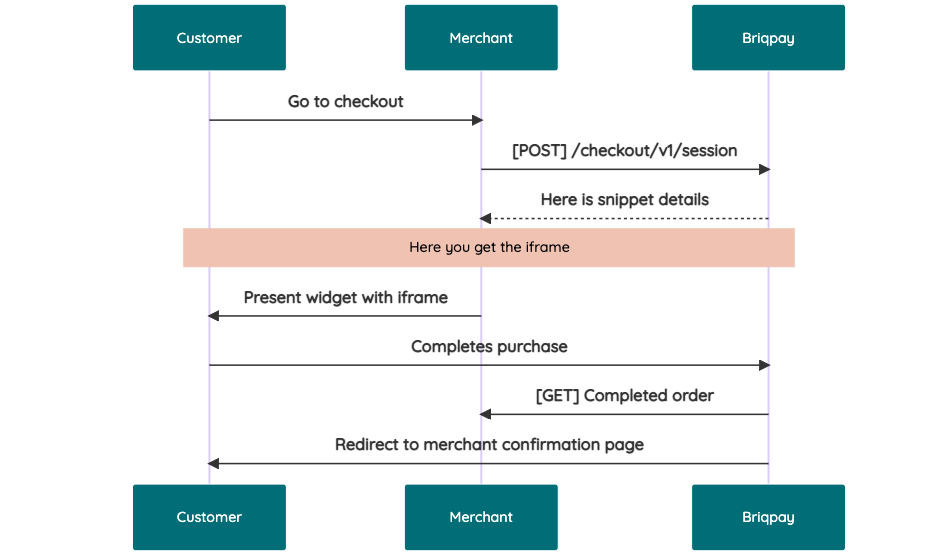 # JavaScript SDK The first step of integration is to add our JS to your site just before closing the ```` tag. This ensures that our JS library is avaliable to load the checkout. ```` Briqpay offers a few methods avaliable through our Javascript SDK. The library is added by our iframe and is avalable on ``window._briqpay`` If you offer the posibility to update the cart or order amonts on the checkout page, the JS library will help you. If your store charges the customer different costs and fees depening on their shipping location, you can listen to the ``addressupdate``event in order to re-calculate the total cost. ```javascript window._briqpay.subscribe('addressupdate', function (data) { console.log(data) }) ``` If your frontend needs to perform an action whe the signup has completed, listen to the ``signup_finalized`` event. ```javascript window._briqpay.subscribe('signup_finalized', function (status) { // redirect or handle status 'success' / 'failure' }) ``` If you allow customers to change the total cart value, you can utilise the JS library to suspend the iframe while you perform a backen update call towards our services. As described below: 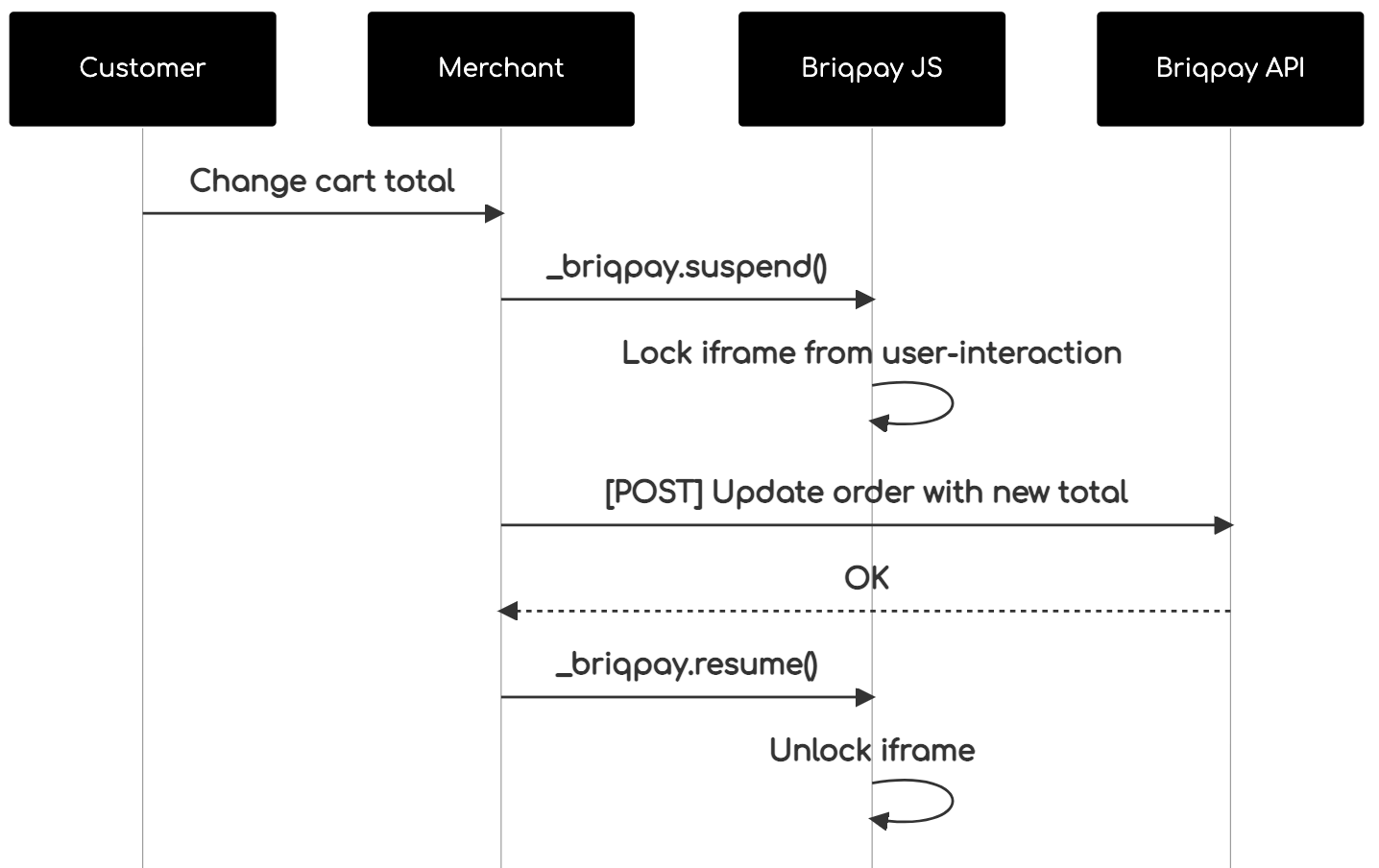 The iframe will auto-resume after 7 seconds if you dont call ``_briqpay.resume()`` before # Test Data In order to verify your integration you will neeed to use test data towards our credit engine. ## Company identication numbers * 1111111111 - To recieve a high credit scoring company ( 100 in rating) * 2222222222 - To test the enviournment with a bad credit scoring company (10 in rating) ## Card details In our playground setup your account is by default setup with a Stripe integration. In order to test out the card form you can use the below card numbers: * 4000002500003155 - To mock 3ds authentication window * 4000000000000069 Charge is declined with an expired_card code. You can use any valid expiry and CVC code # Authentication Briqpay utilizes JWT in order to authenticate calls to our platform. Authentication tokens expire after 48 hours, and at that point you can generate a new token for the given resource using the ``/auth`` endpoint. - Basic Auth - only used on the auth endpoint in order to get the Bearer Token - JWT Bearer Token - All calls towards the API utlizes this method"
sugarcommerce/totp
23 Downloads
TOTP (RFC 6238) and HOTP (RFC 4226) two-factor authentication codes. Zero dependencies, verified against the official RFC test vectors. Works with Google Authenticator, 1Password, Bitwarden and Authy.
novy213/yii2-otp
82 Downloads
YII2 extension for generating one time passwords according to RFC 4226/6238 (HOTP/TOTP Algorithm) and authentication widget
imseyed/auth2fa
251 Downloads
PHP library provides functionality for generating Time-based One Time Passwords (TOTP) and HMAC-based One Time Passwords (HOTP), commonly used in two-factor authentication (2FA) systems.
wovosoft/laravel-permissions
269 Downloads
Roles and Permissions Implementation for https://github.com/spatie/laravel-permission using Laravel and Bootstrap-Vue
theodorejb/multi-factor
1945 Downloads
Vendor-agnostic two-factor authentication library
rodgermd/janrain-bundle
297 Downloads
Integrates Janrain into Symfony. Fork of https://github.com/evario/JanrainBundle
mkd/laravel-otp
7 Downloads
Laravel package for generating and verifying One-Time Passwords (OTPs) using TOTP (Time-based One-Time Password) and HOTP (HMAC-based One-Time Password) algorithms.
wildwolf/wp-two-factor-auth
130 Downloads
WordPress plugin for two factor authentication