Libraries tagged by generate api
generatepdfs/laravel-sdk
10 Downloads
Laravel SDK for GeneratePDFs.com API
factpulse/sdk
86 Downloads
REST API for electronic invoicing in France: Factur-X (CII), UBL 2.1, AFNOR PDP/PA, electronic signatures. ## 🎯 Main Features ### 📄 Invoice Generation - **Formats**: CII XML, UBL 2.1 XML, or Factur-X PDF/A-3 - **Profiles** (CII/PDF): MINIMUM, BASIC, EN16931, EXTENDED - **UBL**: Always EN16931 compliant - **Standards**: EN 16931 (EU directive 2014/55), ISO 19005-3 (PDF/A-3), CII (UN/CEFACT), UBL 2.1 (OASIS) - **Simplified Format**: Generation from SIRET + auto-enrichment (Chorus Pro API + Business Search) ### ✅ Factur-X - Validation - **XML Validation**: Schematron (45 to 210+ rules depending on profile) - **PDF Validation**: PDF/A-3, Factur-X XMP metadata - **VeraPDF**: Strict PDF/A validation (146+ ISO 19005-3 rules) ### ✍️ Electronic Signature - **Standards**: PAdES-B-B, PAdES-B-T (RFC 3161 timestamping), PAdES-B-LT (long-term archival) - **eIDAS Levels**: SES (self-signed), AdES (commercial CA), QES (QTSP) - **Validation**: Cryptographic integrity and certificate verification ### 📋 Flux 6 - Invoice Lifecycle (CDAR) - **CDAR Messages**: Acknowledgements, invoice statuses - **PPF Statuses**: REFUSED (210), PAID (212) ### 📊 Flux 10 - E-Reporting - **Tax Declarations**: International B2B, B2C - **Flow Types**: 10.1 (B2B transactions), 10.2 (B2B payments), 10.3 (B2C transactions), 10.4 (B2C payments) ### 📡 AFNOR PDP/PA (XP Z12-013) - **Flow Service**: Submit and search flows to PDPs - **Directory Service**: Company search (SIREN/SIRET) - **Multi-client**: Support for multiple PDP configs per user ### 🏛️ Chorus Pro - **Public Sector Invoicing**: Complete API for Chorus Pro ### ⏳ Async Tasks - **Celery**: Asynchronous generation, validation and signing - **Polling**: Status tracking via `/tasks/{task_id}/status` - **Webhooks**: Automatic notifications when tasks complete ## 🔒 Authentication All requests require a **JWT token** in the Authorization header: ``` Authorization: Bearer YOUR_JWT_TOKEN ``` ### How to obtain a JWT token? #### 🔑 Method 1: `/api/token/` API (Recommended) **URL:** `https://factpulse.fr/api/token/` This method is **recommended** for integration in your applications and CI/CD workflows. **Prerequisites:** Having set a password on your account **For users registered via email/password:** - You already have a password, use it directly **For users registered via OAuth (Google/GitHub):** - You must first set a password at: https://factpulse.fr/accounts/password/set/ - Once the password is created, you can use the API **Request example:** ```bash curl -X POST https://factpulse.fr/api/token/ \ -H "Content-Type: application/json" \ -d '{ "username": "[email protected]", "password": "your_password" }' ``` **Optional `client_uid` parameter:** To select credentials for a specific client (PA/PDP, Chorus Pro, signing certificates), add `client_uid`: ```bash curl -X POST https://factpulse.fr/api/token/ \ -H "Content-Type: application/json" \ -d '{ "username": "[email protected]", "password": "your_password", "client_uid": "550e8400-e29b-41d4-a716-446655440000" }' ``` The `client_uid` will be included in the JWT and allow the API to automatically use: - AFNOR/PDP credentials configured for this client - Chorus Pro credentials configured for this client - Electronic signature certificates configured for this client **Response:** ```json { "access": "eyJ0eXAiOiJKV1QiLCJhbGc...", // Access token (validity: 30 min) "refresh": "eyJ0eXAiOiJKV1QiLCJhbGc..." // Refresh token (validity: 7 days) } ``` **Advantages:** - ✅ Full automation (CI/CD, scripts) - ✅ Programmatic token management - ✅ Refresh token support for automatic access renewal - ✅ Easy integration in any language/tool #### 🖥️ Method 2: Dashboard Generation (Alternative) **URL:** https://factpulse.fr/api/dashboard/ This method is suitable for quick tests or occasional use via the graphical interface. **How it works:** - Log in to the dashboard - Use the "Generate Test Token" or "Generate Production Token" buttons - Works for **all** users (OAuth and email/password), without requiring a password **Token types:** - **Test Token**: 24h validity, 1000 calls/day quota (free) - **Production Token**: 7 days validity, quota based on your plan **Advantages:** - ✅ Quick for API testing - ✅ No password required - ✅ Simple visual interface **Disadvantages:** - ❌ Requires manual action - ❌ No refresh token - ❌ Less suited for automation ### 📚 Full Documentation For more information on authentication and API usage: https://factpulse.fr/documentation-api/
codewithagents/openapi-laravel
1396 Downloads
Generate Laravel models (spatie/laravel-data classes, validation rules, enums) from an OpenAPI spec. The spec is the source of truth.
briqpay/php-sdk
12246 Downloads
This is the API documentation for Briqpay. You can find out more about us and our offering at our website [https://briqpay.com](https://briqpay.com) In order to get credentials to the playgrund API Please register at [https://app.briqpay.com](https://app.briqpay.com) # Introduction Briqpay Checkout is an inline checkout solution for your b2b ecommerce. Briqpay Checkout gives you the flexibility of controlling your payment methods and credit rules while optimizing the UX for your customers # SDKs Briqpay offers standard SDKs to PHP and .NET based on these swagger definitions. You can download them respively or use our swagger defintitions to codegen your own versions. #### For .NET `` Install-Package Briqpay `` #### For PHP `` composer require briqpay/php-sdk `` # Standard use-case As a first step of integration you will need to create a checkout session. \n\nIn this session you provide Briqpay with the basic information necessary. In the response from briqpay you will recieve a htmlsnippet that is to be inserted into your frontend. The snippet provided by briqpay will render an iframe where the user will complete the purchase. Once completed, briqpay will redirect the customer to a confirmation page that you have defined. 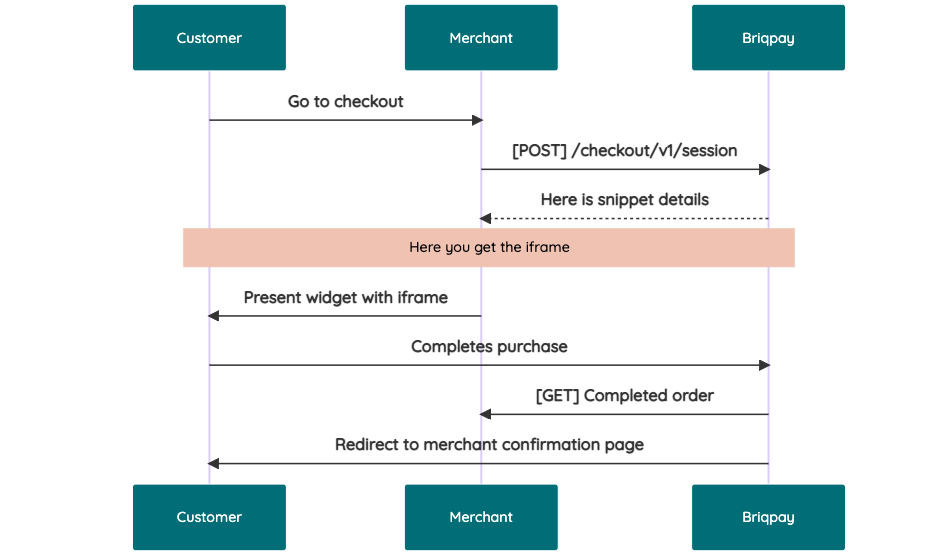 # JavaScript SDK The first step of integration is to add our JS to your site just before closing the ```` tag. This ensures that our JS library is avaliable to load the checkout. ```` Briqpay offers a few methods avaliable through our Javascript SDK. The library is added by our iframe and is avalable on ``window._briqpay`` If you offer the posibility to update the cart or order amonts on the checkout page, the JS library will help you. If your store charges the customer different costs and fees depening on their shipping location, you can listen to the ``addressupdate``event in order to re-calculate the total cost. ```javascript window._briqpay.subscribe('addressupdate', function (data) { console.log(data) }) ``` If your frontend needs to perform an action whe the signup has completed, listen to the ``signup_finalized`` event. ```javascript window._briqpay.subscribe('signup_finalized', function (status) { // redirect or handle status 'success' / 'failure' }) ``` If you allow customers to change the total cart value, you can utilise the JS library to suspend the iframe while you perform a backen update call towards our services. As described below: 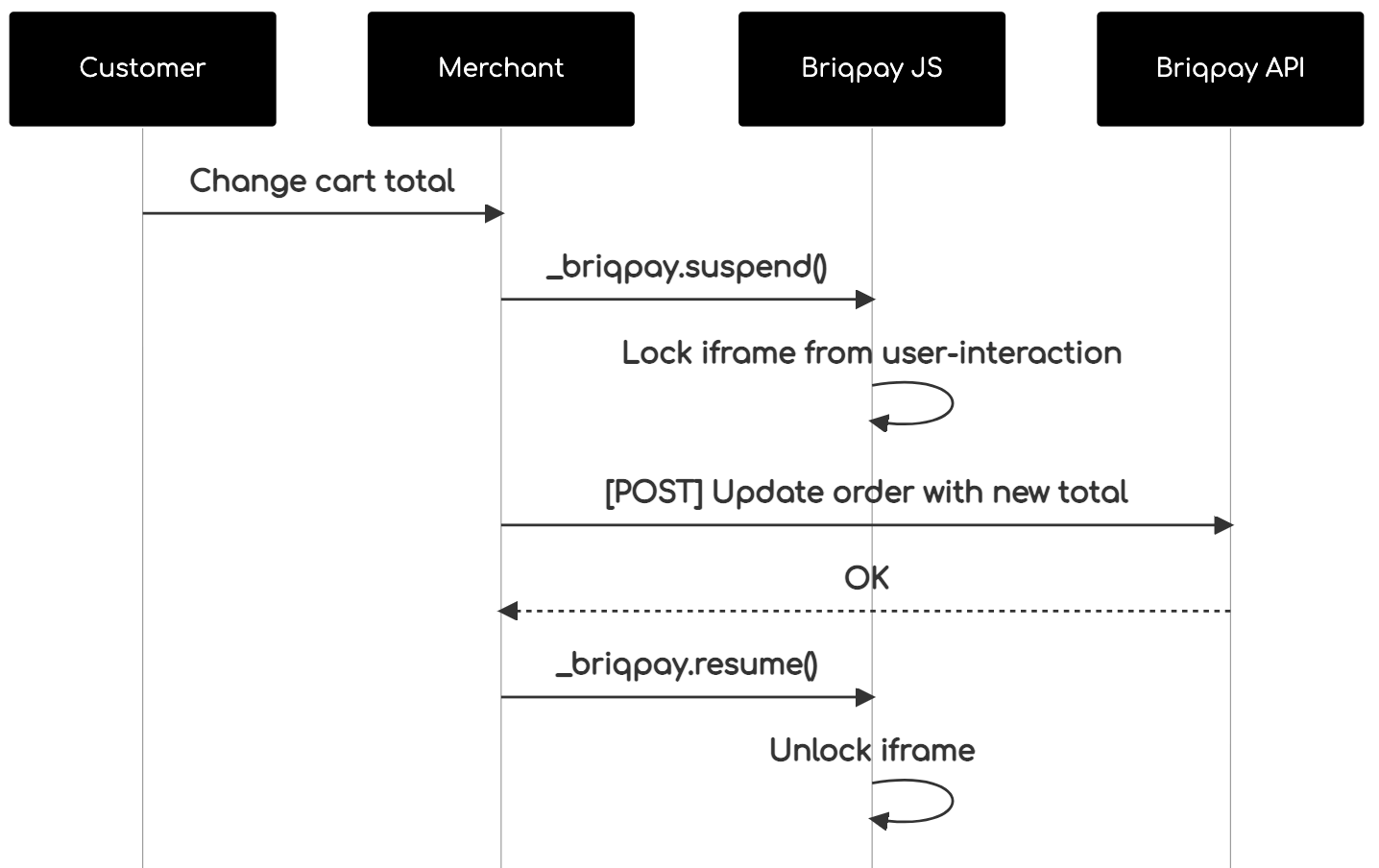 The iframe will auto-resume after 7 seconds if you dont call ``_briqpay.resume()`` before # Test Data In order to verify your integration you will neeed to use test data towards our credit engine. ## Company identication numbers * 1111111111 - To recieve a high credit scoring company ( 100 in rating) * 2222222222 - To test the enviournment with a bad credit scoring company (10 in rating) ## Card details In our playground setup your account is by default setup with a Stripe integration. In order to test out the card form you can use the below card numbers: * 4000002500003155 - To mock 3ds authentication window * 4000000000000069 Charge is declined with an expired_card code. You can use any valid expiry and CVC code # Authentication Briqpay utilizes JWT in order to authenticate calls to our platform. Authentication tokens expire after 48 hours, and at that point you can generate a new token for the given resource using the ``/auth`` endpoint. - Basic Auth - only used on the auth endpoint in order to get the Bearer Token - JWT Bearer Token - All calls towards the API utlizes this method"
aspose/barcode-cloud-php
1562 Downloads
Aspose.BarCode for Cloud is a REST API for Linear, 2D and postal barcode generation and recognition in the cloud. API recognizes and generates barcode images in a variety of formats. Barcode REST API allows to specify barcode image attributes like image width, height, border style and output image format in order to customize the generation process. Developers can also specify the barcode type and text attributes such as text location and font styles in order to suit the application requirements.
dokapi/swagger-bundle
5764 Downloads
Generate Swagger documentation
trin4ik/activeapi
1324 Downloads
generate api documentation from phpdoc
firesphere/silverstripe-docgenerator
42 Downloads
Generate APIGen docs on flush
paylexer/wordpress-starter
5 Downloads
Starter WordPress plugin that takes payments through the PayLexer plugin's developer API. Generate it, rename it, make it yours.
rroek/rest-component-bundle
271 Downloads
BlackBox to easy generate RESTful HATEOAS API
itk-dev/itk_pretix
12550 Downloads
A module using pretix API to generate events from field values
php-gear/auto-client
156 Downloads
A command-line tool to generate Javascript client-side APIs from REST PHP APIs
convergine/craft-content-buddy
1572 Downloads
Content Buddy is an AI-driven CraftCMS plugin that leverages the ChatGPT API to automatically generate and manage multi-language content, including text and images, with customizable settings and features for precise control and enhanced content creation.
remonode/laravel-sdk
110 Downloads
Laravel SDK for API key management and Remonode portal integration. Generate, validate, rotate, and revoke API keys locally with optional portal sync.
expirenza/shorturl-helper
81 Downloads
Helper for generate short urls through EXPIRENZA API